119
Intrusion Detection
All moving objects detected are displayed with detection frames.
When [Decision Point] of an object that meets the [Object Height (%)] and [Object Width (%)] enters a detection area
and exceeds [Duration (Sec)], the detection frame changes to the same color as the detection area, and the status
becomes “detected”.
Face Detection
A face frame appears on all faces which is detected.
• In face detection, it is unable to specify the operation for "detected".
• The following are the main examples of failure to detect faces:
– When the face is extremely small, large, dark, or bright relative to the entire screen
– When the face is facing sideways or diagonally, or the face is upside down
– When part of the face is hidden
• May detect a subject other than a person as a face by mistake.
[Event]
Set operations to be performed upon detection of changes in a subject.
• In face detection, the [Event] tab is disabled.
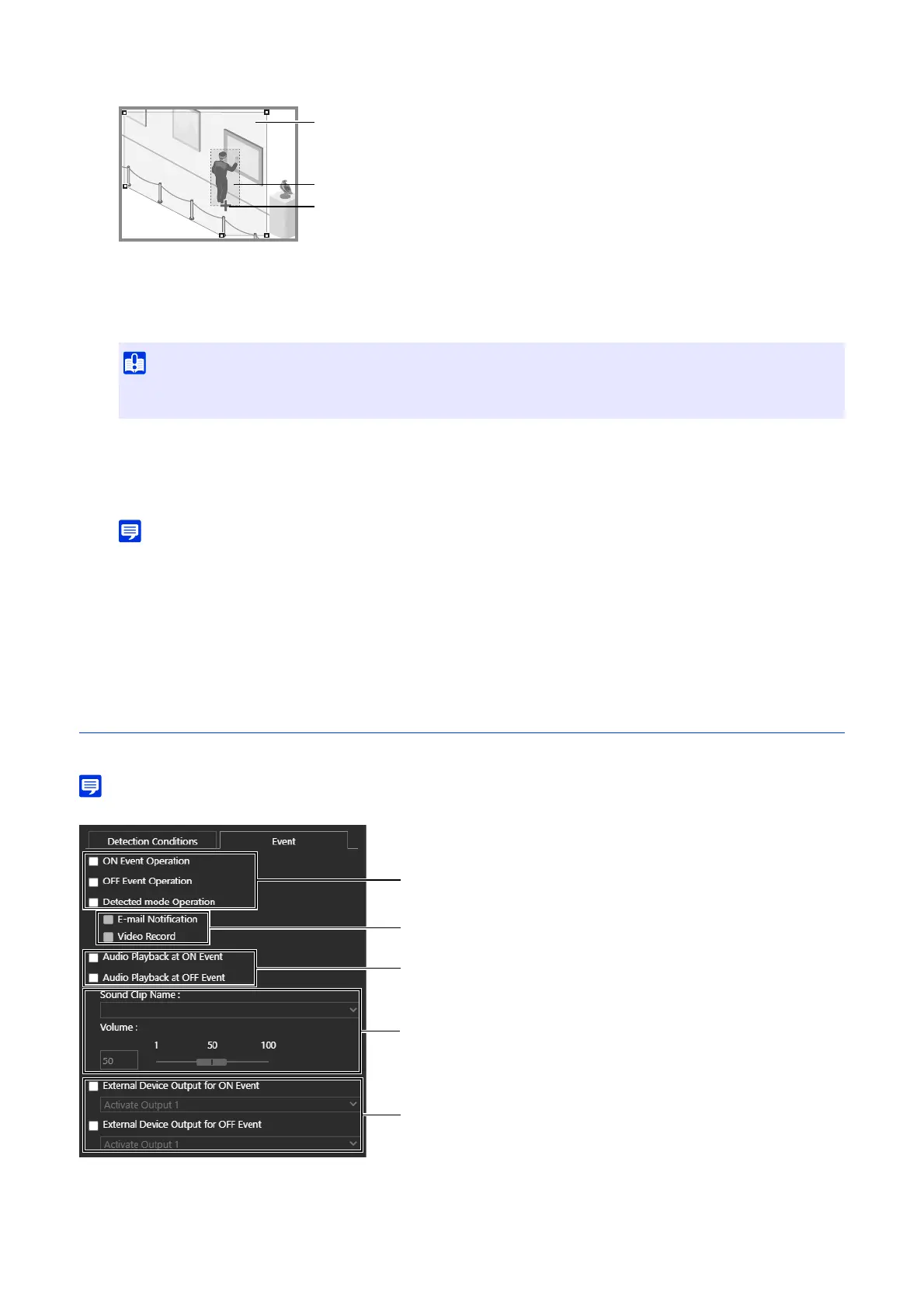
(1) [ON Event Operation], [OFF Event Operation], [Detected mode Operation]
Specifies the operation timing. Multiple selections are possible.
• After the Intrusion Detection is set, conduct a detection test to confirm that the detection frame of the object continues to be
displayed.
Detection Frame
Detection Area
Decision point



 To Next Page