36
Using Pan/Tilt/Zoom
Set the camera angle by panning, tilting and zooming the camera.
• Camera operations using clicking and dragging, do not offer a high precision control of the camera.
• The administrator can operate the camera regardless of view restrictions. Authorized or guest users can only operate the camera within
the view restriction.
Clicking on the Video Display Area or Using the Sliders
Moving by Clicking on the Video Display Area
If clicking in the video display area, the camera angle will move so that the clicked mouse pointer location will
become the center. If the camera angle does not center on the desired location with a single click, repeat the
operation.
• Click operations are not available in the video display area while using the Viewer PTZ or Digital PTZ.
• Click operations in the video display area become available after starting the Viewer PTZ or Digital PTZ.
Moving Using the Sliders
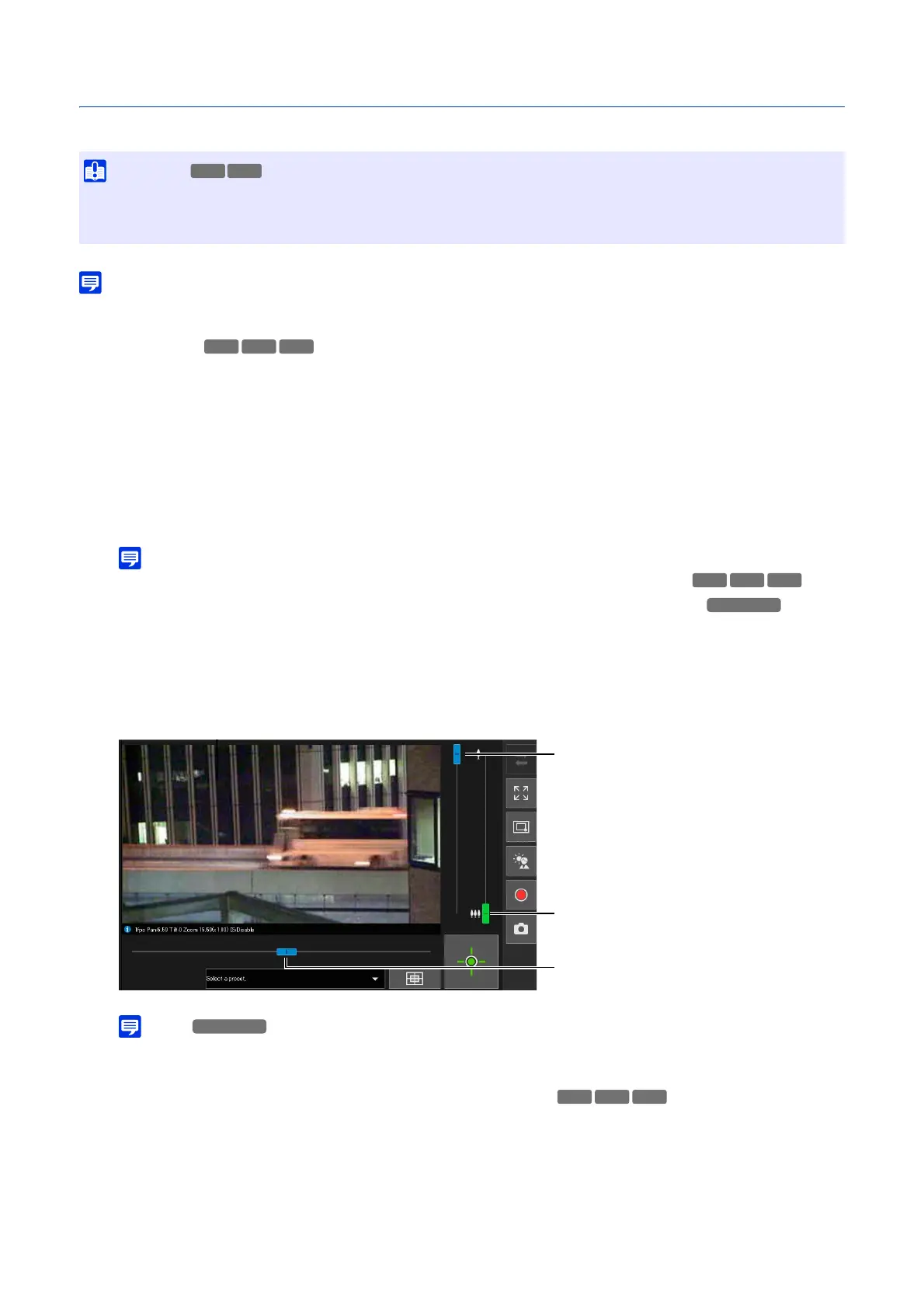
Drag the pan and tilt sliders to pan and tilt the camera.
Drag the zoom slider to zoom the camera.
The slider can also move by clicking directly on the slider bar.
• Slider operations cannot be performed unless the Viewer PTZ or Digital PTZ is started.
Sliders Used for Digital Zoom and Enhanced Digital Zoom
If [Video] > [Picture (Option)] > [Camera Control] > [Digital Zoom] is set to [Enable] on the Settings page (P. 75), the
digital zoom range (orange) will be displayed on the zoom slider and digital zoom operation becomes available.
Also, if [Video] > [Picture (Option)] > [Camera Control] > [Enhanced Digital Zoom] is set to [Enable] on the Settings
page (P. 75), the enhanced digital zoom range (blue) is displayed on the zoom slider and enhanced digital zoom
operation becomes available.
• The camera is designed to last for a total of 50,000 pan/tilt reciprocating operations.
For example, the camera will last for approximately six years if it performs 25 reciprocating operations per day.
If the durability limit for pan/tilt operations is exceeded, the camera may not be able to perform focus and zoom operations correctly.
S32VE
Zoom Slider
Drag upward to zoom in (telephoto), drag
downward to zoom out (wide-angle).
Tilt Slider
Move the camera vertically.
Pan Slider
Move the camera horizontally.
S32D



 To Next Page