82
It is possible to mask any area of the camera image video and fill it with a specified color or apply a mosaic. It is possible to
set up to eight privacy masks while checking the camera video.
When the camera is panned, tilted, or zoomed, the privacy mask areas follow the camera video.
Registering Privacy Masks
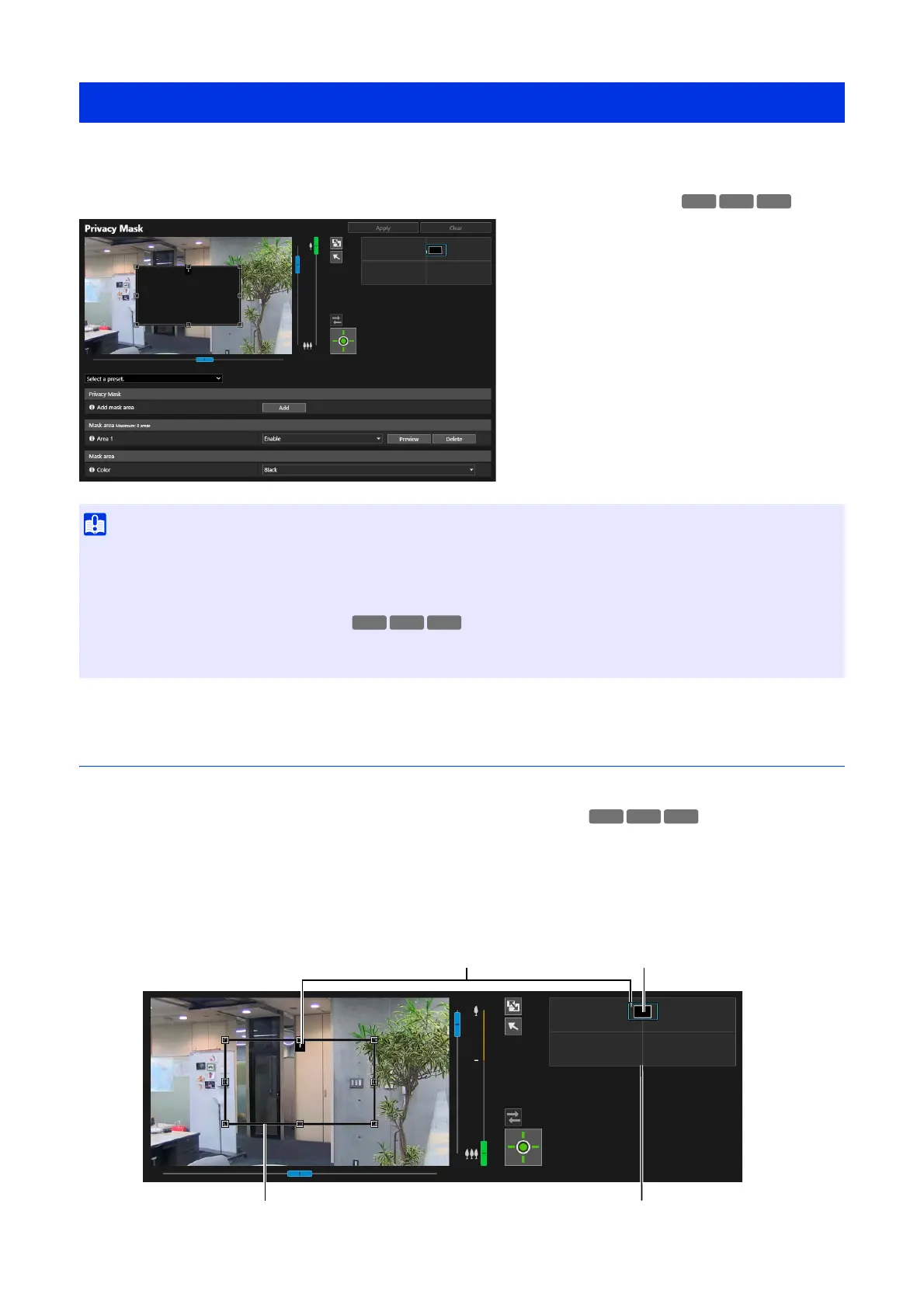
Use the mouse to position and size the privacy mask areas, then save the settings to the camera.
Operate the camera angle using the slider or preset selection box.
The preview frame with an area number is displayed on the video display area, and the privacy mask area with
the corresponding number is also displayed in the privacy mask registration area.
[Video] > [Privacy Mask]
• Privacy masks are applied to all video transmitted from the camera (live video, uploaded video, recorded video and video recorded to
a memory card).
• Privacy masks are not available in the following cases.
– When the camera is launched immediately after being turned on
– While a panorama image is being created
• Intelligent Function detection also works in the privacy mask areas. On [Detection] > [Intelligent Function], the movement of the subject
may be recognized by the outline of the detected object displayed on the mask.
HM4x S32VE
1
Display the area to be added as a mask area on the video display area.
2
In [Add mask area], click [Add].
HM4x
S32VE S32D
Area Number Privacy Mask Area
Privacy Mask Registration AreaPreview Frame



 To Next Page