87
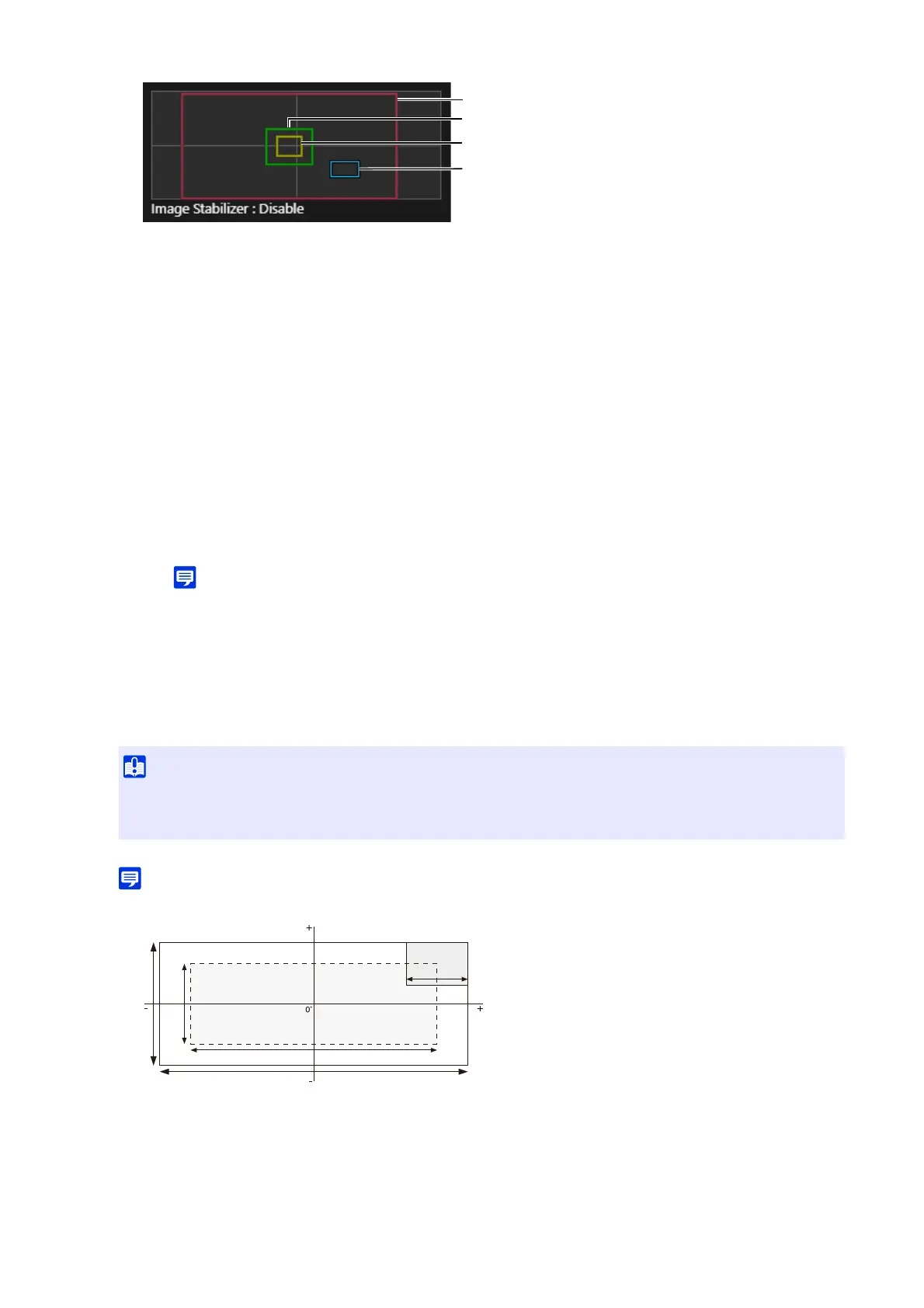
(1) Pan/Tilt Preview Frame (Red Frame)
Displays the vertical and horizontal range the camera can move. The view restriction area can be changed
directly by dragging the pan/tilt preview frame.
If the pan/tilt preview frame is dragged to outside of the panorama area, the view restriction is disabled for
each end (there is no restriction).
(2) Wide-Angle Preview Frame (Green Frame)
The restriction limit of wide-angle can be directly changed by dragging the wide-angle preview frame, but
the aspect ratio cannot be changed.
The wide-angle preview frame can be set within the pan/tilt preview frame.
(3) Telephoto Preview Frame (Yellow Frame)
The restriction limit of telephoto can be directly changed by dragging the telephoto preview frame, but the
aspect ratio cannot be changed.
The telephoto preview frame can be set within the wide-angle preview frame.
(4) Preview Frame (Blue Frame)
Indicates the current position shown in the video display area.
• If the preview frame (blue frame) is positioned outside the pan/tilt preview frame (red frame) that is transformed, the
camera position will be moved inside the view restriction.
• When the pan/tilt preview frame is changed, the preview frame will move onto the changed end. If the limit of the wide-
angle/telephoto preview frame are changed, the wide-angle/telephoto end of the preview frame will also be changed.
The settings are saved to the camera.
• The controllable range and shootable range are as follows.
3
Click [Apply].
• The panorama screen may vary slightly from the actual video. After setting the view restrictions, be sure to use the Camera
Viewer to confirm the view restriction settings have been reflected correctly. View restrictions are not applied to the video
display area of the view restriction setting.
Maximum Vertical Shootable Range
Tilt Controllable Range
Pan Controllable Range
Maximum Horizontal Shootable Range
Maximum Wide-angle of View



 To Next Page