3-CONTROLSANDINSTRUMENTS
ClimatecontrolswithAir-Conditioning(A/C)(optional)
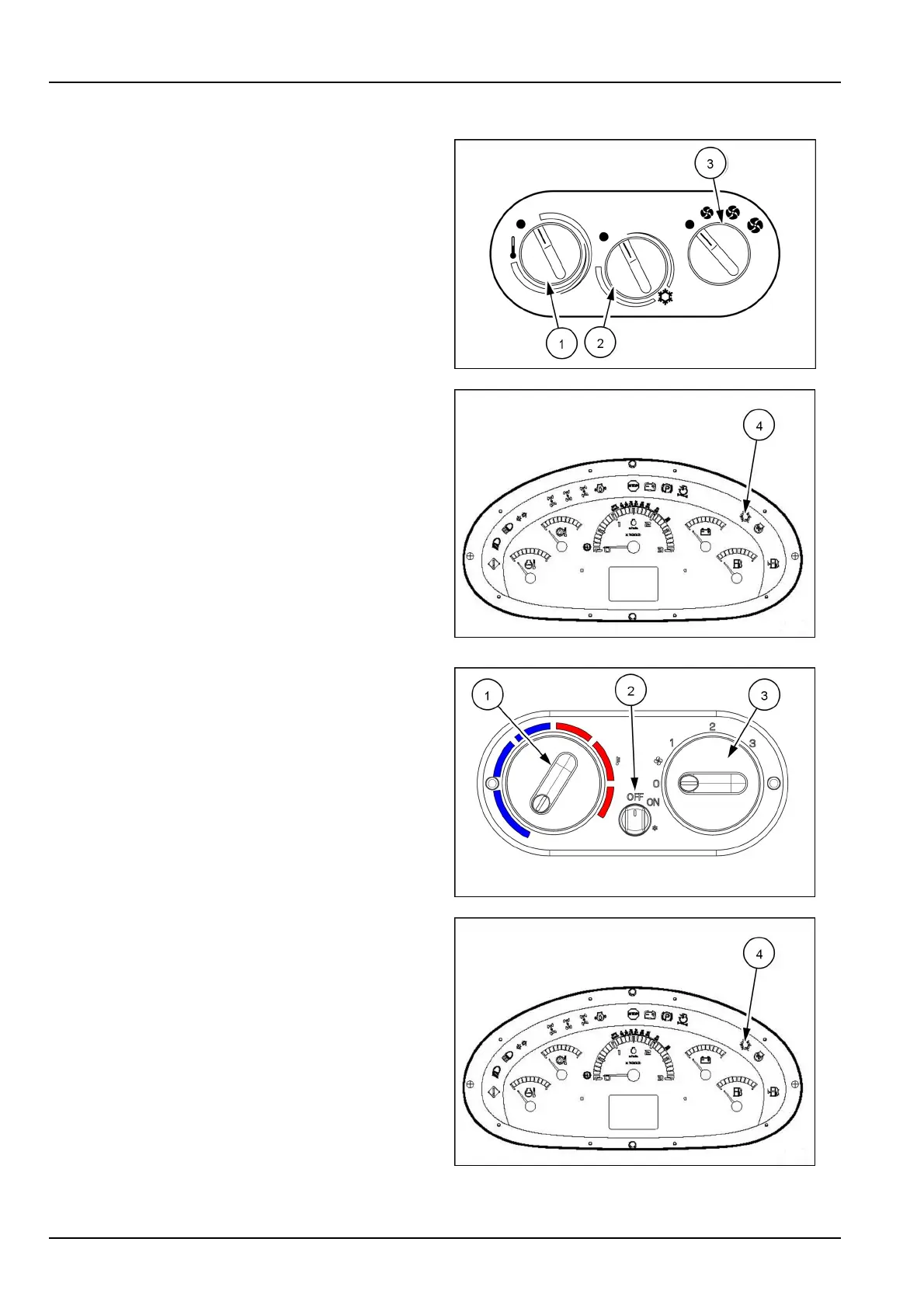
ActivatetheAir-Conditioningsystemwithcontrolsshown:
1.Startthemachine.
2.Turnthefancontrolknob(3)tooneofthethreefan
speedsettings.
3.Makesurethattheheatercontrolknob(1)isintheOFF
position0,otherwiseboththeheaterandA/Csystems
willbeON.
4.TurntheAir-Conditioning(A/C)temperaturecontrol
knob(2)tothedesiredtemperature.Turntheknob
clockwiseforwarmerairorcounter-clockwisefor
coolerair.
NOTE:TheA/Ctemperaturecontrolknobmustnot
beintheOFFposition0.TheA/Csymbol(4)onthe
instrumentclusterwillilluminatewhentheA/CisOn.
5.AllowtheA/Ctooperateforafewminutesandthen
adjustthetemperatureandfancontrolstothedesired
settings.
MOLI12LBB0195AB9
LEEN11T0334AA10
ActivatetheAir-Conditioningsystemwithcontrolsshown:
1.Startthemachine.
2.Turnthefancontrolknob(3)tooneofthethreefan
speedsettings.
3.TurntheA/CON/OFFswitcht(2)otheONposition.
NOTE:TheA/Csymbol(4)ontheinstrumentcluster
willilluminatewhentheA/CisOn.
4.TurntheAir-Conditioning(A/C)temperaturecontrol
knobtothedesiredtemperature.Turntheknobclock-
wiseforwarmerairorcounter-clockwiseforcoolerair.
5.AllowtheA/Ctooperateforafewminutesandthen
adjustthetemperatureandfancontrolstothedesired
settings.
RAIL15TLB0537AA11
LEEN11T0334AA12
3-80



 To Next Page