7-MAINTENANCE
Replacethebulbs
NOTICE:Nevertouchahalogenbulbwithyourngers.Alwaysuseacleanclothwhenhandlinghalogenbulbs.
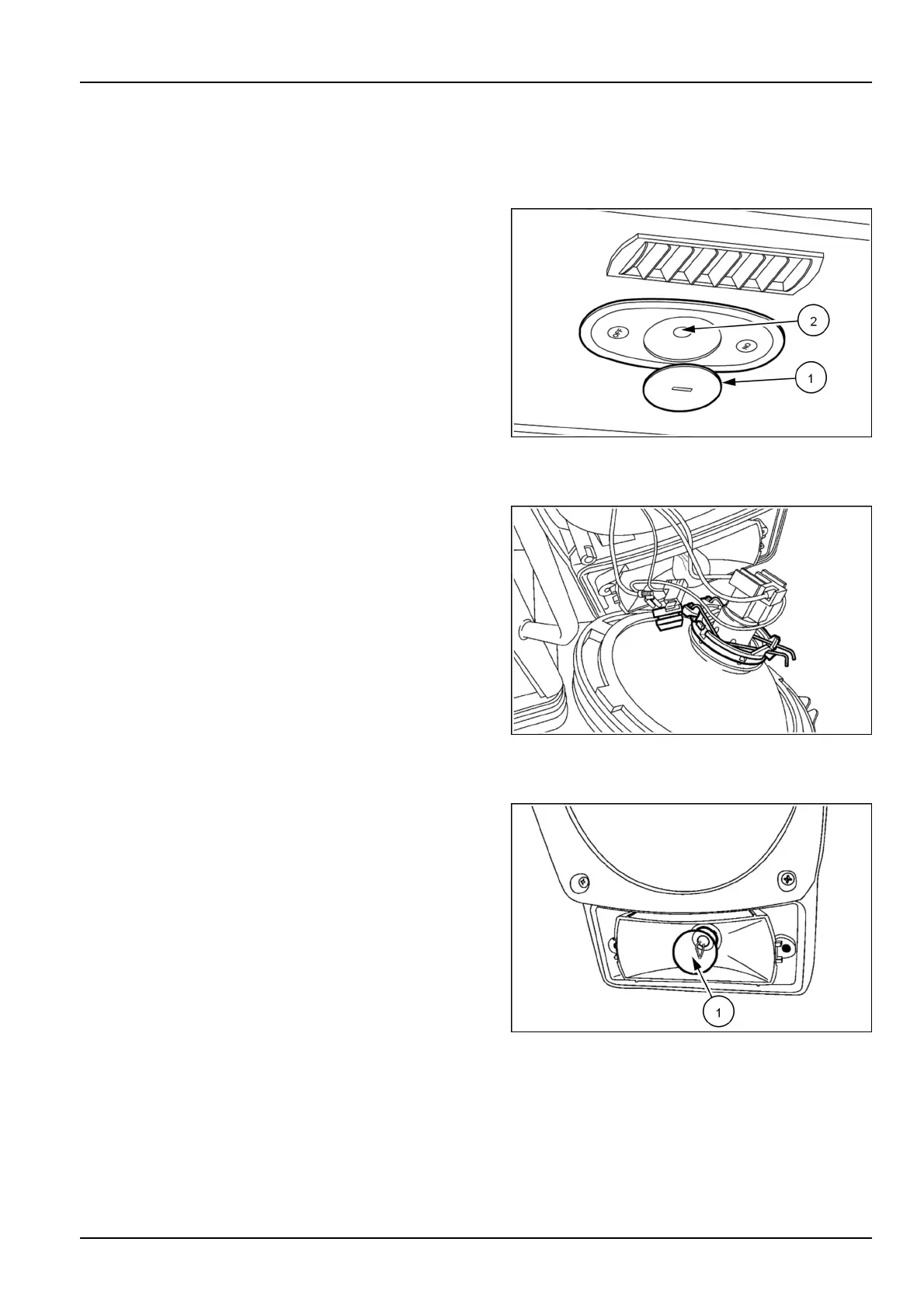
Operator’scompartmentlight
1.Removethelens(1)unscrewingitbyturning90°
throughitscentralslot.
2.Removethebulb(2)andinstallabulbofthesame
wattage10W.
3.Reinstallthelens(1).
LEEN12T0488AA1
Mainbeamheadlightsandsidelights
1.Removethefourscrews,removetheretainingframe
andremovethelightassembly.
2.Removetheplugfromthelightbase.Foldbackthe
clips,removethedefectivebulbandreplaceitwitha
bulbofthesamewattage55/60W.
3.Ifthesidelightbulbisdefective,replaceitwithabulb
ofthesamewattage4W.
4.Installthelightbase.Installtheretainingframeandthe
fourscrews.
LEEN12T0489AA2
Frontdirectionindicator
1.Removethetwoscrewsandremovethelens.
2.Removethebulb(1)andinstallabulbofthesame
wattage21W.
3.Securethelensinplacewithscrews.
LEEN12T0490AA3
7-115



 To Next Page