7-MAINTENANCE
Bucketteeth-replacement
Loaderbucket
1.Movethemachinetoalevelandrmground.
2.Positiontheloaderbucketsothatthebucketteethcan
bereplaced.
3.Placethedirection-of-travelleverandgearshiftleverin
neutralposition.
4.Immobilizethemachinewiththeparkingbrake.
5.Stoptheengineandremovethestarterswitchkey.
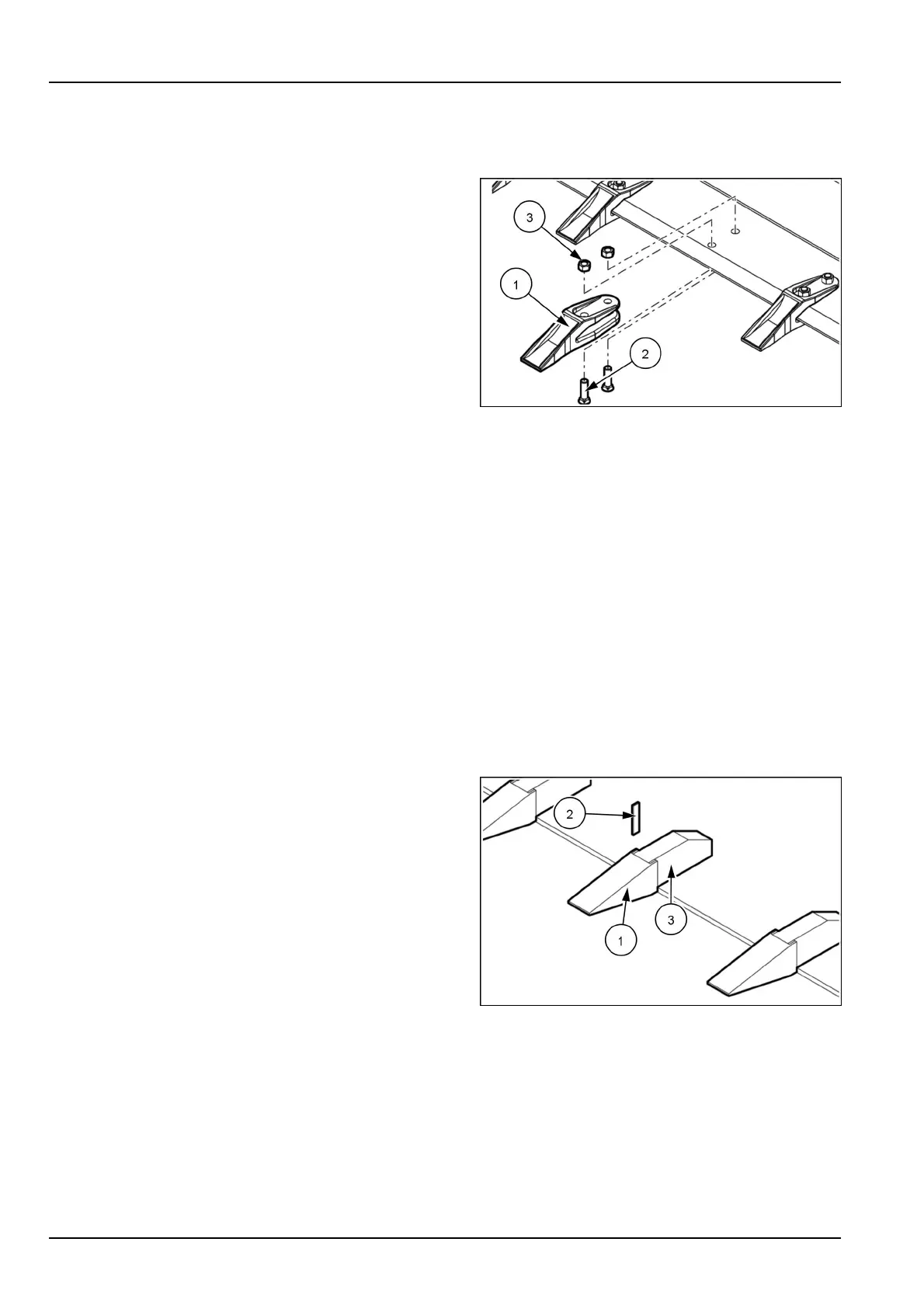
6.Loosenandremovethescrews(2)withthenuts(3).
7.Extractthetooth(1).
8.Cleantheareaaroundthetooth.
9.Assemblethenewtooth(1).
10.Screwinandtightenthescrews(2)withthenuts(3).
LEEN12T0502AA1
Backhoebucket
1.Movethemachinetoalevelandrmground.
2.Positionthebackhoebucketsothatthebucketteeth
canbereplaced.
3.Placethedirection-of-travelleverandgearshiftleverin
neutralposition.
4.Immobilizethemachinewiththeparkingbrake.
5.Stoptheengineandremovethestarterswitchkey.
NOTICE:Nobodymustbeinthetrajectoryofthetoothholderandofthetoothtoberemoved.Duringtoothremoval,
boththetoothholderandthetoothcouldbeunexpectedlyprojected,thushittingpersonsstandingintheirtrajectory
ornearby.Projectedmetalchipscouldhitpersonsandcauseinjury.
6.Removethetoothholder(2)usingahammeranda
chisel.
7.Removethetooth(1)fromthetoothholder(3).
8.Cleantheinsideofthetoothholder,removinganydirt
orrust.
9.Insertanewtooth(1)intothetoothholder(3).
10.Lockthenewtoothbyinstallingthetoothholder(2).
LEEN12T0504AA2
7-134



 To Next Page