INSTRUMENTS/CONTROLS
59
RIGHT PAGE
Bur 6-34090EUR
GAUGE DISPLAY
BD02B020
Programming Your Gauge Display
When you start your machine you will see the Hourmeter in the Display Center.
Your wheel loader is shipped from the factory with Gauge Display 05. To check
what Gauge Display your machine currently is using do the following:
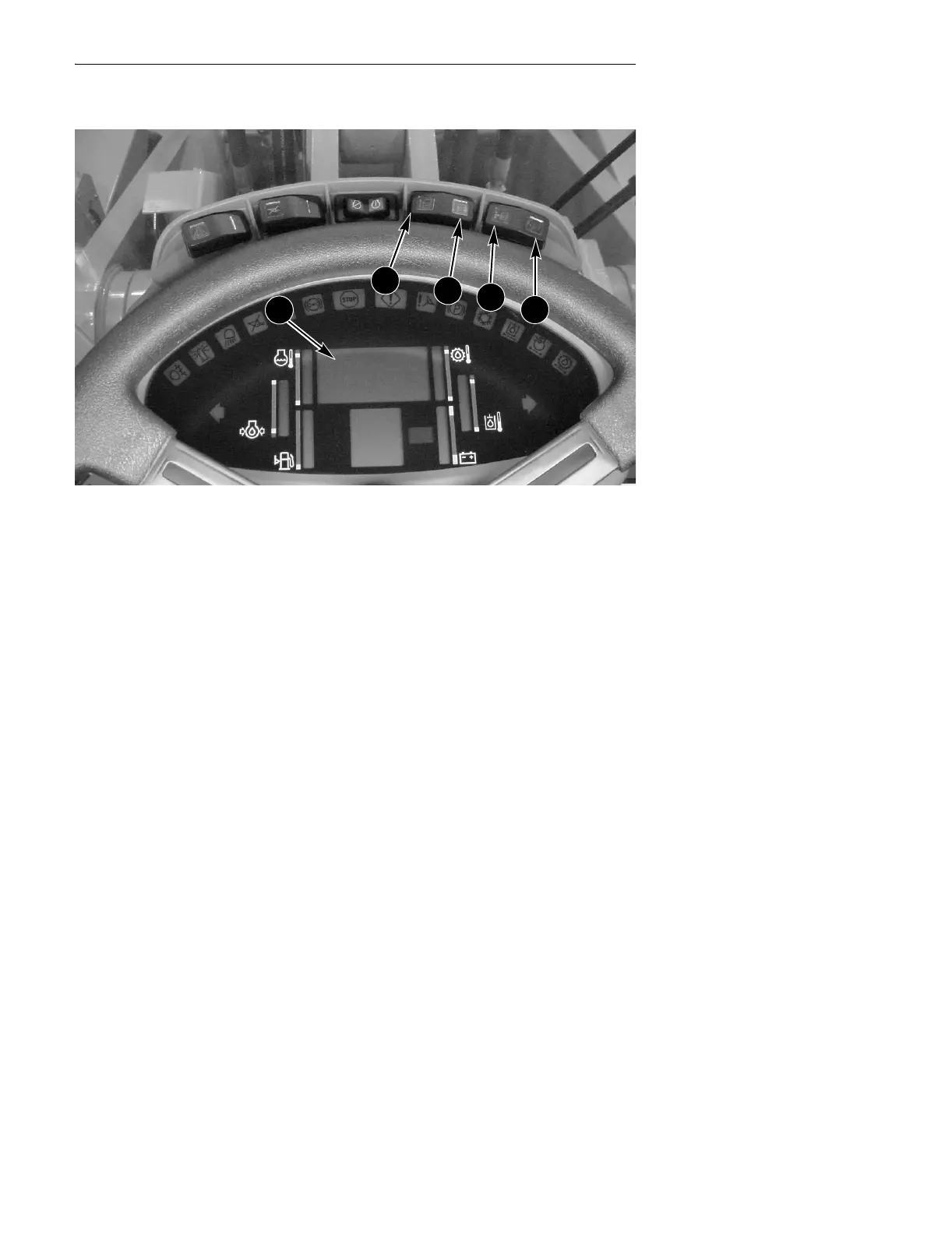
● Press the program (C) switch (left side of the program/reset (C, D) switch).
● Press the up count (A) switch until the display reads 010.
● Return the program/reset (C, D) switch to the OFF (center) position.
● Read the number (01, 02, 03, 04 or 05) shown on the Display Center. If this is
the Gauge Display you want, press the reset (D) switch (right side of the
program/reset (C, D) switch) momentarily and you are done.
● If you want a different Gauge Display, press the up count (A) switch until the
display reads the Gauge Display you want (between 01 to 05).
● Press the reset (D) switch (right side of the program/reset (C, D) switch)
momentarily.
A. UP COUNT C. PROGRAM
B. DOWN COUNT D. RESET
A
B
C
D
2


 To Next Page