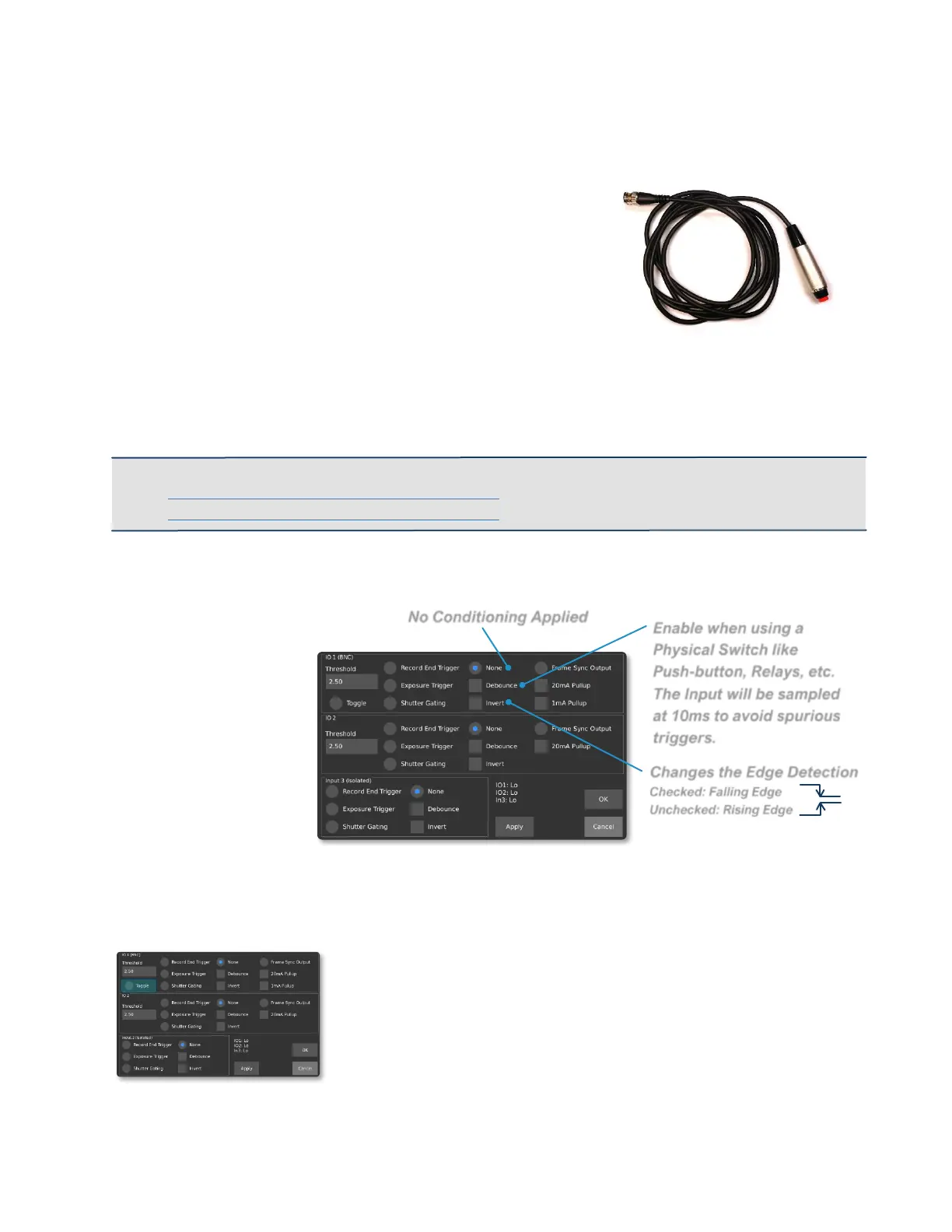
Enable when using a
Physical Switch like
Push-button, Relays, etc.
The Input will be sampled
at 10ms to avoid spurious
triggers.
TRIG1 and TRIG2 can also change direction and output a frame sync signal (a signal
synchronized with the exposure of the sensor).
To trigger the camera with a BNC trigger switch from our
store, go to the IO settings screen and adjust the following
for IO 1 (BNC):
• Enable a pullup
• Set Signal Conditioning for Debounce
• Set Trigger Type to Record End Trigger
• Plug the Trigger cable into the BNC Connector
• Make sure IO1 Status shows as Hi when the button is not pressed
• Press on the trigger button to verify that the status goes from Hi to Lo
• You are ready to go
IMPORTANT: For more information on triggering, see our tutorials here:
https://www.krontech.ca/chronos-1-4-resources/
https://www.krontech.ca/chronos-2-1-resources/
SIGNAL CONDITIONING
SYNCHRONIZING TO EXTERNAL SOURCES
TRIGGER MODES
TOGGLE TRIGGER
When selected, the trigger is setup to start a recording on
one push of the BNC trigger switch, while stopping a
recording on the subsequent push in Normal recording
mode.



 To Next Page