Page | 40
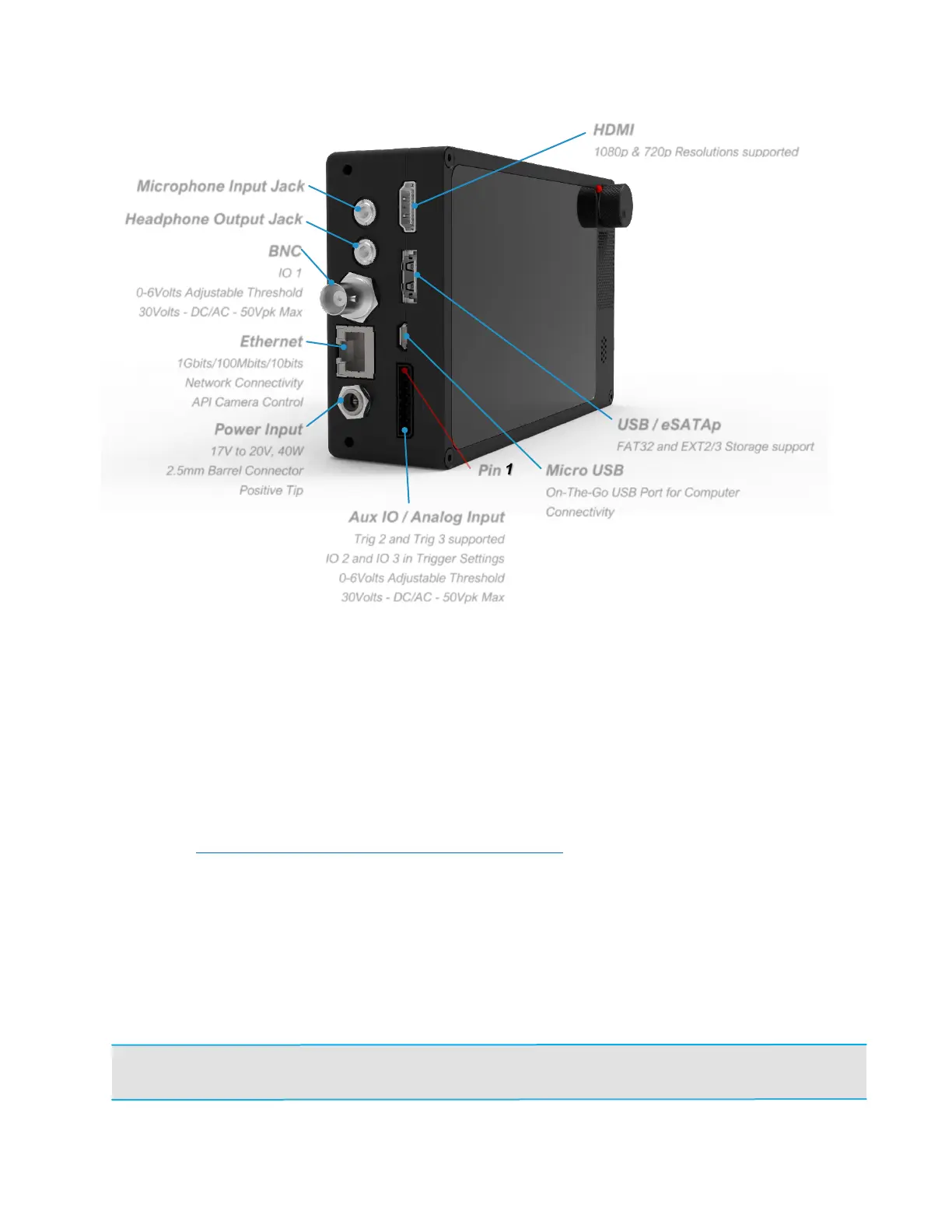
CAMERA’S SIDE
HDMI
• When connected to a monitor via HDMI, the camera will automatically output
a video signal during live video feed, recording, and playback, but not during
saving. It will output a 1080p signal over HDMI by default.
• If the monitor supports 720p, but not 1080p, then 720p will be used.
AUDIO IO
• Not supported in current software, but the hardware is present in all cameras.
• Please sign up for the Krontech newsletter here:
https://www.krontech.ca/chronos-newsletter/.
• You will receive emails about software updates, including those for audio
support.
USB/ESATA
• This port accepts both USB type A and eSATA devices. USB mass storage
devices such as flash drives and hard drives can be connected to this port.
• This port is also able to supply power using an eSATAp cable.
NOTE: Most 2.5” hard drives and SSDs will work with the Chronos, but most 3.5” drives
will not. This is because the eSATAp port only supplies 5v, not 12v.
Aux IO / Analog Input
Trig 2 and Trig 3 supported
IO 2 and IO 3 in Trigger Settings
0-6Volts Adjustable Threshold
30Volts - DC/AC - 50Vpk Max



 To Next Page