EasyManua.ls Logo

Chronos 1.4 - Save Settings

Chronos 1.4
103 pages
Print Icon
To Next Page IconTo Next Page
To Previous Page IconTo Previous Page
Loading...
Page | 88
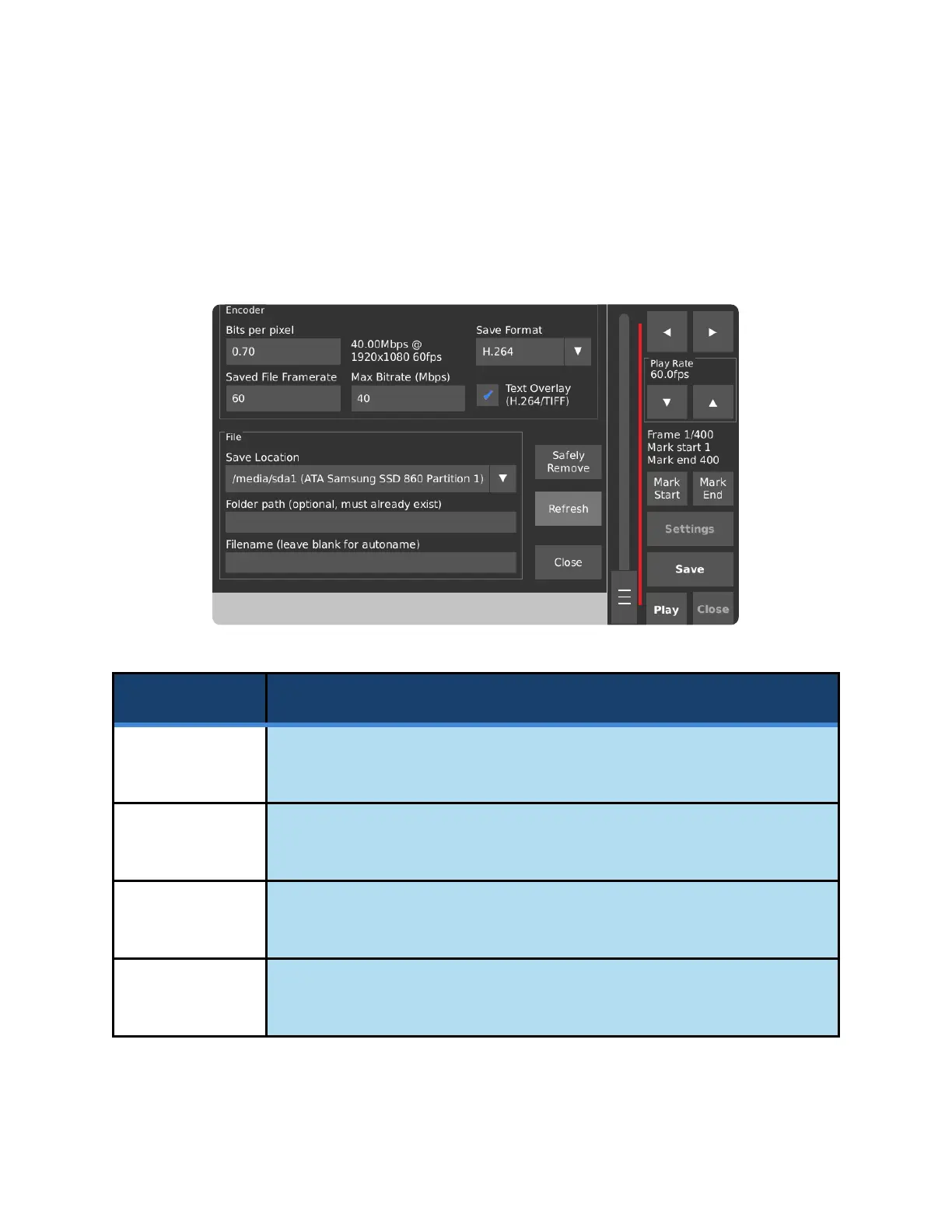
SAVE SETTINGS
The Save Settings pop-up allows for the configuration of the file before it is written to the external storage
device. By default, frames are encoded as H.264 MPEG-4 files and saved to the last storage device that
was attached to the camera. Bits per pixel, Saved File Framerate and Max Bitrate are only used when
saving as H.264.
Control
Function
Bits Per Pixel
Primary quality control for H.264 (MPEG-4) encoded saved video.
Defaults to 0.70 Bits per pixel.
Max Bitrate
Sets a limit to the playback data rate in megabits per second. [H.264 only]
Defaults to 40 Mbps.
__.__ Mbps @
_x_ _fps
Shows the bitrate and framerate calculated from the Bits per pixel setting and
frame resolution.
Saved File
Frame Rate
Sets the playback framerate for saved video files.
Defaults to 60 frames per second.

Table of Contents

Related product manuals