WHITE BALANCE
White Balance is an adjustment in electronic and film
imaging that corrects for the colour balance of the lighting -
so that white objects appear white, rather than coloured (for
example) yellow when lit by tungsten filament lights, or
excessively blue under sunlight.
Most digital cameras have automatic compensation for
white balance, and the more advanced allow some
manual adjustment - either to fixed settings or balancing
on a particular image (e.g. a grey card). The white
balance is adjusted by applying different weightings to the
red, green and blue (RGB) components of the image
coming from the sensor - based on the colour
temperature.
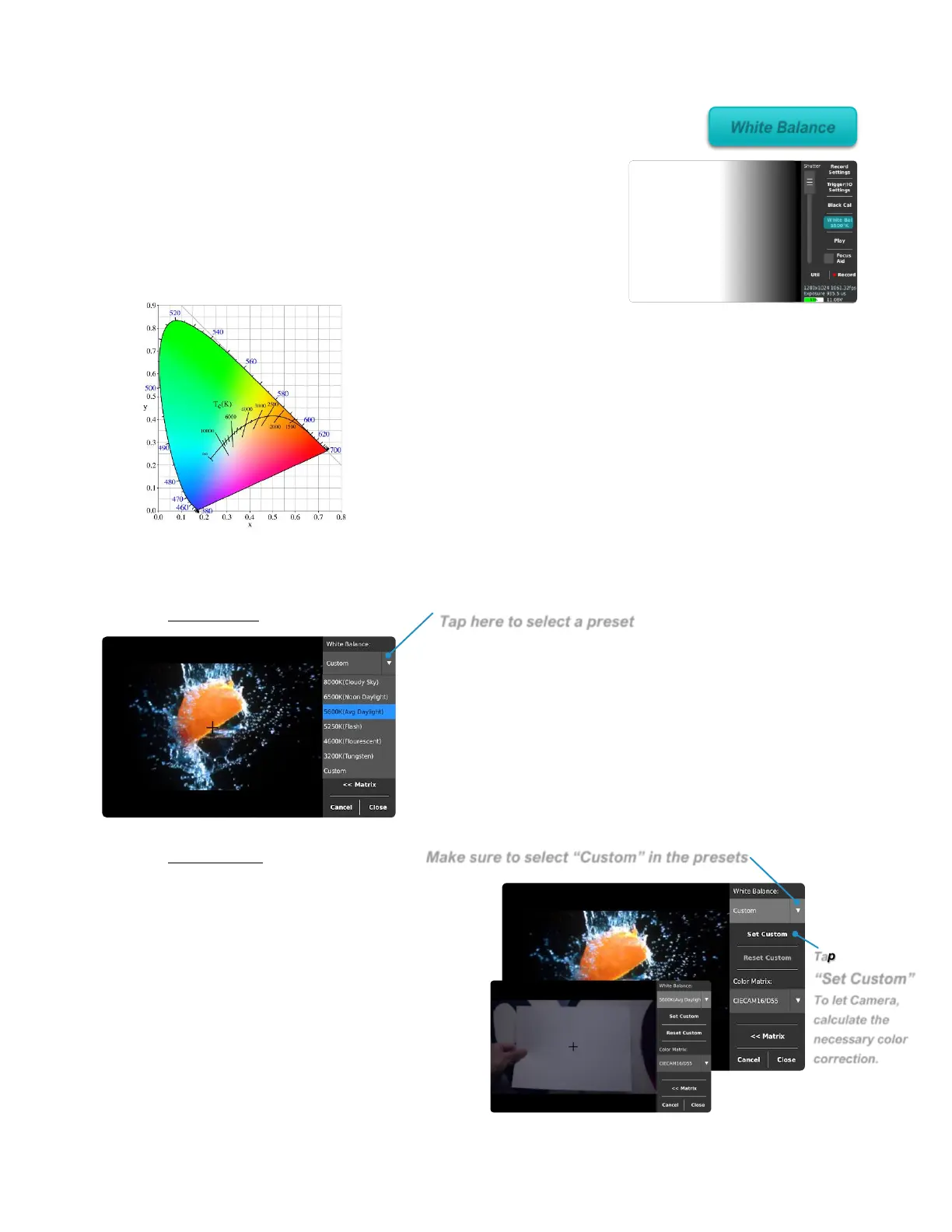
WHITE BALANCE CALIBRATION
1
st
Method:
The easiest and fastest way to adjust the white
balance is by evaluating the environmental light
around the subject. To put in front of the camera a
white piece of paper and to select from the drop-
down menu “White Balance” the presets that
matches the type of light used and to make the white
of the paper come out as white as possible without
any blue or orange tint.
2
nd
Method:
The second way to adjust the color
temperature to match the scene is to
put a properly lit white piece of paper
in front of the camera. Then, select
from the presets list “Custom” and
then tap the “Set Custom” button for
the camera to estimate the right
amount of correction to obtain the
best neutral white possible.



 To Next Page