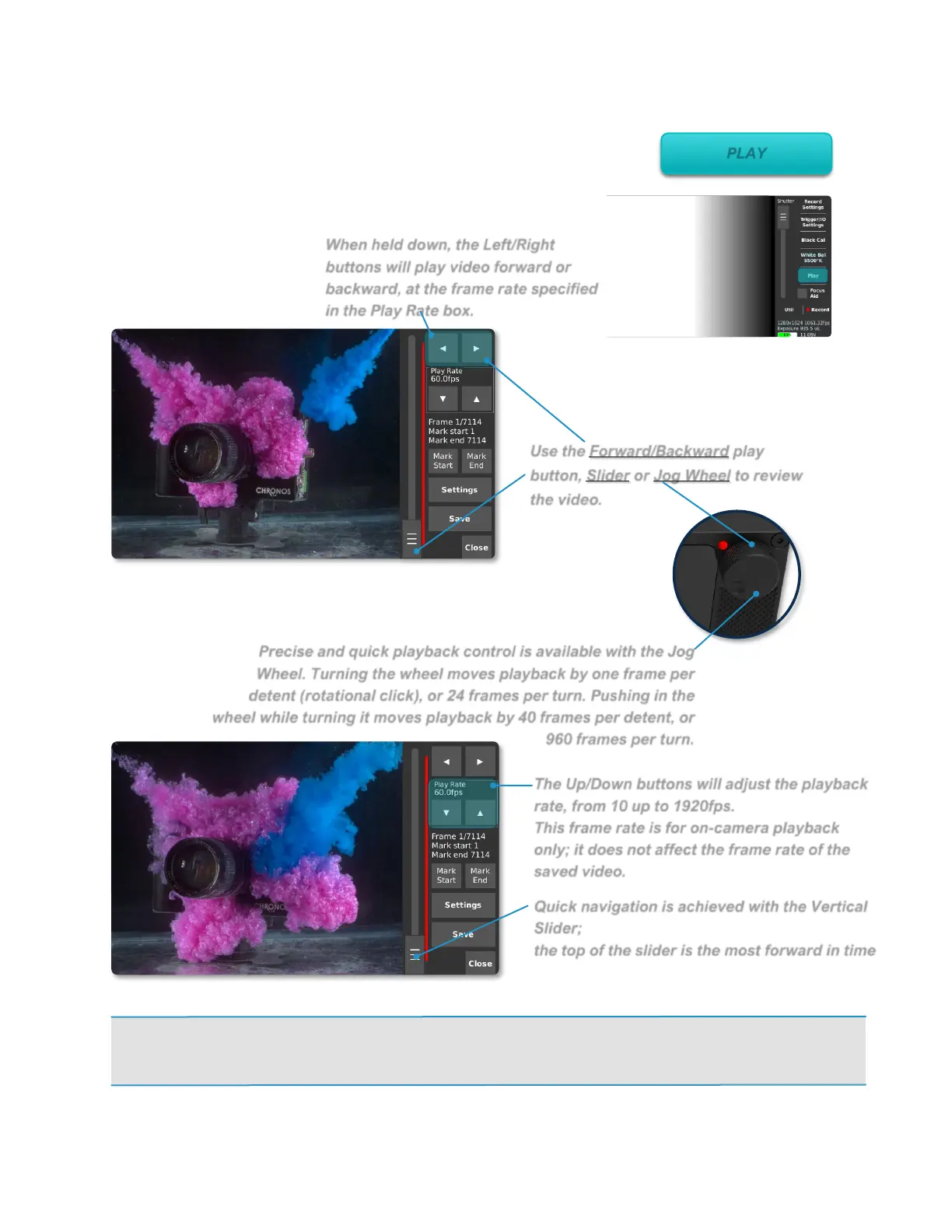
Use the Forward/Backward play
button, Slider or Jog Wheel to review
the video.
When held down, the Left/Right
buttons will play video forward or
backward, at the frame rate specified
in the Play Rate box.
The Up/Down buttons will adjust the playback
rate, from 10 up to 1920fps.
This frame rate is for on-camera playback
only; it does not affect the frame rate of the
saved video.
Quick navigation is achieved with the Vertical
Slider;
the top of the slider is the most forward in time
(newest frames).
Precise and quick playback control is available with the Jog
Wheel. Turning the wheel moves playback by one frame per
detent (rotational click), or 24 frames per turn. Pushing in the
wheel while turning it moves playback by 40 frames per detent, or
960 frames per turn.
Playback
The Playback and Save are accessed through the play
button on the main screen
The Playback screen only plays back the most recently recorded
video segment(s) stored in RAM.
NOTE: If One-touch Playback was enabled on the Util screen, you will see a Play button just to
the left of the Close button. This will activate One-touch Playback mode where, once the button is
tapped on the Play screen, the playback will loop between the marked start and end points.



 To Next Page