134
CP30 Mobile Computer
Reference Manual
9.2 BUTTON ASSIGNMENT UTILITY
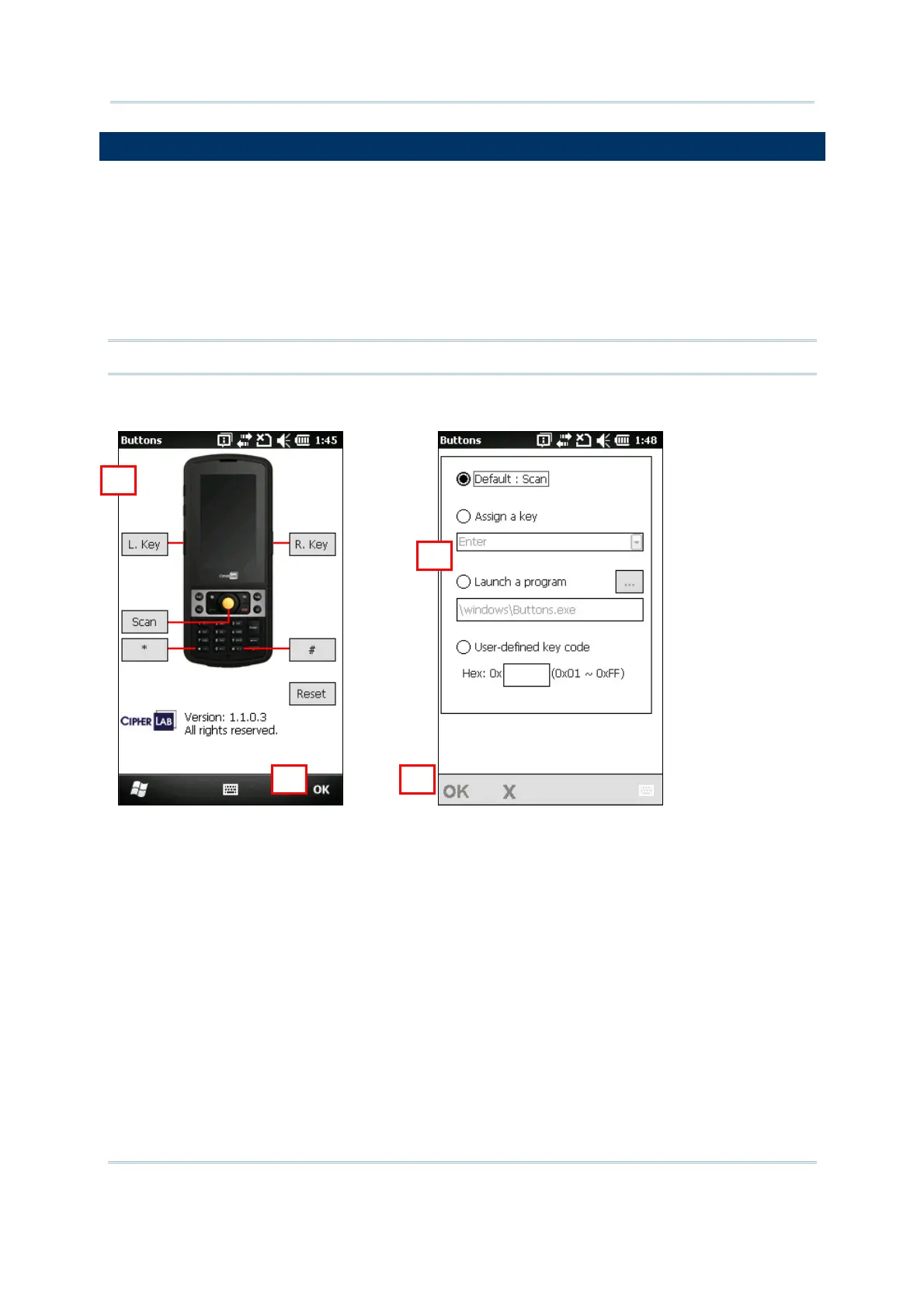
The Button Assignment Utility allows the following keys to be re-defined to another
key or serve as a shortcut key for launching a specific program.
[Scan]
Two side triggers on each side of the touch screen
[Á] (Asterisk)
[#] (Hash)
Note: By default, the two side triggers are programmed to serve as Scan keys.
Go to Start | CipherLab Utilities to open the Button Assignment Utility.
1) Tap the label of one of these keys.
For example, tap [L. Key] to configure the side trigger on the left.
2) You may input a hex value or assign one of the following key values to the left side
trigger or have it serve as a shortcut key to launch a specific program.
Enter
Scan
Esc
Delete
Backspace
Space
Tab
1



 To Next Page