163
Appendix III 2D Imager
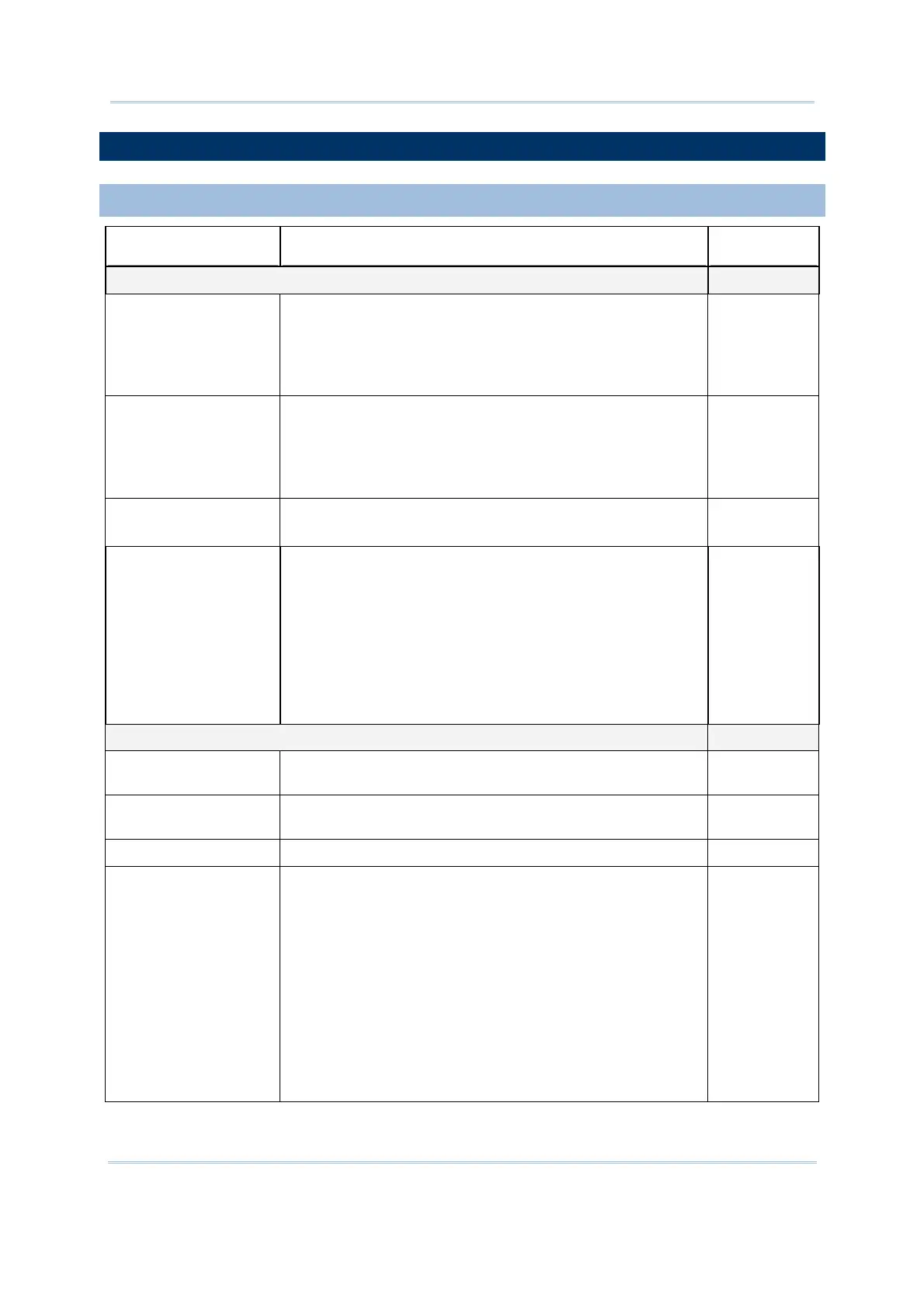
SYMBOLOGY SETTINGS TABLE
1D SYMBOLOGIES
2D Engine Description Default
Codabar Enable
CLSI Editing When applied, the CLSI editing strips the start/stop
characters and inserts a space after the first,
fifth, and
tenth characters of a 14-character Codabar barcode.
The 14-character barcode length does not include
start/stop characters.
No
NOTIS Editing Decide whether to include the start/stop characters in the
data being transmitted.
NOTIS Editing is to
strip the start/stop characters,
which equals to “Disable Transmit Start/Stop
Characters”.
No
Select Length
(min/max)
One or two fixed lengths
Range (1~55)
4~55
Intercharacter Gap
Size
he Code 39 and Codabar symbologies have an
intercharacter gap that is typically quite small. Due to
various barcode printing technologies, this gap can grow
larger than the maximum size allowed, preventing the
scan engine from decoding a barcode. If this problem
occurs, set it to “Large Intercharacter Gaps” to tolerate
these out-of-specification barcodes.
Normal intercharacter gaps
Large intercharacter gaps
Normal
Code 128 Enable
GS1-128
(UCC/EAN-128)
Read GS1-128 barcodes with leading FNC1 character. Enable
GS1-128
(UCC/EAN-128)
Read GS1-128 barcodes with leading FNC1 character. Enable
ISBT 128 Read ISBT 128 barcodes. Enable
ISBT Concatenation Decide whether to decode and concatenate pairs of ISBT
barcodes.
Disable
Enable – When this option is selected, there must be
two ISBT barcodes for the scanner to decode and
perform concatenation.
Auto-discriminate –
When this option is selected, the
scanner decodes and concatenates pairs of ISBT
barcodes immediately. If only a single ISBT barcode is
present, the scanner must decode 10 times before
transmitting its data to confirm that there is no
additional ISBT barcode.
Disable



 To Next Page