31
Chapter 2
Learnin
Windows Mobile Basics
2.1.2 TITLE BAR
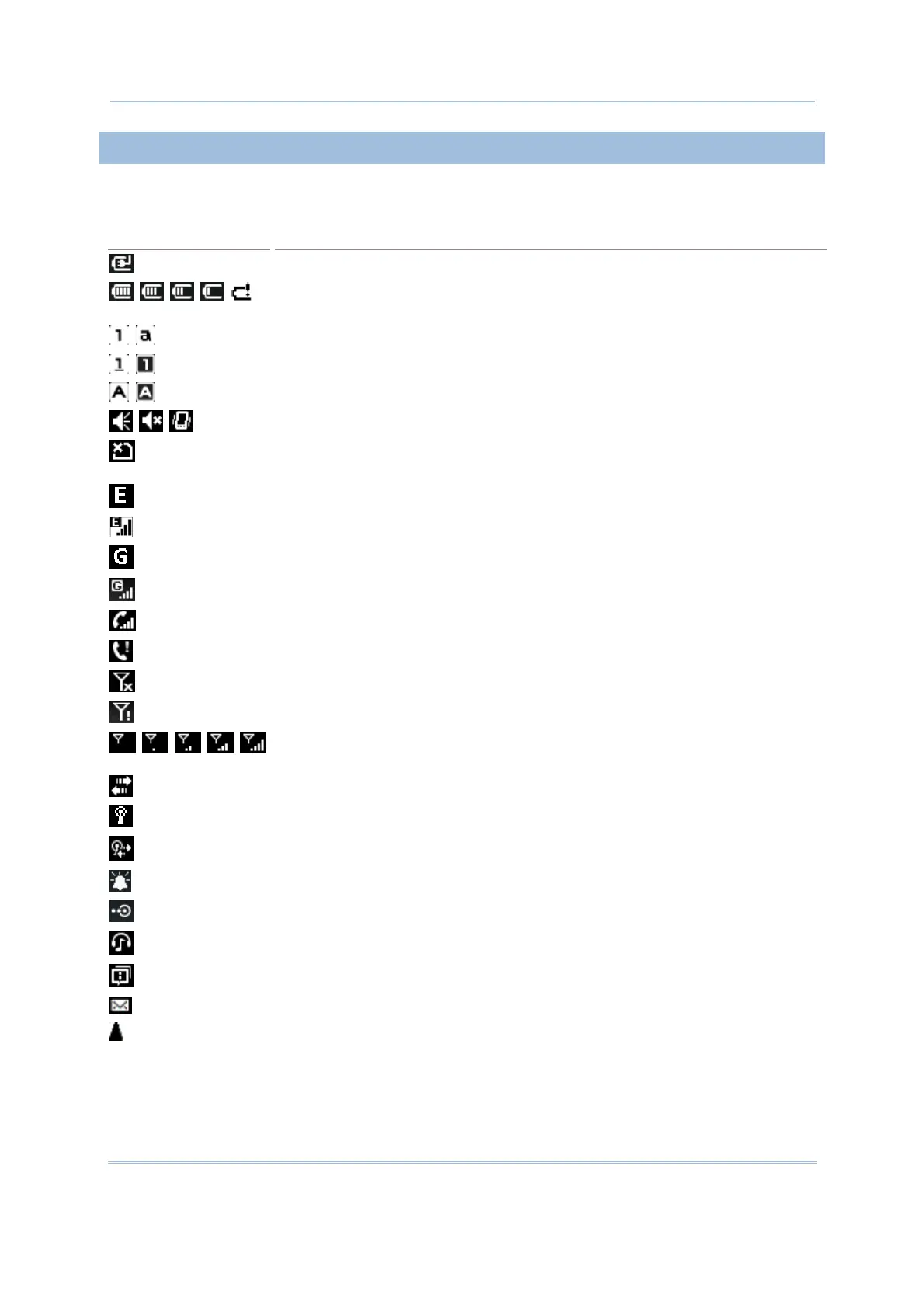
The icons at the top of the screen are explained below.
Icon
Description
External power source is connected.
Battery power remaining: The more the white bars, the more power in the
main battery.
Current input mode of keypad.
Shift [] is enabled in numeric mode.
Shift [] is enabled in alpha mode.
Volume status: On, off, or vibrate.
Insert SIM card: The SIM card is missing. You can still make emergency calls
if your service provider supports it.
EDGE service available.
EDGE connection is established.
GPRS service available.
GPRS connection is established.
Incoming call.
Missed call.
Antenna signal status: Phone power off.
Antenna signal status: PIN Code required for powering on the Phone.
Antenna signal status: Phone power on; the more bars, the stronger the
signal.
Connection is active.
Wi-Fi Network is detected.
Wi-Fi Network is connected.
Reminder for an alarm or appointment is active.
Receiving Bluetooth beams.
Bluetooth stereo headset is in use.
More notification icons can be displayed.
E-mail/text message is received.
Roaming.
.



 To Next Page