32
CP30 Mobile Computer
Reference Manual
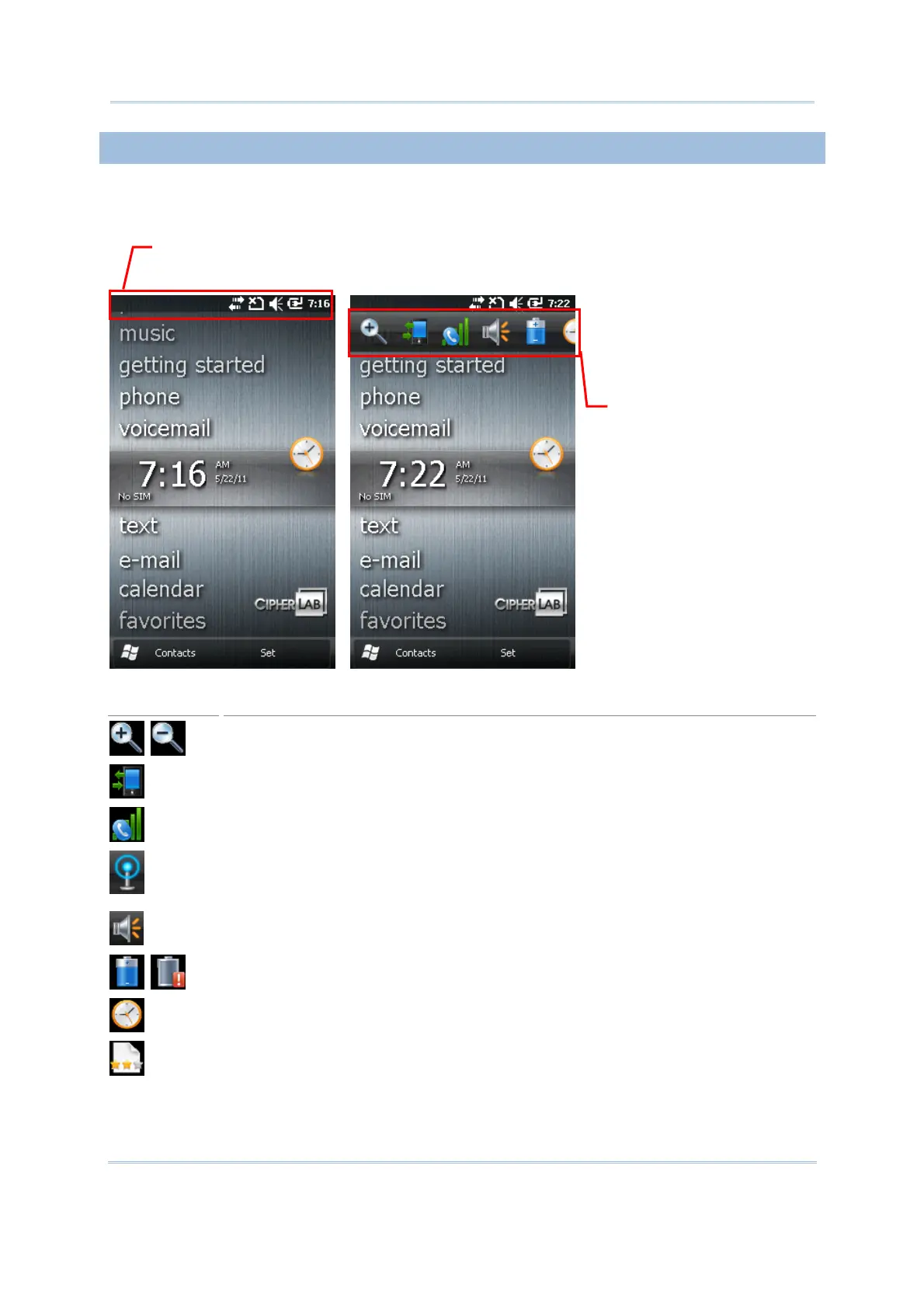
2.1.3 TITLE BAR DROP-DOWN LIST
The title bar drop-down list is hidden at the top of the screen be showed below:
Icon
Description
Tap it to zoom in or zoom out of current view.
Tap it to check the connections status. You may configure the settings through
Wireless Manager.
Tap it to check the phone status. You may configure the settings through
Wireless Manager.
Tap it to show detected networks for Wireless local area networking (WLAN)
connection, which is not available until Wi-Fi power is turned on through Wireless
Manager. Alternatively, you may tap Notification on the left soft key bar.
Tap it to change the system volume or phone ring. You may mute it or have it
vibrate instead.
Tap it to monitor the charging status and change the power scheme.
Tap it to change the clock and alarms settings.
Tap it to help leave customer feedback
to Microsoft for improving Windows Mobile
software.
Tap the title bar to reveal
the drop-down list.
Drag the drop-down list
o left or right to view
all the icons.



 To Next Page