58
CP30 Mobile Computer
Reference Manual
3.3.2 UNDERSTAND DEVICE CONFIGURATION
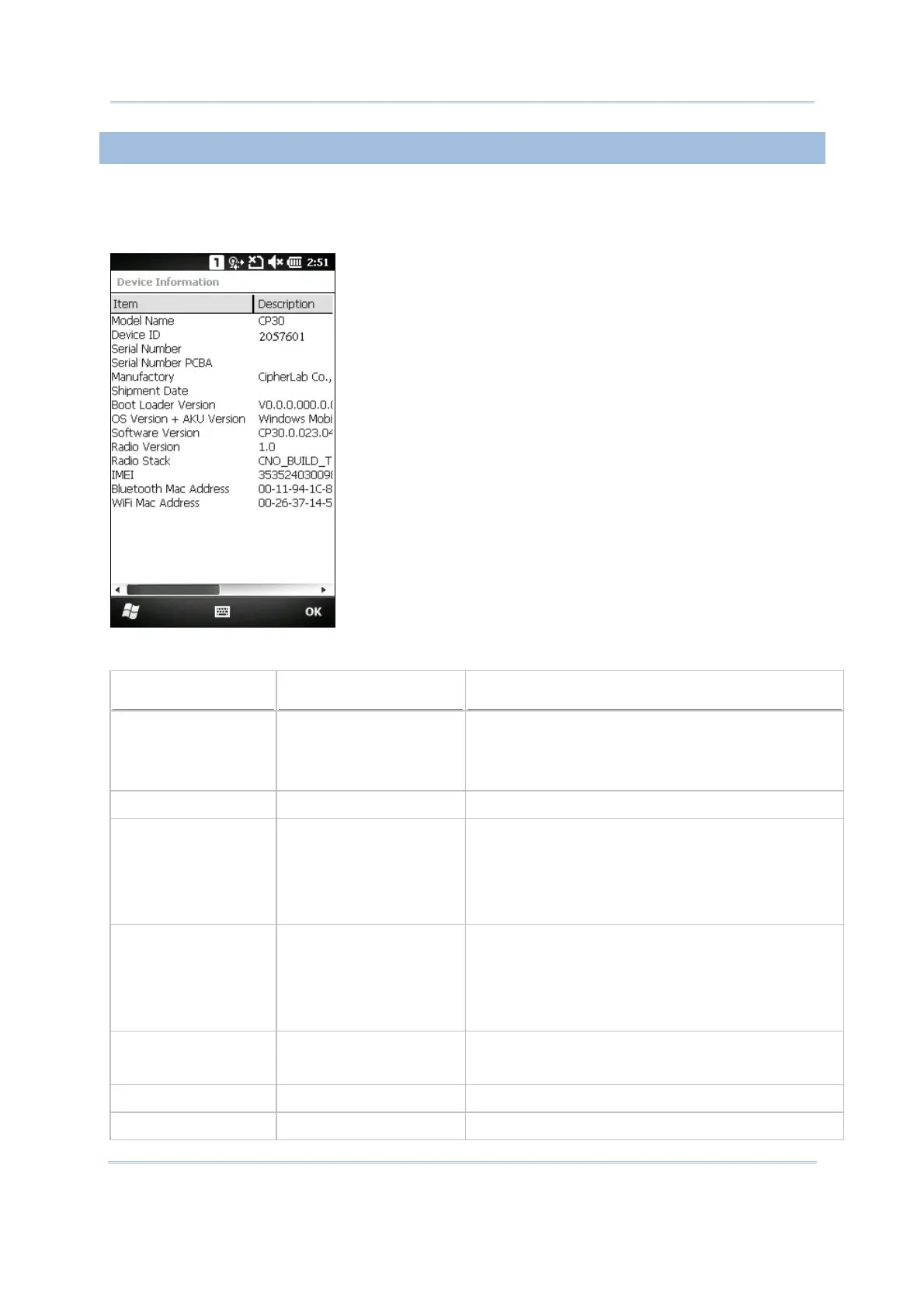
Go to Start | Settings | System, and tap Device Information to view the device
information. The device configuration of CP30 Mobile Computer is displayed in 7 digits:
xxxxxxx
Take the screenshot for example. Its device ID is
“2057601”; therefore, the mobile computer has the
following features –
28-key, WQVGA screen
A scan engine that employs Laser scan engine
Integrated communications: Bluetooth, Wi-Fi and
GSM/GPRS
Integrated GPS receiver and camera
Device ID
Modular Component Types
1
st
digit Reader module 0= none
2= Laser (SE955)
3= 2D Imager
2
nd
digit Reserved 0
3
rd
digit Bluetooth, GSM/GPRS 0= none
1= Bluetooth
4= GSM/GPRS
5= Bluetooth + GSM/GPRS
4
th
digit Wi-Fi, GPS 0= none
3= Wi-Fi
4= GPS
7= Wi-Fi + GPS
5
th
digit LCD, Camera 2= WQVGA
6= WQVGA + Camera
6
th
digit Keypad 0= 28-key
7
th
digit PCB main board 1= EVT1



 To Next Page