59
7.1.2 Checklist
Here are some is a list of gotchya’s to check before starting a motion profile. These are all
“obvious” yet somehow we still skip one of the items on this list and have to reshoot a scene.
o Slider/Tripod/Gear stable for all camera positions
o Camera set to “Manual” mode
o Camera has enough storage for all the pictures / video
o Fresh batteries all around!
o Image stabilization off
o Auto-focus off
o Auto-ISO turned off
o Exposure tested at different locations of the panorama
o Camera in single-shot only (continuous mode turned off)
o Camera shutter cable firmly attached to camera and StackShot 3X (do a test-shot!)
7.2 Motion Home Screen
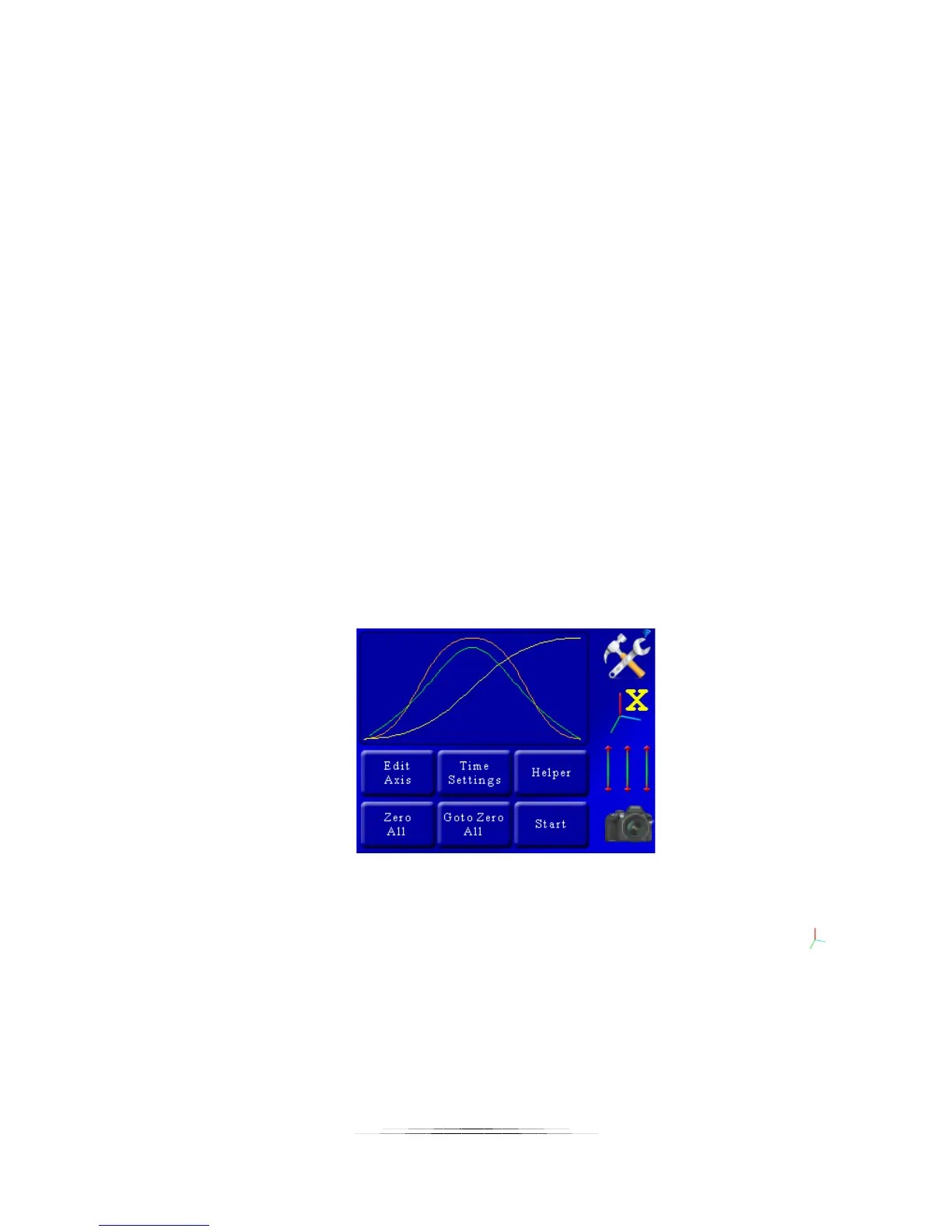
The “Home” screen for the motion modes is identical (except for Dragon Frame control). From
here you can see all three axes and the path they will follow:
Here you are presented with the standard controls along the right-hand side. There are six
buttons available:
1. Edit Axis: Edit the motion profile of the currently selected axis (indicated by the )
2. Time Settings: Change shutter, video, lead-in, lead-out settings
3. Helper: This is your friend. The “Helper” button will ask a few questions and
generate the motion profile for you.
4. Zero All: All motion starts from position zero. This button will set the current
motor positions as zero.



 To Next Page