52
6.3 Panoramic: 360
This mode is similar to the single-axis with the exception that you do not have to choose both a
start and stop position. You only have to choose where the panorama will start. Just like the
single-axis mode, the rotary table must be attached to the X-axis.
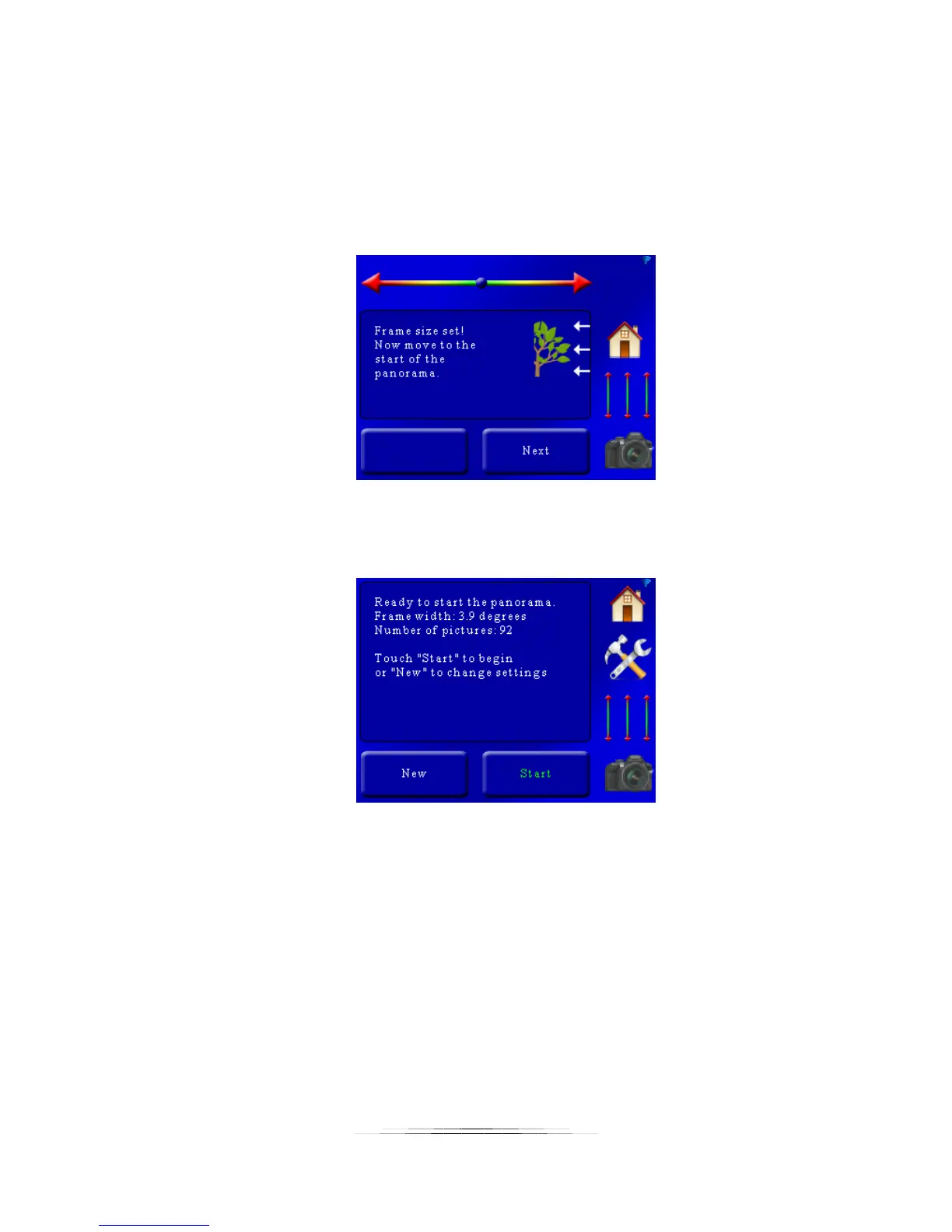
Once the field of view is set you are prompted to move to the start of the panorama:
Use the slider at the top to adjust the rotary table to the beginning of the panorama. After that
press the “Next” button. You will then see a summary:
Here the frame-width is 3.9 degrees with a total of 92 pictures. To begin the panorama press
the “Start” button. Just like the single-axis mode, a status screen will keep you informed on the
progress of the panorama.
6.4 Panoramic: Multi-Row
Multi-Row panoramic requires the use of two rotary tables attached in their Pan/Tilt system
configuration. The X-axis is set up as pan, the Y-axis as tilt (X-axis is attached to a tripod, and
the Y-axis rotary is attached to the X-axis rotary table).
Multi-Row lets you pan and tilt your way through a scene to create a giga-pixel panorama. The
process is extremely simple:



 To Next Page