62 - Socket Port Configuration DeviceMaster Installation and Configuration Guide: 2000594 Rev. F
Web Page Help System
Web Page Help System
The web page Help system is available separately for your convenience. The web page Help system contains
detailed information and configuration procedures for each mode discussed in
SocketServer Architecture on
Page 62.
The Help system for the web page is available at: http://downloads.comtrol.com/dev_mstr/rts/software/
socketserver/help/ssvr_help.zip.
To use the help system:
1. Unzip the files in a folder.
2. Open the ssvr_help.htm file.
3. Use your browser find function to locate the option or information for which are searching.
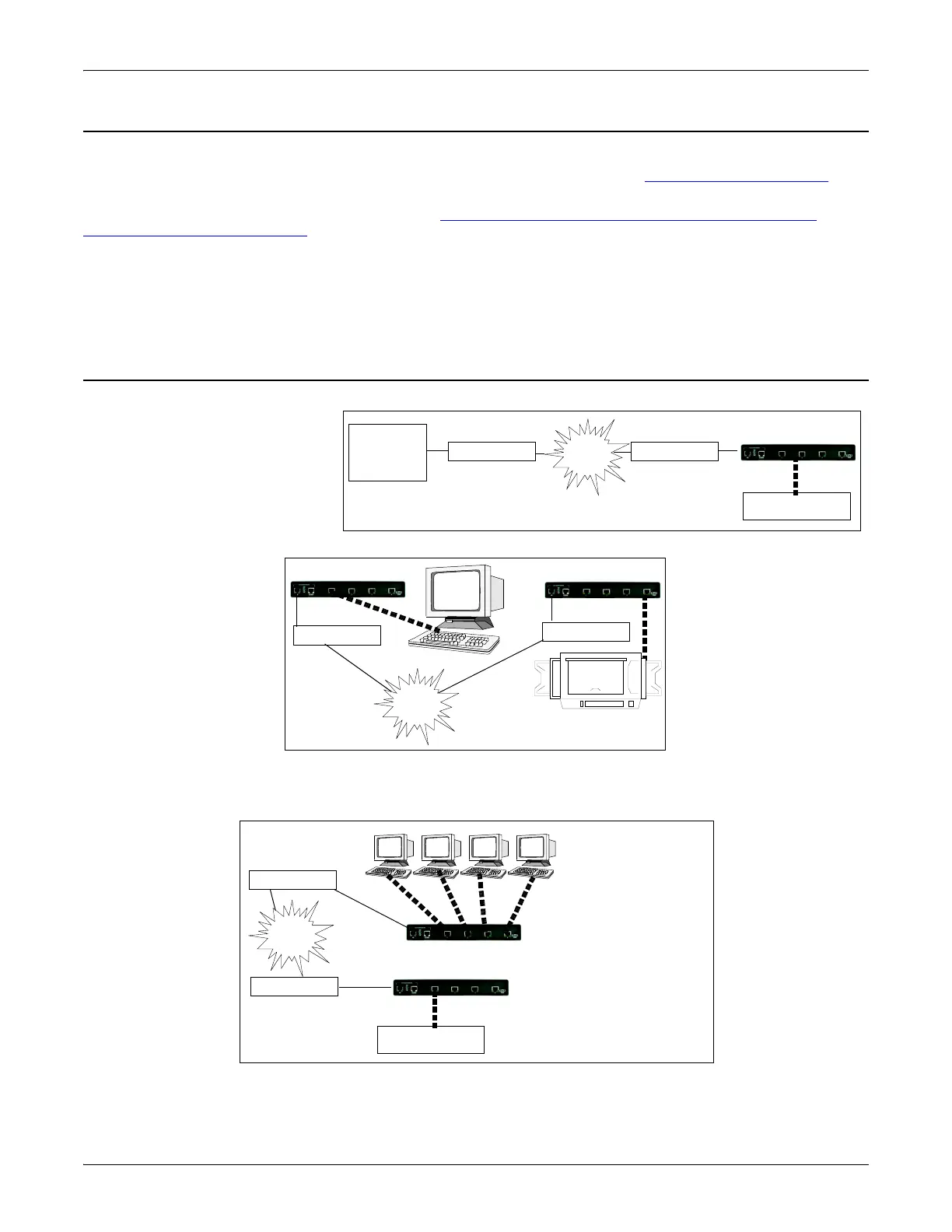
SocketServer Architecture
TCP/IP socket mode operation is
used to connect serial devices
with an application that supports
TCP/IP socket communications
addressing.
Serial tunneling mode is used to
establish a socket connection
between two DeviceMasters
through an Ethernet network.
UDP mode is designed for applications that need faster data transmission, or that make use of UDP’s
broadcast capabilities. UDP differs from TCP in that a UDP transmission does not first require a connection
to be opened before sending data and the receiving device does not issue acknowledgments to the sender.
PC or
Mainframe
LAN/WAN
Ethernet Hub
DeviceMaster
Serial Device
IP socket
application
Ethernet Hub
TCP/IP Socket Mode
DeviceMaster
DeviceMaster
Ethernet Hub
Ethernet Hub
Dumb Terminal
Printer
Serial Tunneling Mode
LAN/WAN
UDP Mode
DeviceMaster
Ethernet Hub
Ethernet Hub
LAN/WAN
1234
Serial Device
In this example, four
PCs receive data
simultaneously from one
serial device.
DeviceMaster
Serial RS-232 connections



 To Next Page