44 - Initial Configuration DeviceMaster Installation and Configuration Guide: 2000594 Rev. F
Accessing DeviceMaster Documentation from PortVision DX
Accessing DeviceMaster Documentation from PortVision DX
You can use this procedure in PortVision DX to download and open the previously downloaded documents for
the DeviceMaster. You can also check to see if you have the latest version of the documentation using
PortVision DX.
How to Download Documentation
Use this procedure to initially download a document or documents.
1. If necessary, open PortVision DX: Comtrol > PortVision DX or use the desktop
shortcut.
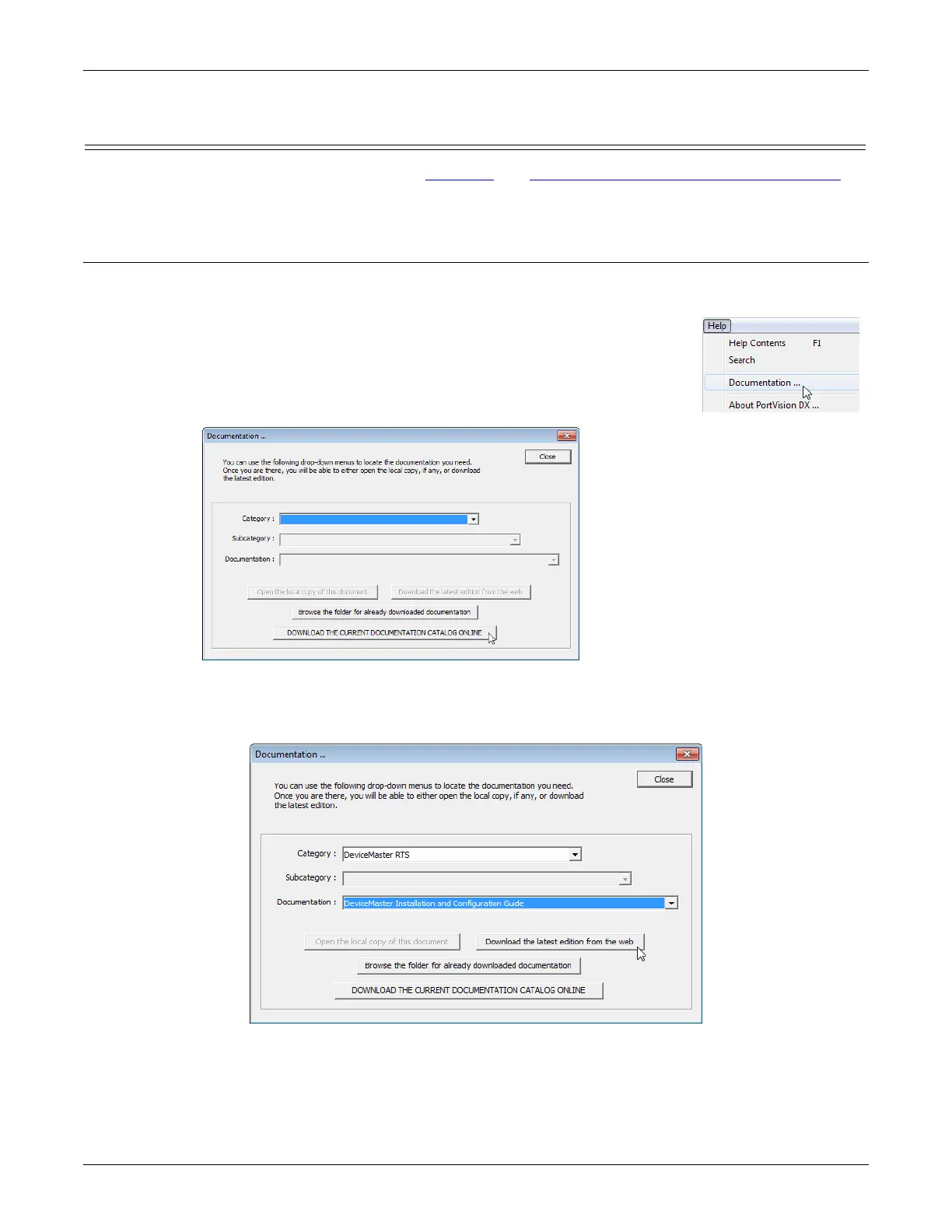
2. Click Help > Documentation.
3. Optionally, click the DOWNLOAD THE CURRENT DOCUMENTATION CATALOG
ONLINE button to make sure that the latest documentation is available to
PortVision DX.
4. Select the product Category from the drop list.
5. Select the document you want to download from the Documentation drop list.
6. Click the Download the latest edition from the web button.
Note: It may take a few minutes to download, depending on your connection speed. The document opens
automatically after it has downloaded.
7. Click Close if you have downloaded all of the documents that you wanted.



 To Next Page