DeviceMaster Installation and Configuration Guide: 2000594 Rev. F Hardware Installation - 13
Hardware Installation
Installation Overview
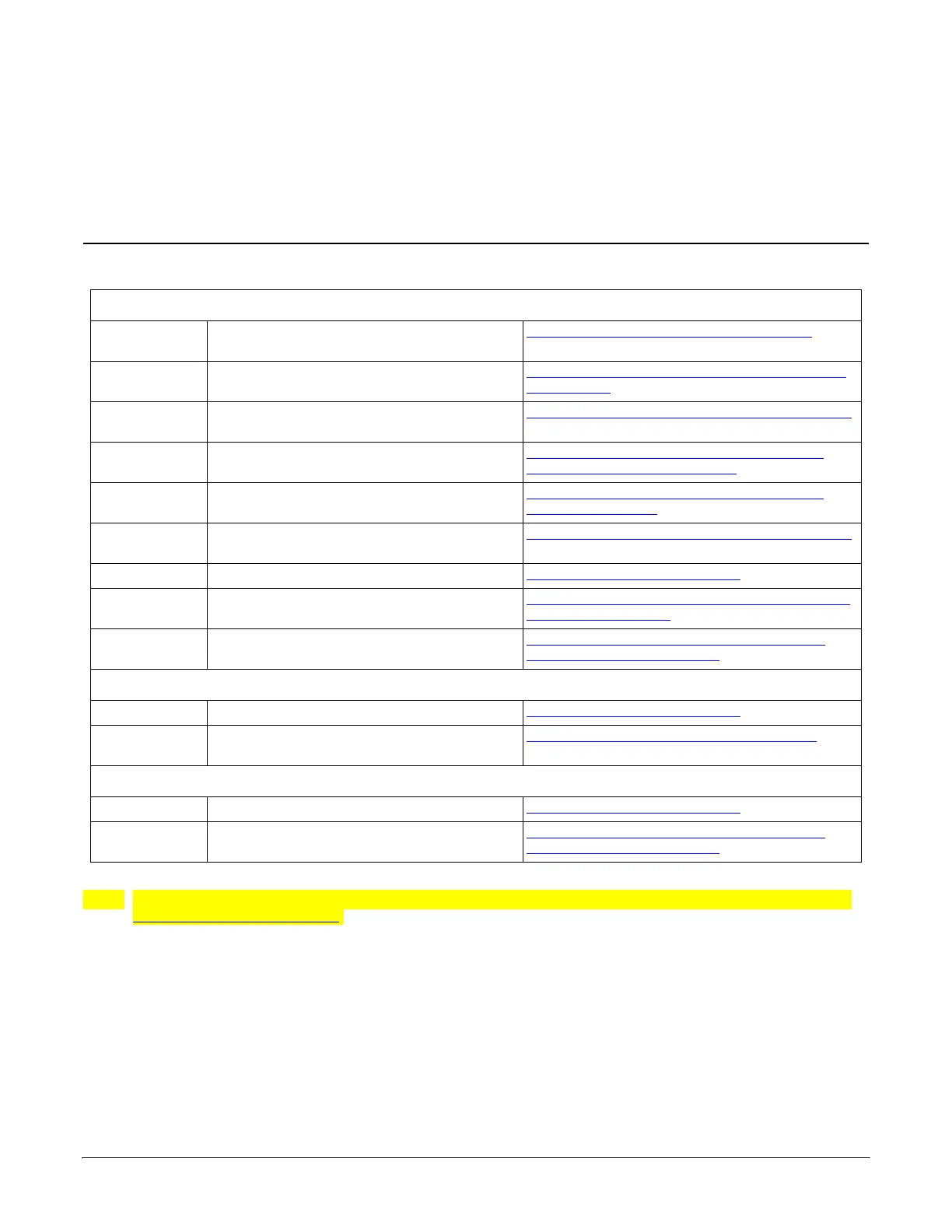
Use the links below to locate installation procedures for the following models:
Note: The DeviceMaster LT provides different RJ45 pin outs and is not discussed in this guide, refer to the
DeviceMaster LT User Guide.
DeviceMaster RTS
1-Port DB9 serial port - panel mount
1-Port - Panel Mount (DB9) Installation
on
Page 14
1-Port
DM-2201
Screw terminal serial port - DIN rail
DM-2201: 1-Port DIN Rail (Terminal Block)
Installation on Page 16
1-Port
DM-2101
DB9 serial port - DIN rail
DM-2101: 1-Port DIN Rail (DB9) Installation
on Page 17
2-Ports
DM-2202 and DM-2402
Screw terminal serial ports - DIN rail
DM-2202 and DM-2402: 2-Port DIN Rail
(Terminal Block) Installation on Page 18
2-Ports
DM-2102 and DM-2302
DB9 serial ports - DIN rail
DM-2102 and DM-2302:
2-Port DIN Rail
(DB9) Installation on Page 20
4-Ports
DM-2304
DB9 serial ports - DIN rail
DM-2304: 4-Port DIN Rail
(DB9) Installation
on Page 22
4† or 8†-Ports DB9 serial ports with dual Ethernet ports 4-Port and 8-Port Installation
on Page 23
16-Ports RJ45 serial ports with dual Ethernet ports
16-Port (DeviceMaster RTS - External Power
Supply) Installation on Page 25
16 or 32-Ports
RJ45 serial ports with a single Ethernet
port
16/32-Port Rack Mount Models (Internal
Power Supply) Installation on Page 29
DeviceMaster PRO
8†-Ports DB9 serial ports with dual Ethernet ports 4-Port and 8-Port Installation
on Page 23
16-Ports RJ45 serial ports with dual Ethernet ports
16-Port (DeviceMaster PRO) Installation
on
Page 27
DeviceMaster Serial Hub
8-Ports DB9 serial ports with dual Ethernet ports 4-Port and 8-Port Installation
on Page 23
16-Ports
DB9 serial ports with a single Ethernet
port
16/32-Port Rack Mount Models (Internal
Power Supply) Installation on Page 29
† The DeviceMaster RTS 4 and 8-port models may also include DB9 to RJ45 adapters.



 To Next Page