DeviceMaster Installation and Configuration Guide: 2000594 Rev. F Troubleshooting and Technical Support - 151
Troubleshooting and Technical Support
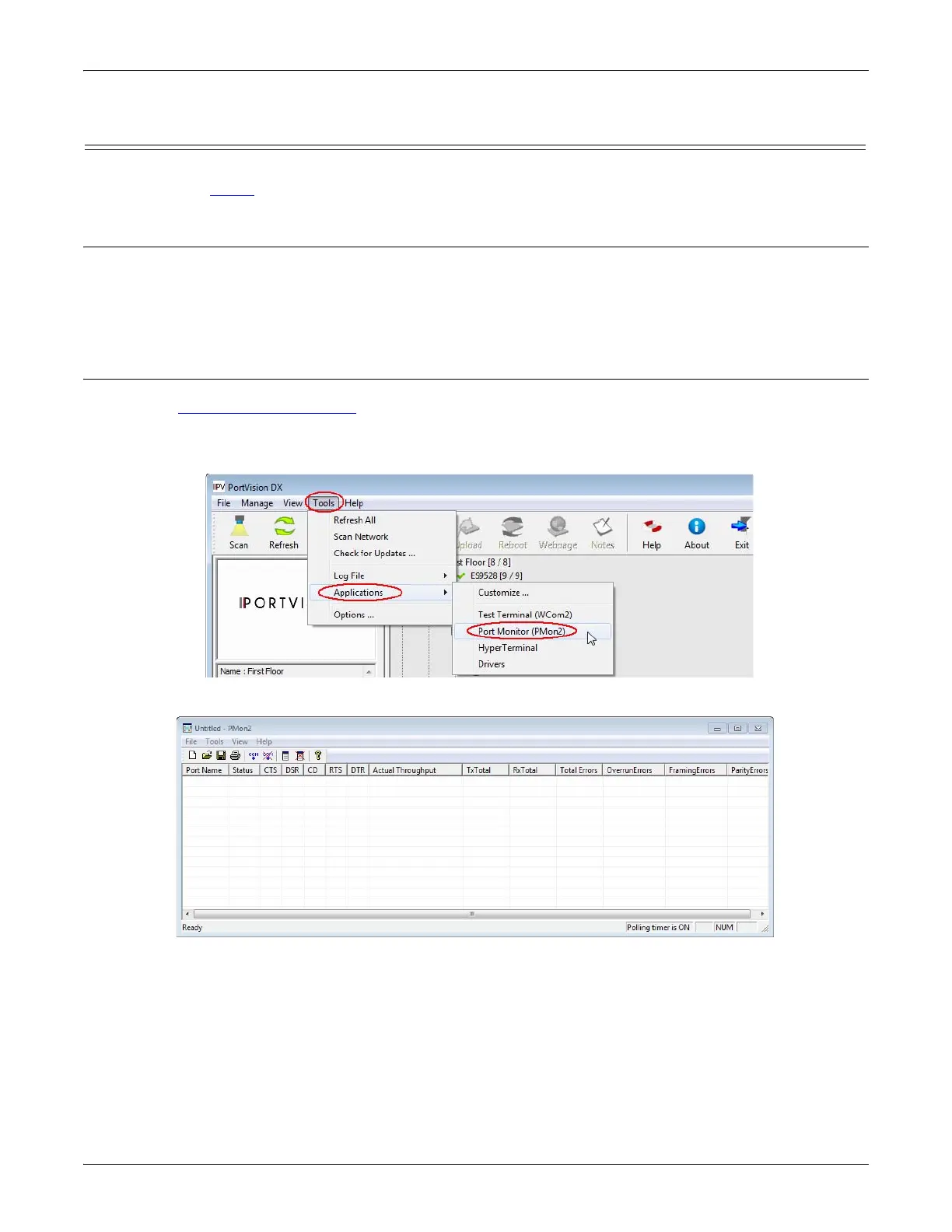
Testing Ports Using Port Monitor (PMon2)
You can use this subsection to test the DeviceMaster driver installation. If you need to install the device
driver, locate the latest
driver and driver installation documentation.
Overview
This procedure will check whether the DeviceMaster can:
• Communicate through the Comtrol device driver
• Determine if a port is open with an application
Testing Comtrol COM Ports
If necessary, Installing PortVision DX on Page 35 to install PortVision DX, which contains Port Monitor.
1. Start PortVision DX from the Start menu, select Comtrol > PortVision DX or click the desktop shortcut.
2. Select Tools > Applications > Port Monitor (PMon2).
3. Click Add Ports using the icon or Tools > Add Ports,



 To Next Page