74
8.4 Replacing the backup battery on the control board of the
Condair CP3 Pro
1. Set the Condair CP3 out of operation as described in chapter 6.4, disconnect it from the
mains and secure the unit against inadvertent power-up.
2. Undothetwoscrewsofthefrontcover,thenremovethefrontcover.
CAUTION!
The electronic components
insidethehumidierarevery sensitive to electrostatic discharge.
Beforecarryingoutthenextstep,appropriatemeasures must be taken to protect the electronic
components against damage caused by electrostatic discharge (ESD protection).
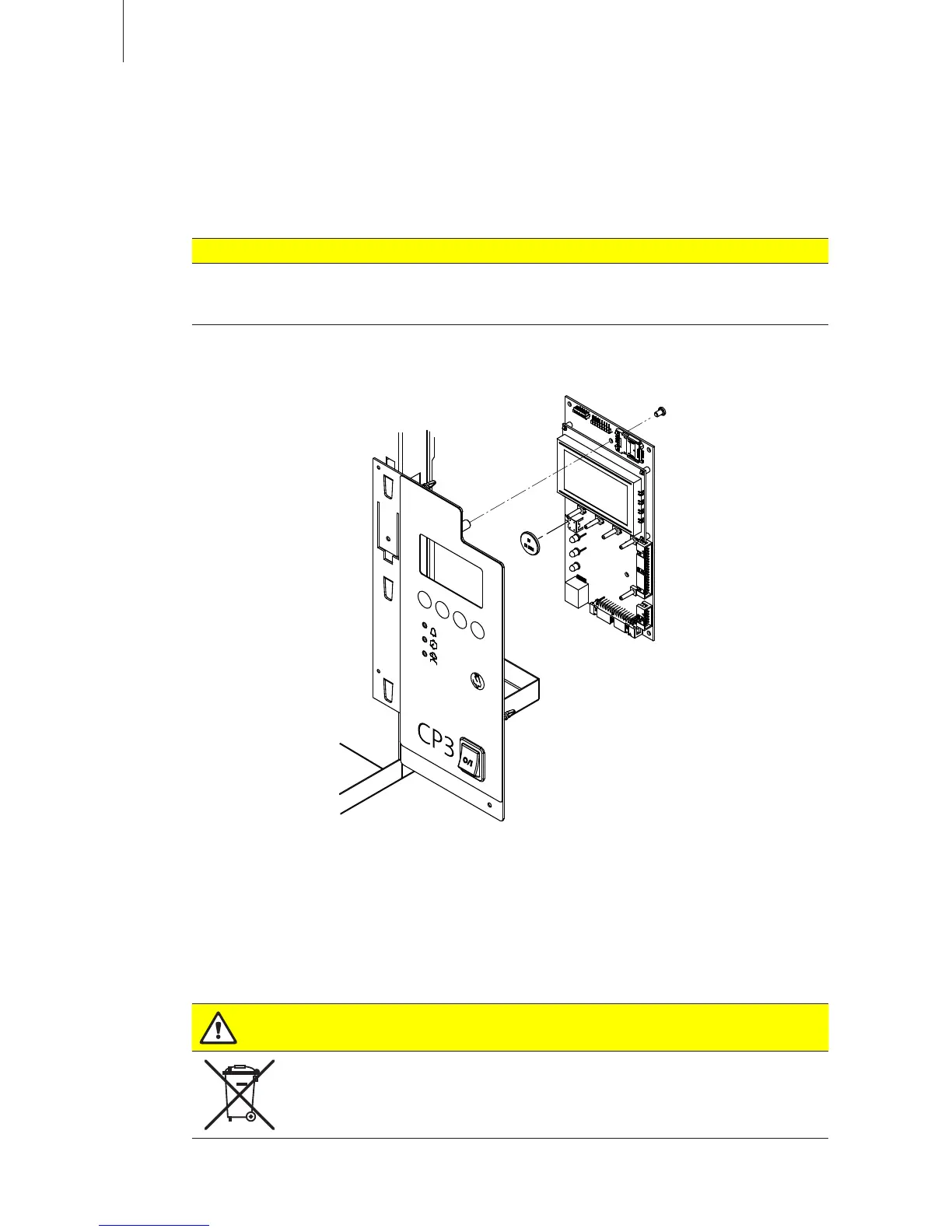
3. Carefullylift-offthedisplayandcontrolunitfromthehousingframe,swivelit90°totheleft,then
xittotheunitframeagain.
4. Undothefasteningscrewofthecontrolboard,thencarefullypull-offthecontrolboardfromthe
control unit assembly.
5. Replacethebackupbattery(CR2032,Lithium3V).
6. Reassemble the unit in reverse order.
7. Ifnecessarysetdateandtime(seechapter6.7.11and6.7.12).
WARNING!
Environmental hazard!
Theoldbatterymustbereturnedtoanauthorisedcollectingpointforcorrectdisposal/
recycling in accordance with local regulations. In no case the old battery must be
disposedofinthedomesticwasteorintotheenvironment.












 To Next Page