Scanning 37
Positioning originals
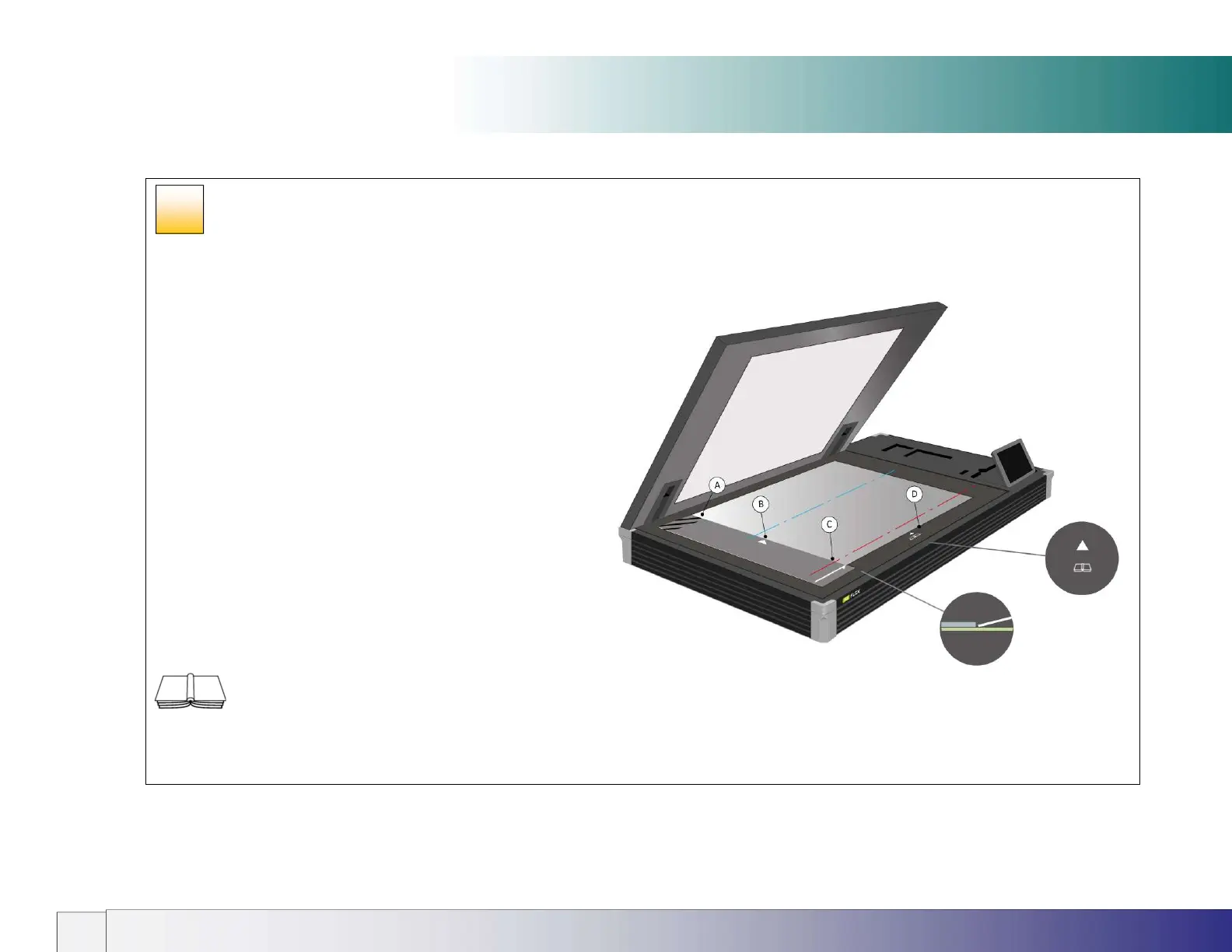
Alignment positions
Position A – Oversize scanning (Wizard enabled two-stage
scanning). Use this position to scan documents positioned long-
edge against the ruler. Accepts documents up to 841mm long by
594mm wide (A1). Requires the Nextimage software option. See
separate section for more details.
Position B – Centered (Normal) scanning with automatic size
detection. Use this position to have the size of the document
detected automatically. Place the center line of the document in line
with the white triangle on the ruler. Alternatively select a standard
size from pull-down menu or enter the dimensions manually (as
above).
Position C – Corner (Normal) scanning with non-automatic sizing.
Select the size from the paper list or enter the dimensions manually.
Align the document edges against the raised ruler guide at the left
side of the scanner glass and the long white arrowed line on the
guide. Requires the Nextimage software option.
Position D – Book scanning. Place the book on the
glass with the book spine in line with the book icon and the long
white line arrowed line on the guide.
29













 To Next Page