Product Manual — Doc. 9349B Crestron Zūm® Wired Solutions • 245
Sunrise/Sunset Schedule
The ZUM-HUB4 determines sunrise and sunset based on the location set in Location on page 256
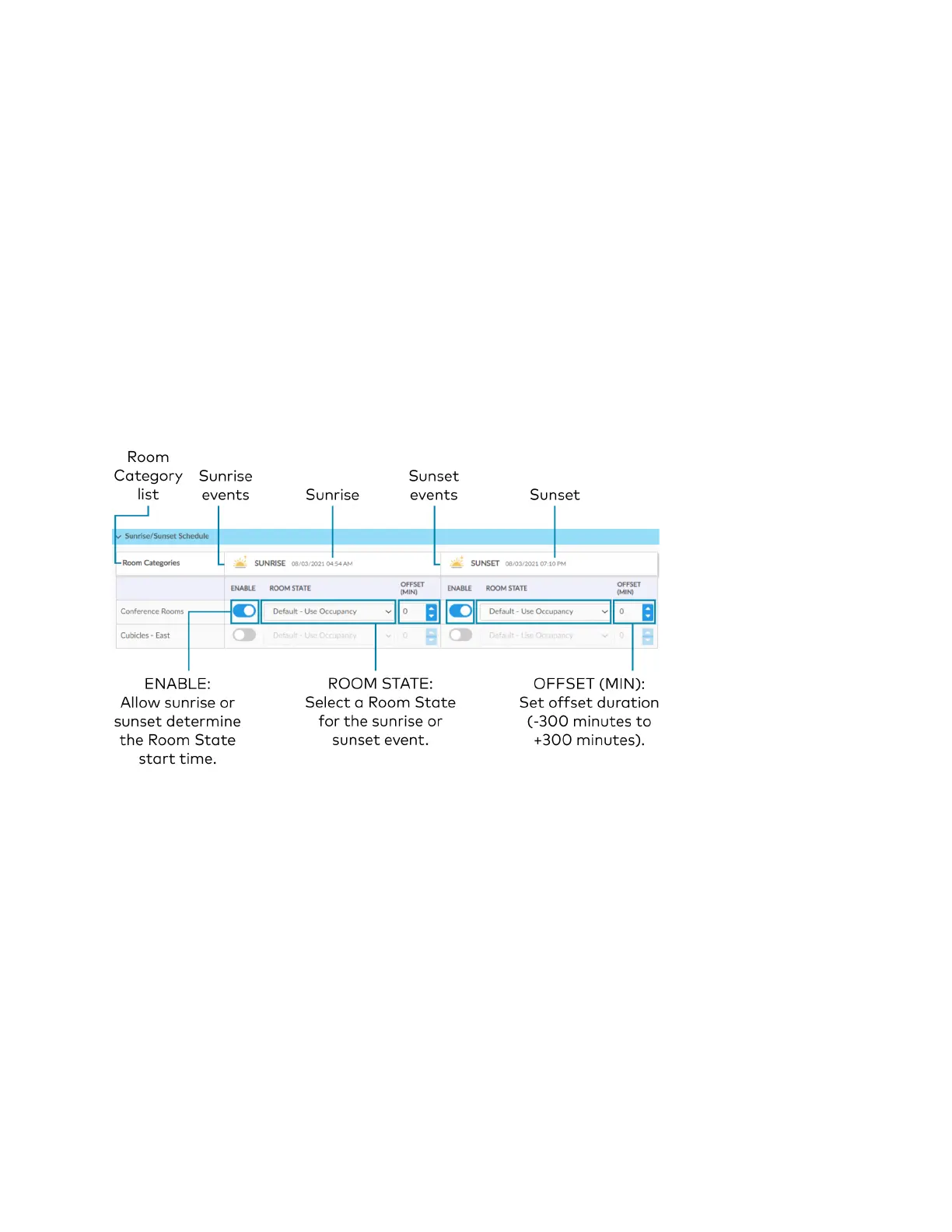
settings. The Sunrise/Sunset Schedule assigns a Room State to a Room Category based on the
Day Pattern and the sunrise or sunset. Only one Sunrise event and one Sunset event can be set
for a Room Category per day. To assign Room States based on the sunrise or sunset:
1. Expand the Sunrise/Sunset Schedule menu.
2. Locate the Room Category.
3. Adjust the settings in the Sunrise events column and/or the Sunset events column.
l
ENABLE: Click the ENABLE toggle to allow sunrise or sunset to trigger an event.
l
ROOMSTATE: Select the a Room State from the drop-down menu.
l
OFFSET (MIN): If necessary, set an offset duration in minutes. The offset can be
positive so the Room State occurs after sunrise or sunset or negative so that the
Room State occurs before sunrise or sunset.


 To Next Page