220 Network
1. Press (Fax).
2. Load your document.
3. To change the fax-sending settings, Press p or q to display the Setup Send option, and then press OK.
When you have finished changing settings, press OK.
4. Select a Speed Dial or One Touch number.
5. Press Start.
The machine starts scanning. After the document is scanned, it is transmitted to the recipient via your SMTP
server. You can cancel the send operation by pressing Cancel during scanning. When the transmission is
finished, the machine will enter standby mode.
How Your Dell Machine Receives an Email or I-Fax
Related Models:Dell E515dn / Dell E515dw
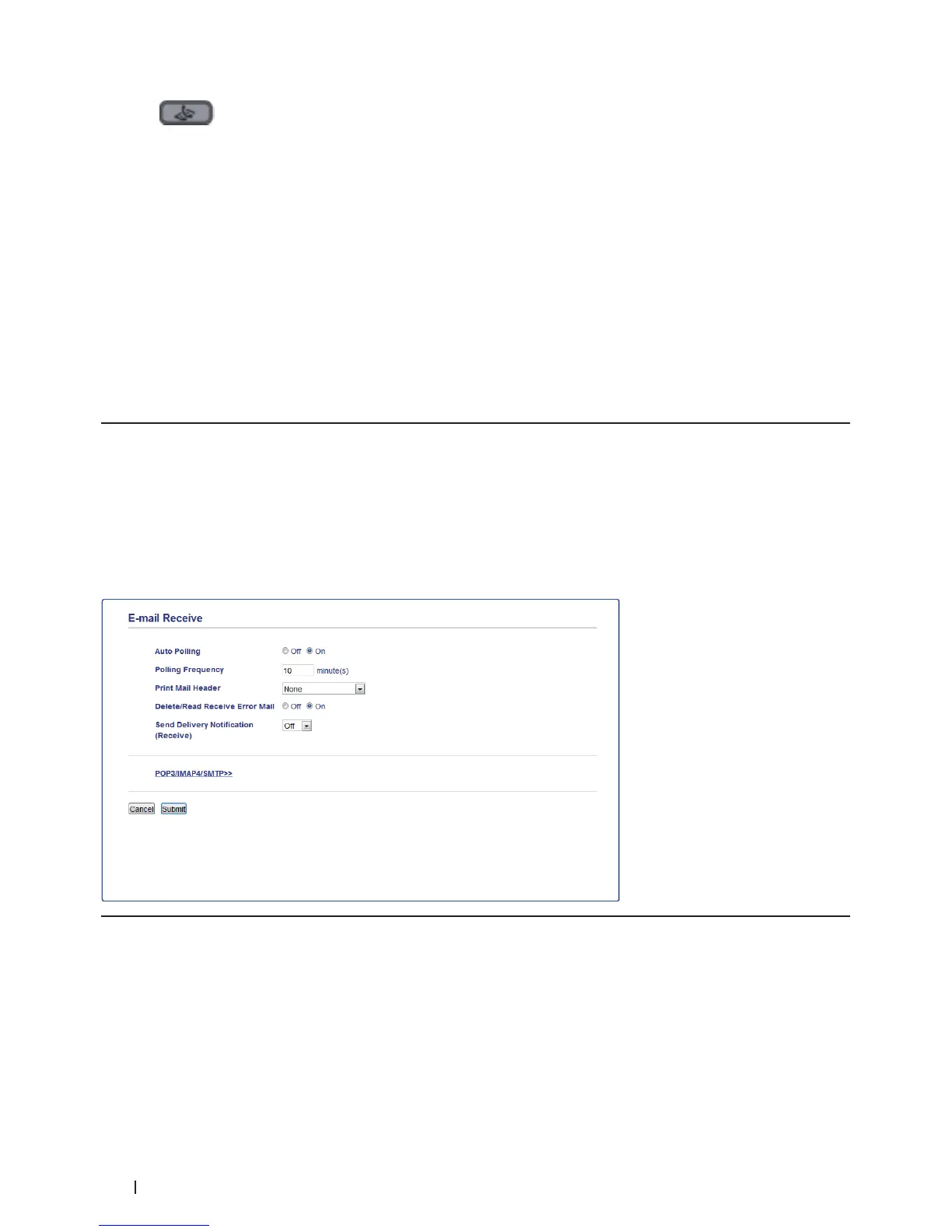
When your Dell machine receives an incoming I-Fax, it will print the I-Fax automatically. To receive an I-Fax, we
recommend using the control panel or Web Based Management to configure the following optional items:
• Auto Polling
• Polling Frequency
• Print Mail Header
• Delete/Read Receive Error Mail
• Send Delivery Notification (Receive)
There are two ways you can receive email messages:
• POP3/IMAP4 receiving at regular intervals
• POP3/IMAP4 receiving, manually initiated
When using POP3/IMAP4 receiving, the machine polls your email server to receive data. Polling can occur at
set intervals (for example, you can configure the machine to poll the email server every ten minutes) or you can
manually poll the server.










 To Next Page