46 Paper Handling
Document Sizes Supported
Length: 5.8 in. to 14.0 in. (147.3 to 355.6 mm)
Width: 5.8 in. to 8.5 in. (147.3 to 215.9 mm)
Weight: 17 to 24 lb (64 to 90 g/m
2
)
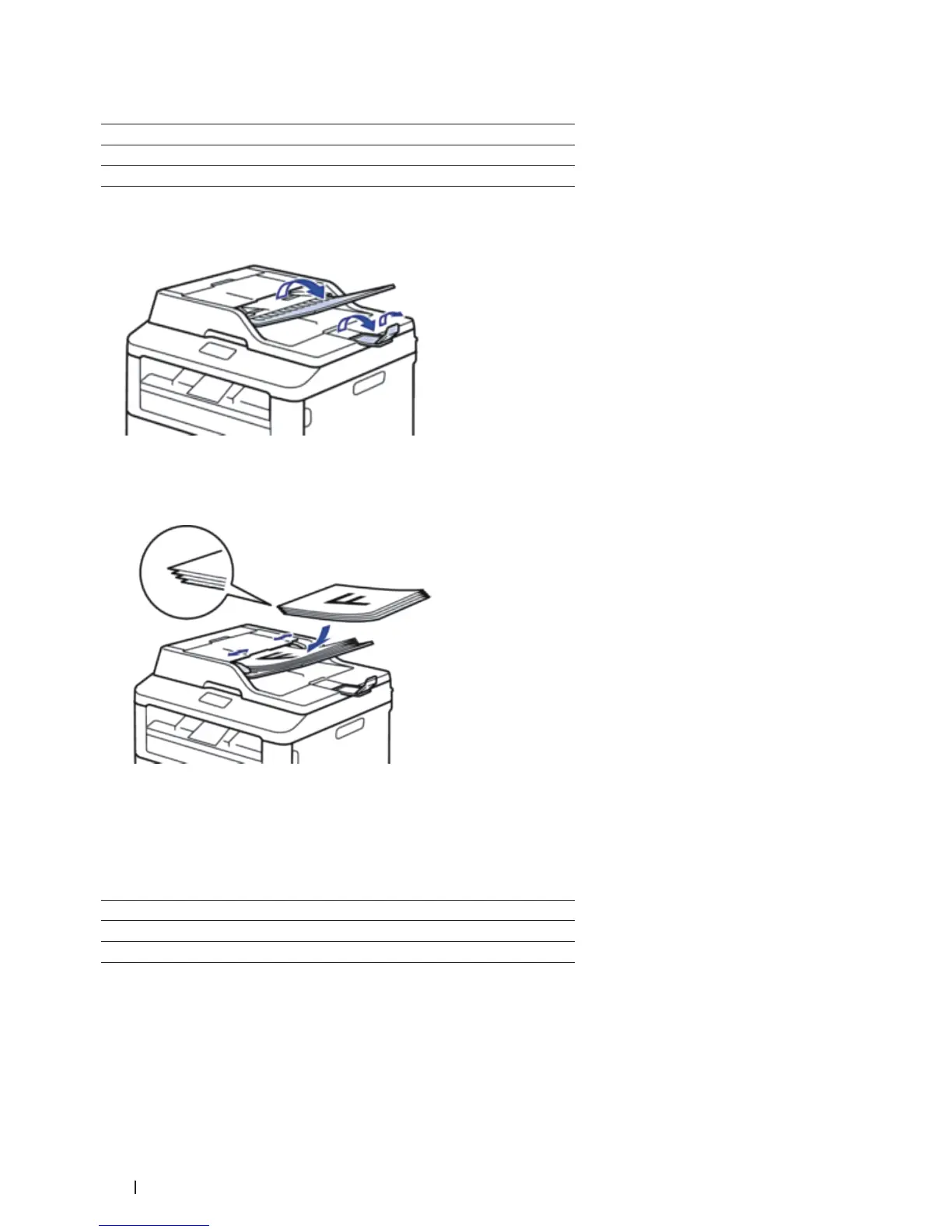
1. Unfold the ADF document support.
Lift and unfold the ADF document output support flap.
2. Fan the pages well.
3. Stagger the pages of your document and load it
face up
and
top edge first
, into the ADF as shown in the
illustration.
4. Adjust the paper guides to fit the width of your document.
Load Documents on the Scanner Glass
Use the scanner glass to fax, copy, or scan one page at a time.
Document Sizes Supported
Length: Up to 11.8 in. (300.0 mm)
Width: Up to 8.5 in. (215.9 mm)
Weight: Up to 4.4 lb (2.0 kg)
NOTE: To use the scanner glass, the ADF must be empty.
1. Lift the document cover.
2. Place the document on the scanner glass
face down
.










 To Next Page