SEVEN PLUS User’s Guide | 21
1.4 TRANSMITTER OVERVIEW
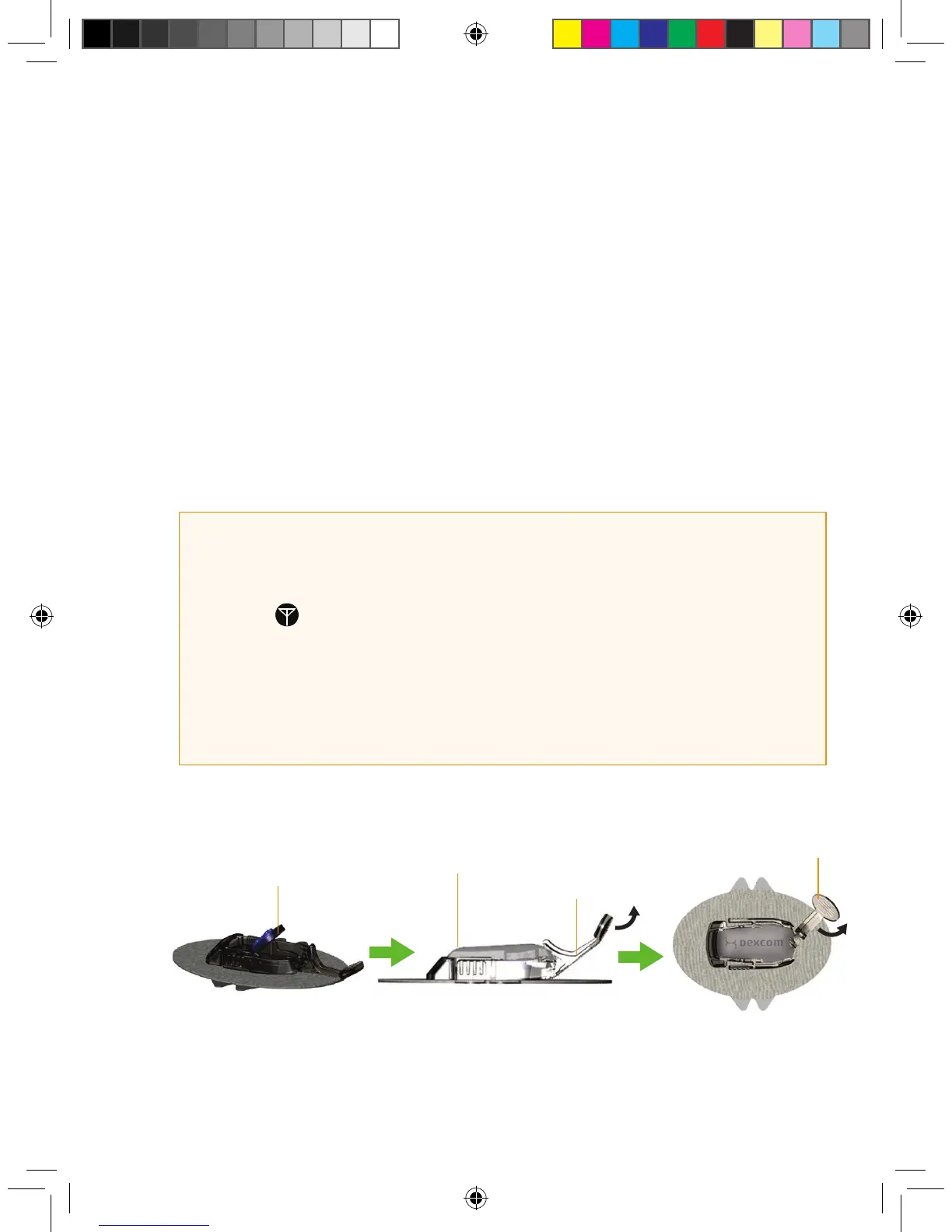
The Transmitter wirelessly sends your glucose information from the Sensor to the Receiver. Once
you insert the Sensor, you will snap the Transmitter into the Sensor Pod using the Transmitter
Latch. The same Transmitter is used when you change Sensors.
As the Transmitter nears the end of its battery life, it can sometimes lose communication with the
Receiver. This can happen even if the Receiver and Transmitter are within 5 feet (1.5 m) of each
other. Once the Transmitter battery has drained, you will need to replace the Transmitter because
it can no longer communicate (talk) to the Receiver. You can easily set up a new Transmitter
to talk with your Receiver (see Chapter 2, Section 2.2.2, “Setting your Transmitter ID”).
HELPFUL HINTS:
• Your Transmitter is re-used for many Sensor uses (1-year warranty).
• If you see in place of a glucose reading: This can happen even when your
Transmitter and Receiver are within 5 feet of each other. Contact Technical Support at
1-888-SEVENGO (738-3646) to determine if you need to purchase a new Transmitter.
• The Receiver and Transmitter are designed and tested to withstand common
electromagnetic interference, including airport security systems.
Install Transmitter
in Sensor Pod
Transmitter Installed
Transmitter Latch
Remove
Transmitter Latch



 To Next Page