SEVEN PLUS User’s Guide | 75
5.4 GLUCOSE STATUS
5.4.1 GLUCOSE STATUS BOX SYMBOLS
During your Sensor Session the Status Box in the upper right hand corner can display any of the
information below.
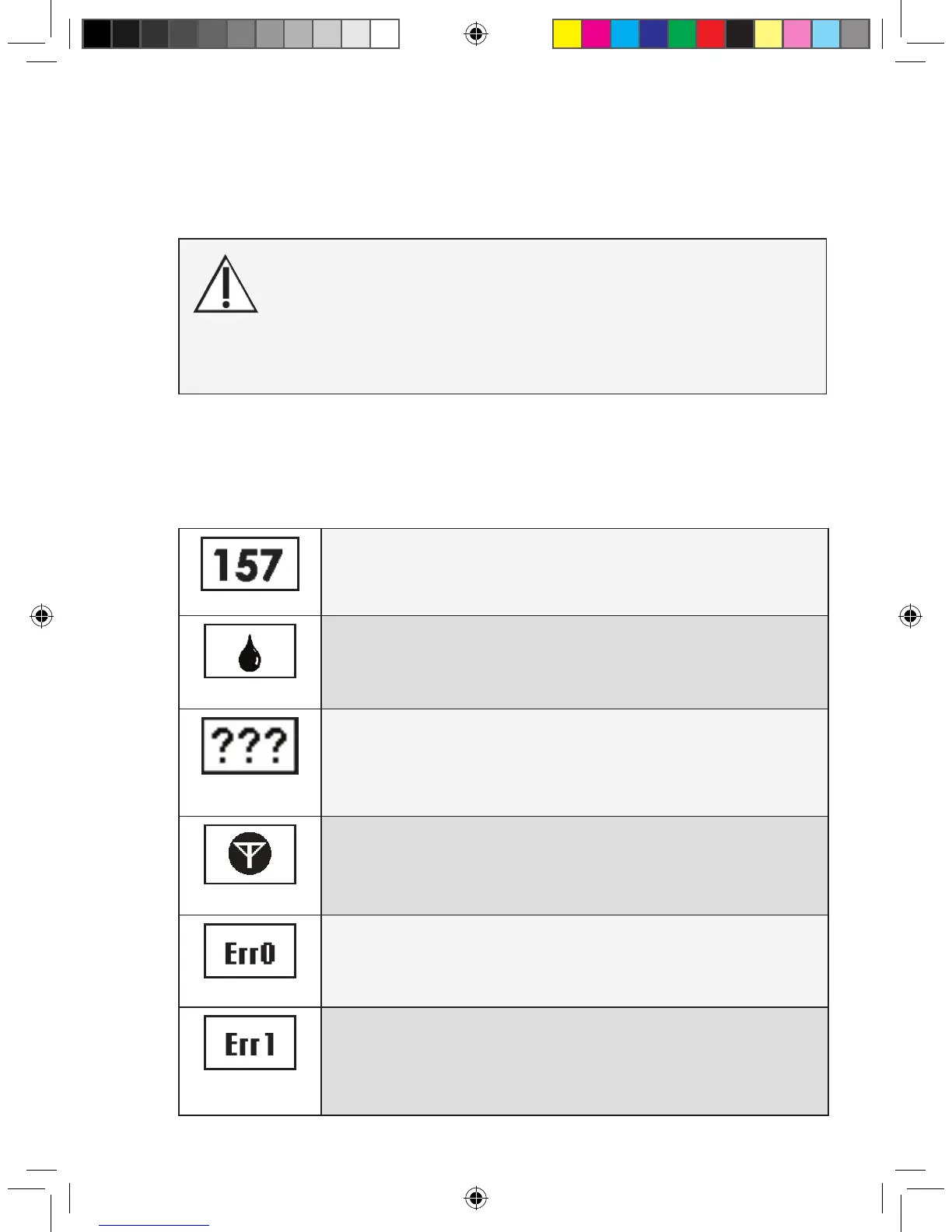
Glucose Reading
Once the Receiver is calibrated, your glucose readings will appear in the
Status Box in mg/dL units. Your glucose readings are updated every 5
minutes.
Calibration Needed
A blood drop tells you your System requires another ngerstick reading
entry. You might be due for your 12-hour calibration or the Receiver might
need an additional ngerstick to improve
its calibration. (See Section 4.4)
Glucose Reading
Error
Three question marks mean the Receiver cannot understand the Sensor
signal. You should wait for more prompts and do not enter any ngersticks
when you see this symbol.
(See Section 5.4.3)
RF Error
A white antenna in a black circle, means the Transmitter and Receiver are
out of range. Make sure the Receiver and
Transmitter are within 5 feet of each other. (See Section 5.4.4).
Sensor Error #0
Means the Sensor cannot calibrate right now. If you see this screen, enter
at least 1 more calibration ngerstick reading in the next 10-15 minutes. If
the Sensor still cannot calibrate after this additional ngerstick, the Sensor
needs to be replaced. (See Section 8.4)
Sensor Error #1
Means the Sensor is not calibrating properly. If you see this screen, wait
about one hour and then enter at least 1 more ngerstick reading. If no
readings display on the Receiver after this additional ngerstick, the Sen-
sor needs to be replaced. (See Section 8.4)
This device is not designed to replace a blood glucose meter.
During Missing Glucose Information, rely on your blood glucose
meter.
Symptoms related to low or high blood glucose levels should
not be ignored. If you have symptoms of low or high glucose
conrm them using your blood glucose meter.



 To Next Page