SEVEN PLUS User’s Guide | 53
•
If the correct Transmitter ID has been entered into your Receiver and the Receiver and Trans-
mitter are still not talking, then contact DexCom Technical Support for further help at 1-888-SE-
VENGO (738-3646).
3.8 BEGINNING A SENSOR SESSION
After you have checked that your Transmitter and Receiver are talking, you need to tell the
Receiver that you have inserted a new Sensor.
To tell the Receiver that you have inserted a new Sensor, follow the steps below.
1. Press any button to turn on the Receiver.
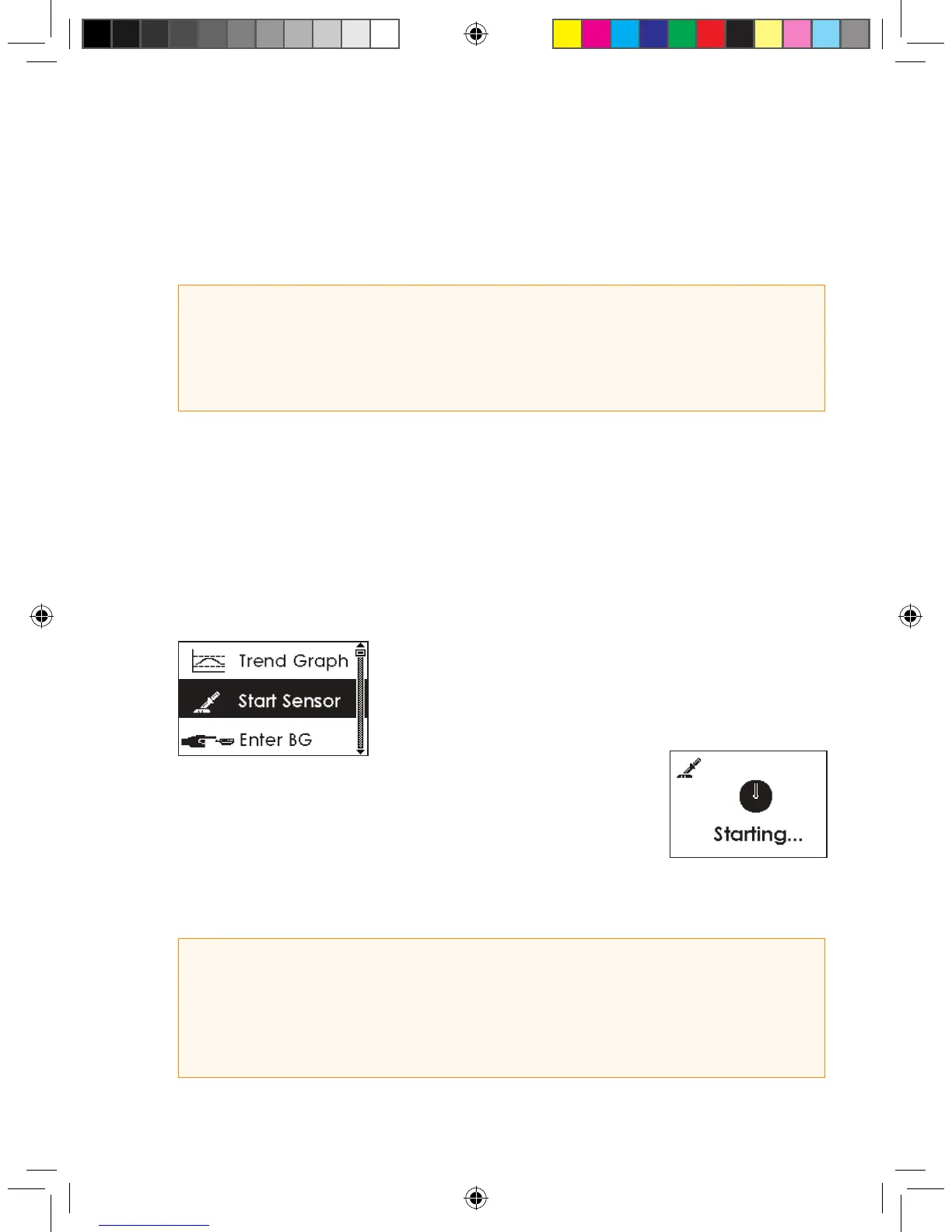
2. From any Trend Graph, press the OK button to reach the Menu Screens.
3. Use the Up p and Down q Arrows to scroll until you high-
light “Start Sensor.”
4. Press the OK button to conrm the start of a new Sensor, and you
will see this screen:
5. Your Receiver will return to the 3-Hour Trend Graph.
6. Your 2-hour Start Up period has begun.
HELPFUL HINTS:
The Transmitter and Receiver may lose communication at the following times:
• When they are near metallic objects
• While you are lying on a waterbed
• When you are using an electric blanket
HELPFUL HINT
• The Start Sensor Menu option will now disappear from the menu. The option will only appear again if
an active continuous glucose monitoring session ends.
• Each time you insert a new Sensor and press “OK” on the Start Sensor Screen, you will restart the
2-hour Start-Up period.



 To Next Page