WINAQMS MINI DAS User manual 1.0 Introduction
3
1.4 WinAQMS Mini DAS Architecture
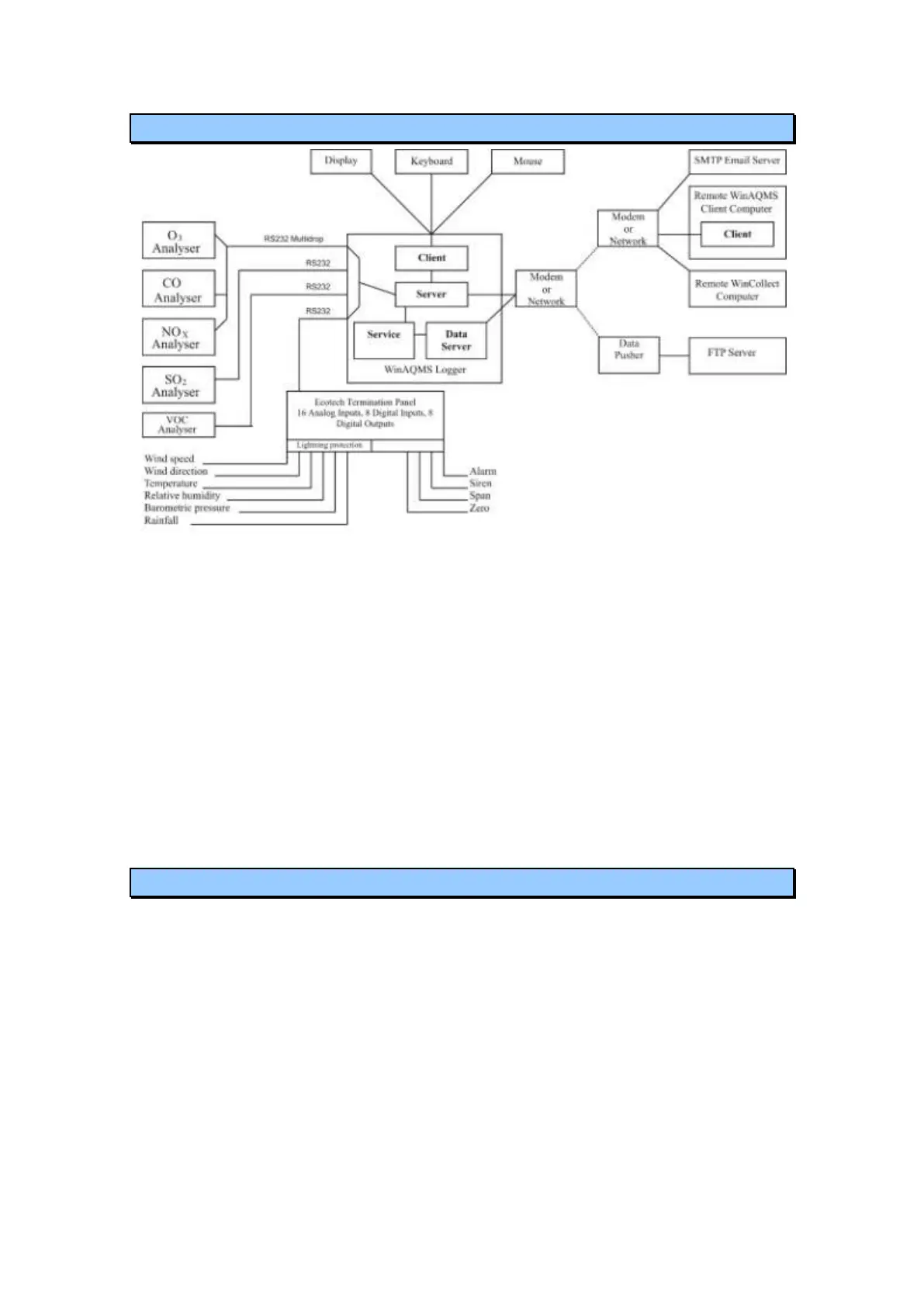
Figure 3 The WinAQMS Mini DAS architecture
WinAQMS Mini DAS has been designed as a client/server program. This means that
WinAQMS Mini DAS has two parts: the client and the server. The server handles all
the communication between the DAS and the analysers, recording of data and
starting/stopping of calibrations. The client is concerned with giving the user access to
settings and data. On its own the server has no user interface and there is no way you
can interact with it using the mouse or keyboard. The client is the visual interface of
WinAQMS and communicates with the server by requesting information or receiving
information that it has asked for at a prior time. This arrangement means that the
WinAQMS server must always be turned on before the WinAQMS client program
can connect to it.
1.5 WinAQMS Mini DAS agent
The WinAQMS agent allows the user to activate or deactivate individual components
of WinAQMS Mini DAS. The current status of each component is shown across the
top, underneath each component heading. The agent works on a simple start/stop
method where pushing the button underneath the status will either turn on (green
arrow) or turn off (red square) that program.



 To Next Page