Edit Menu WinAQMS Mini DAS User manual 1.0
42
Telnet Settings
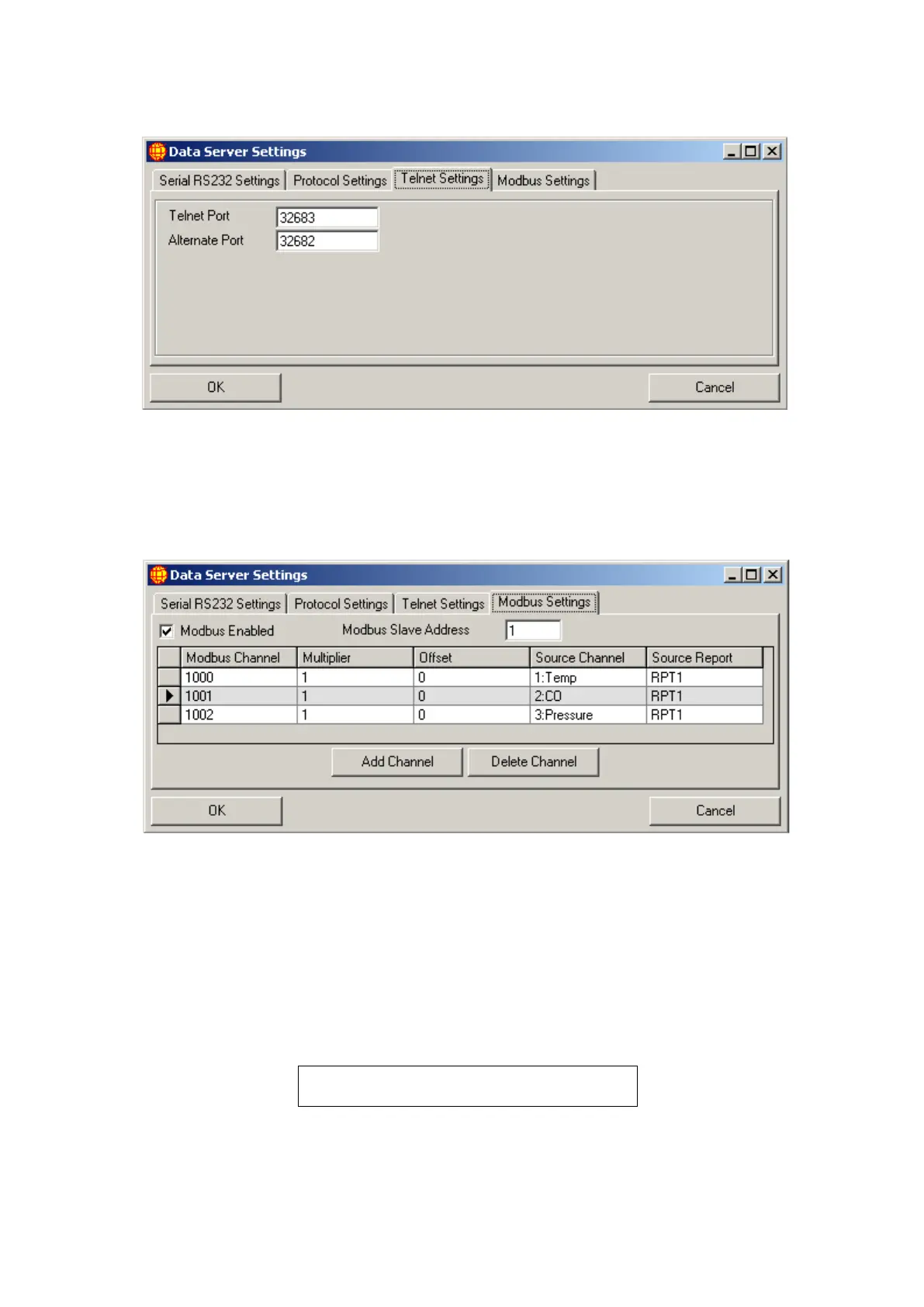
Figure 46 Telnet Settings
The Telnet Settings tab sets the Port number which the data server will listen to for an
incoming connection. The First Telnet port is set to the default of 32683 where it
listens for valid data requests. The alternative port is set to a port number that the data
server will also listen to for valid data requests.
Modbus Settings
Figure 47 Modbus Settings
The Modbus settings tab allows the Modbus protocol to be enabled. The Modbus
protocol is an alternative protocol for the request and transfer of data. WinAQMS
Mini DAS acts as a slave to the requesting program and must have a unique slave
number to respond to appropriate requests for data. Modbus channels are different to
those in WinAQMS Mini DAS and within this window the Modbus channels can be
linked to their equivalent WinAQMS Mini DAS channels. Channels can be created
and deleted by using the two buttons near the bottom of the tab, the information sent
from WinAQMS Mini DAS can be transformed using the multiplier and offset fields,
and the data sent is specified to a certain report period.
Note: Leaving Multiplier as 1 and Offset as 0
will not perform any transformation to data.



 To Next Page