Patient Monitor User Manual Monitoring NIBP
- 92 -
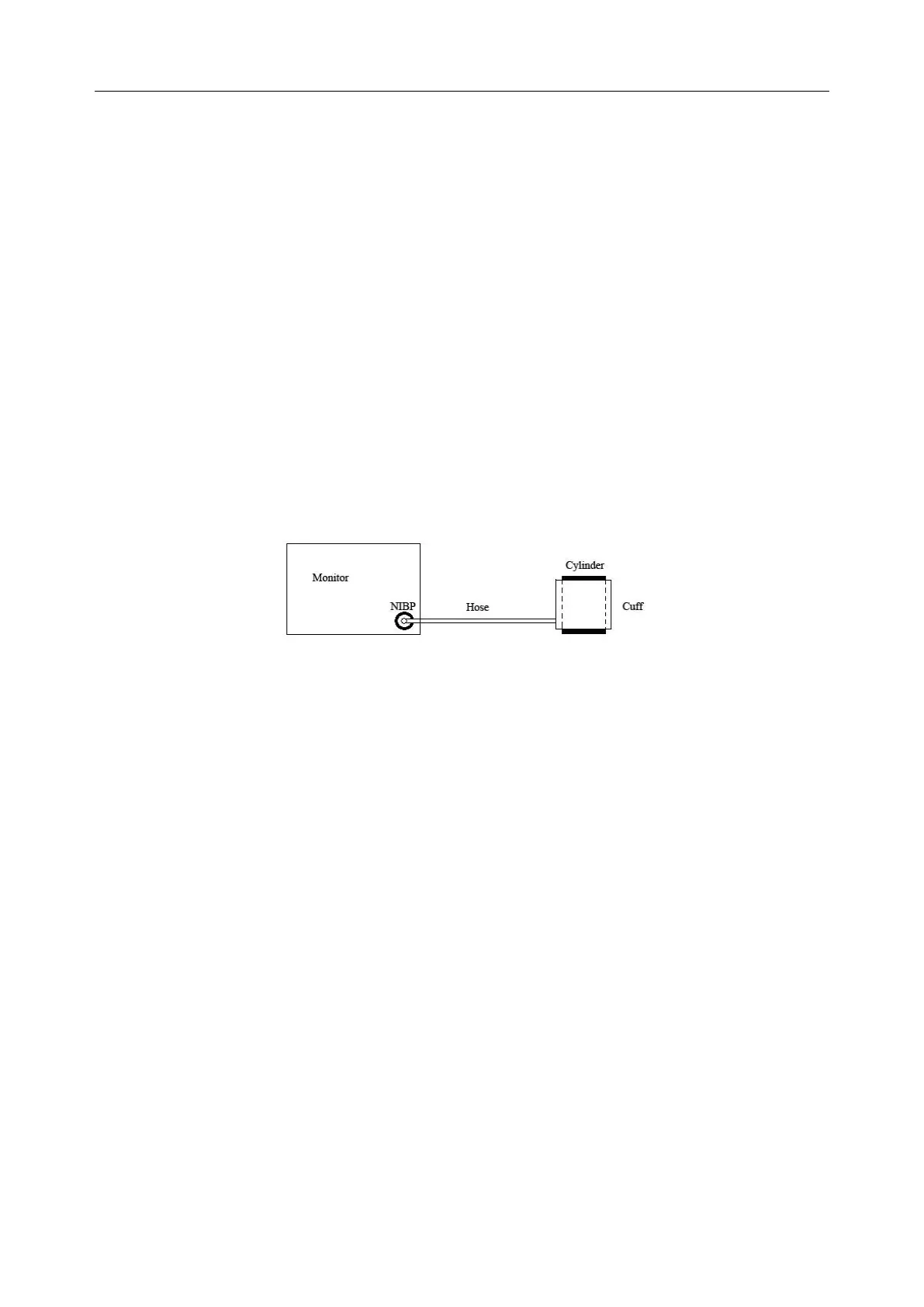
2. Wrap the cuff around the cylinder of an appropriate size, don’t wrap the cuff around limbs.
3. Make sure the patient type has been set to Adult.
4. Access User Maintain > NIBP Maintain.
5. Select Leakage Test. Then the prompt Leak. Test Running will appear indicating that the
system has started the leakage test.
The system will automatically inflate the pneumatic system to about 180 mmHg. After 20
seconds to 40 seconds, if system leakage has detected, the system will automatically open the
deflating valve to stop the leak test and indicates NIBP Leak. If no system leakage is detected
when the pneumatic system is inflated to 180 mmHg, the system will perform a deflation to an
approximate value of 40 mmHg and subsequently perform the second phase leak test. After 20
seconds to 40 seconds, the system will automatically open the deflating valve and provide
corresponding indication based on the test result.
6. If the alarm information NIBP Leak appears, it indicates that the airway may have air leaks.
In this case, the user should check for loose connection. After confirming secure connections,
the user should re-perform the leakage test. If the failure prompt still appears, please contact
the manufacturer for repair.
Diagram of NIBP Air Leakage Test
12.10 Setting Inflation Mode
To change the inflation mode:
1. Select NIBP Setup > Inflation Mode;
2. Choose Manual or AUTO from the pull-down list.
If Manual is chosen, the preset value by users will be adopted as the inflation value when
measuring blood pressure.
If AUTO is chosen, the default value will be adopted as the inflation value when
measuring blood pressure.
12.11 Cleaning Mode
To start the cleaning mode, please select User Maintain > NIBP Maintain > Cleaning Mode,
click Start Cleaning button, at this time the monitor displays: Make sure the cuff has been
removed from the monitor. After the user’s confirmation, cleaning mode starts. The cleaning
mode lasts three minutes. In this mode, the monitor displays Cleaning in progress, the remaining
time of cleaning mode and cuff value are also displayed. When the counting down finishes, the
monitor exits cleaning mode automatically, if the user needs to exit the cleaning mode in advance,
please click Stop button.
When the air pressure is abnormal, the monitor will automatically turn off the cleaning mode and
display the prompt message: Cleaning failed.
NOTE: Cleaning mode is only available when the patient type is adult.



 To Next Page