10│en Introduction to the system
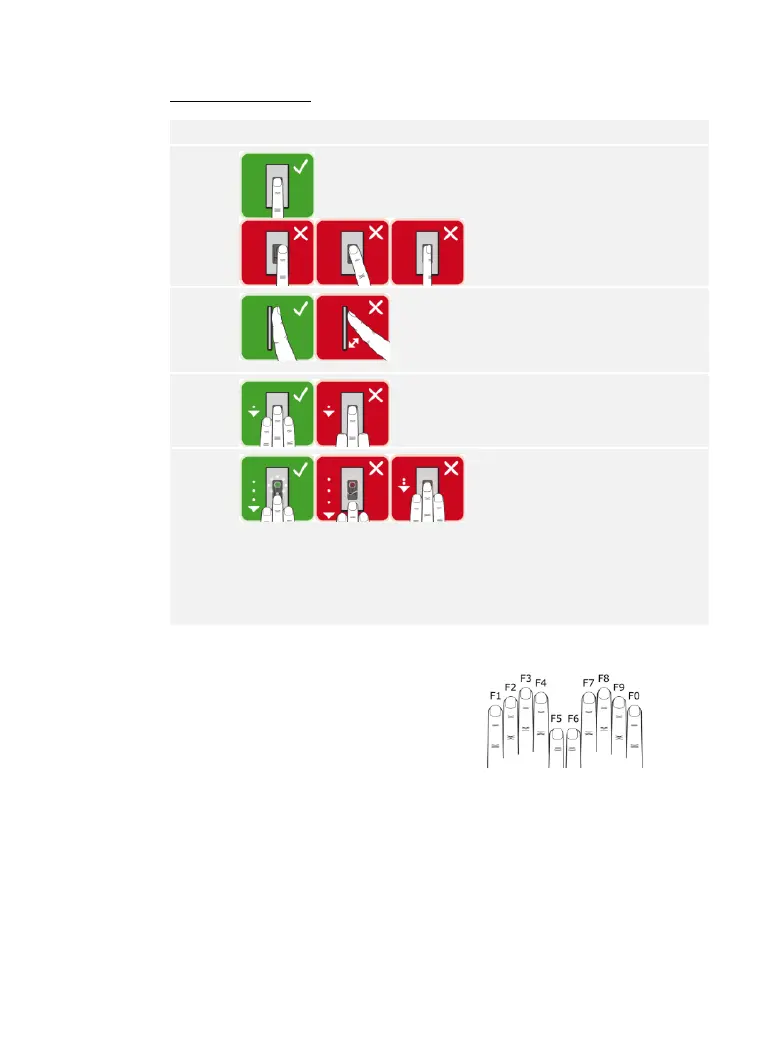
Correct operation of the finger scanner
Incorrect operation will impair the function of the finger scanner.
“Swiping the finger”
Hold your finger straight and
place it centrally between the
guiding edges. Do not twist
the finger.
Place the joint of the front
phalanx directly onto the
sensor. Place your finger flat
onto the finger swipe area.
Stretch out the neighboring
fingers.
Move your finger evenly
downward over the sensor.
Move the whole hand
simultaneously. Swipe the
front phalanx fully over the
sensor in order to achieve
optimal results. The
movement takes approx. 1 s.
General hints for achieving a good-quality fingerprint:
□ Recommended finger numbering: .
□ The index, middle, and ring fingers work best. The thumb and
little finger supply fingerprints that are difficult to analyze.
□ In the case of fingers that are frequently wet, store the images
with wet fingers.
□ Children's fingerprints work from approx. 5 years of age.



 To Next Page