TRANSIENT3000
92/162
6.3.1.3.2 Air Discharge
The „ESD Finger“ Adapter must be on top of the ESD discharge network. After pressing the RUN-button:
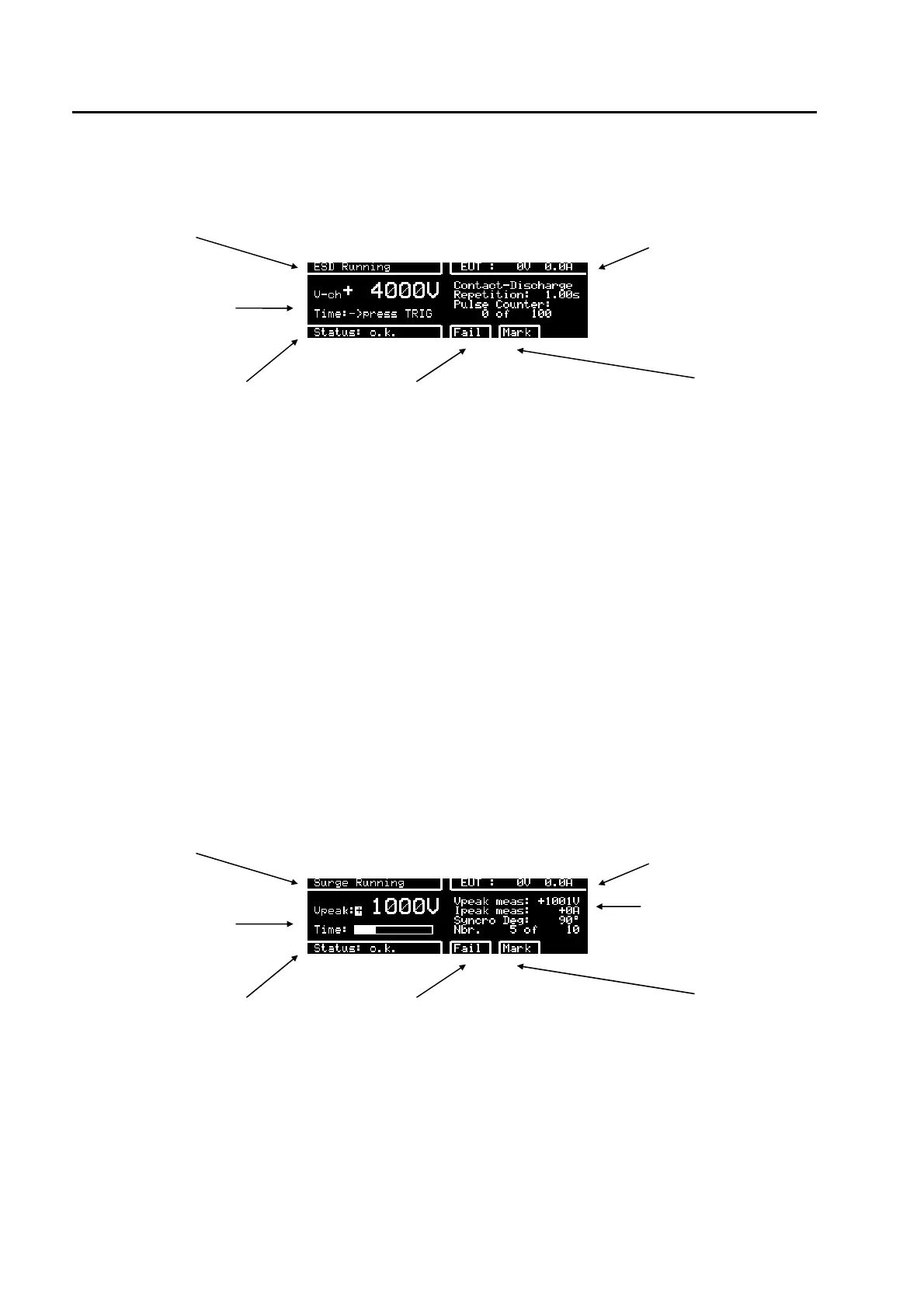
test in operation EUT power v, i
test voltage and what to
do
discharge mode
indicates the status of the actual
test
when the operator visually detects
an EUT failure, F4 can be pressed
and the status of the test turns to
"failed". Protocol shows " test
failed"
by pressing "Mark" the actual test
parameter will be written in the
protocol and showed on the
display at test end.
Air discharge Sequence
1.
Press the button on the ESD discharge network as soon as the request „press button“ appears on the
display. The capacitor in the ESD discharge network will be charged to the preselected voltage.
2. As soon as a „Beep“ sounds, the finger can be moved against the EUT. The display shows „contact
EUT“. For the movement against the EUT a maximum of 5 Seconds are reserved, corresponding to the
holding time in the standard.
3. When the discharge onto the EUT has occurred, you need not to wait 5 seconds. By pressing the button
a second time, either two or three „Beeps“ will be heard. Two beeps means no full discharge has occurred,
and the discharge will not be reported. Three beeps means the discharge occurred, and the discharge will
be counted and reported..
For the next discharge, steps 1 to 3 must be repeated.
6.3.1.4 SURGE
test in operation EUT power v, i
test voltage and test
time
Impulse Vpeak and
Ipeak
5 pulses of 10 are
made
indicates the status of the actual
test
when the operator visually detects
an EUT failure, F4 can be pressed
and the status of the test turns to
"failed". Protocol shows " test
failed"
by pressing "Mark" the actual test
parameter will be written in the
protocol and showed on the
display at test end.



 To Next Page