10
ADVANCED USER GUIDE
Commander SX
IP66/Nema 4X variable speed drive
PARAMETER SETTING USING THE LCD KEYPAD
CONTROL TECHNIQUES
3854 en - 03.2008 / b
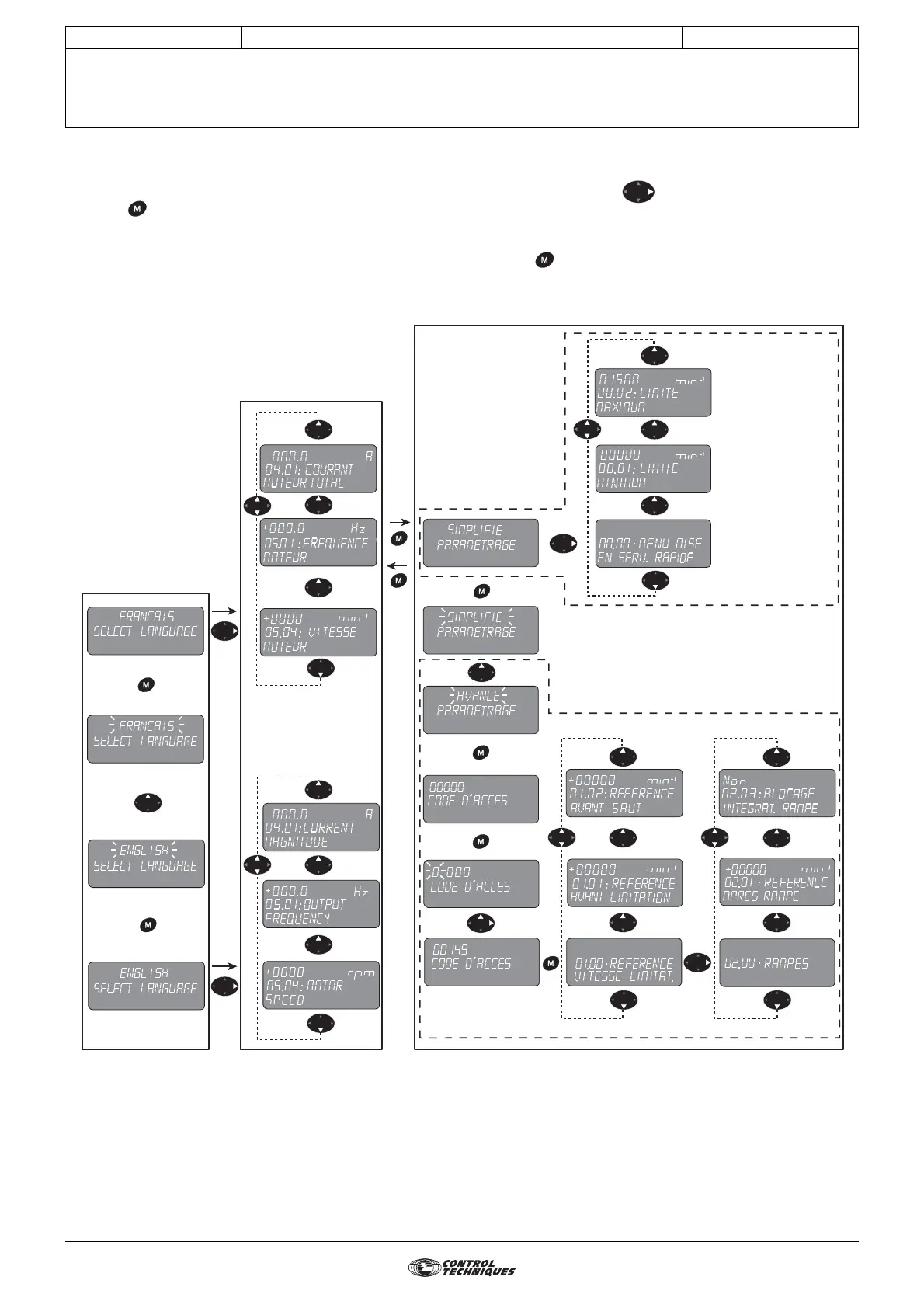
1.3 - Architecture
On power-up, the keypad offers a choice of languages (factory setting: French). Press the key to access read mode. Then
press the key to access parameter-setting mode; there are 2 parameter-setting levels:
- "Simplified" parameter setting (user menu, known as menu 0)
- "Advanced" parameter setting (menus 1 to 21), protected by an access code (factory setting = 149)
To return from parameter-setting mode to read mode, simply hold down the button for a few seconds.
Basic architecture
Language selection
Read mode
Parameter-setting mode
5 sec
Simplied parameter
setting (menu 0)
Advanced parameter setting (menus 1 --> 21)




 To Next Page