RECLOSER CONTROL EVRC2A-N6,NT http://www.entecene.co.kr
33
ENHANCED
TECHNOLOGY
3.2. LCD Display
y 20 x 4 Character Display(LCD or VFD : Vacuum Fluorescent Display)
y All menus are arranged in rotation algorithm.
y When cursor is in top menu, if you press [▲] key, you go to the bottom menu due to Rotation
Menu Algorithm.
y Displays Context Help Message.
3.2.1. Main Menu Summary
EVRC2A has 6 Setting Menu BANKs which can be changed individually.
BANK in Primary Setting Menu is applied to System, BANK in Alternate Setting/EditBank
Setting Menu is not applied to System. Press [Alternate Enabled] button and make the lamp on,
Alternate setting Menu is applied to the system. EditBank Setting is used for setting value.
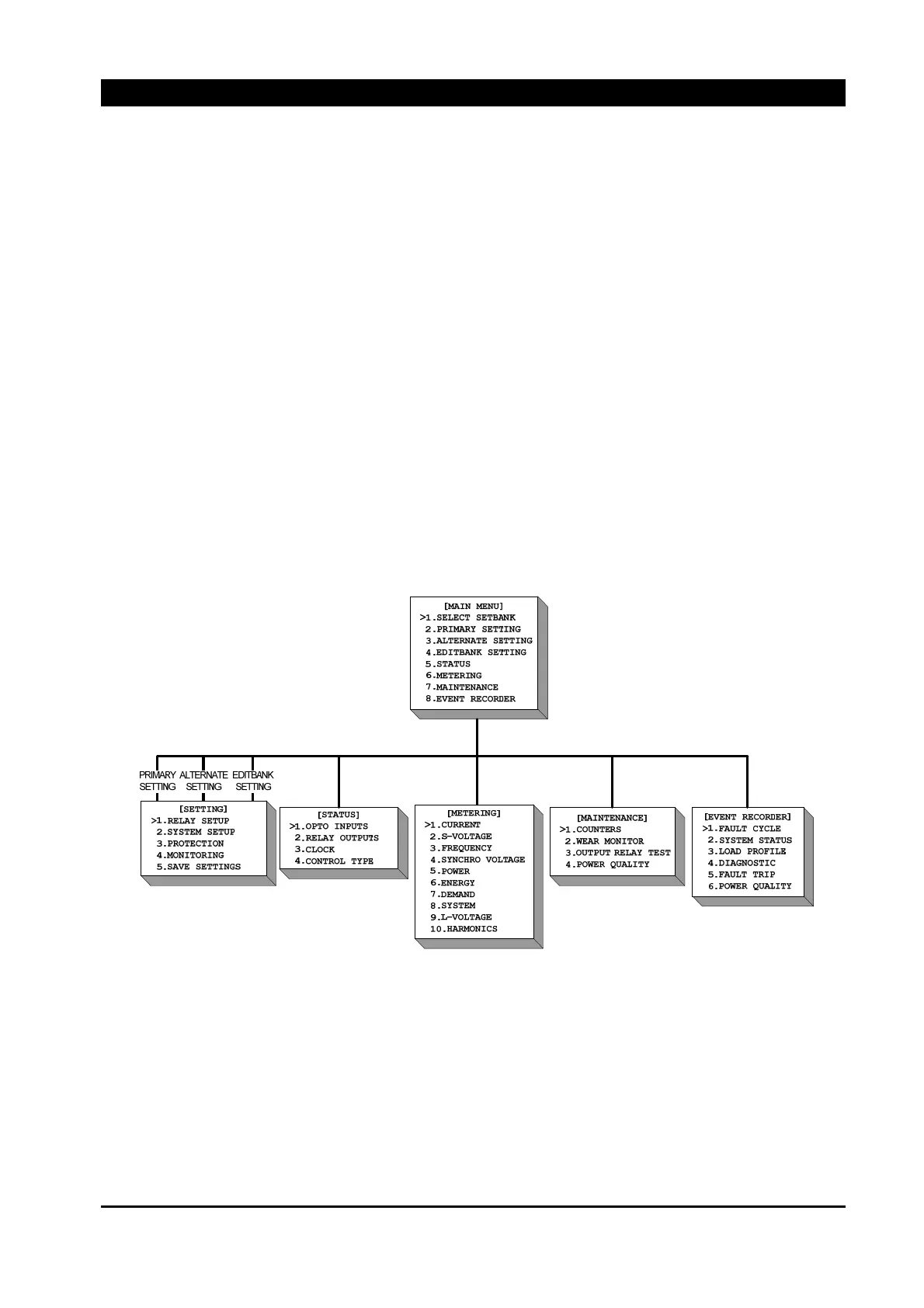
EVRC2A Main Menu consists of 8 sub-menus.
Figure 3-11. Main Menu Tree
3.2.2. Select Setbank
Consists of Primary, Alternate, Edit.
y Primary : Select BANK to be applied to System.
y Alternate : Press [Alternate Enable] button and select a BANK to apply in the system.
y Edit : Select a BANK to edit.



 To Next Page