14
Product description
Eppendorf Xplorer
®
/Eppendorf Xplorer
®
plus
English (EN)
3 Product description
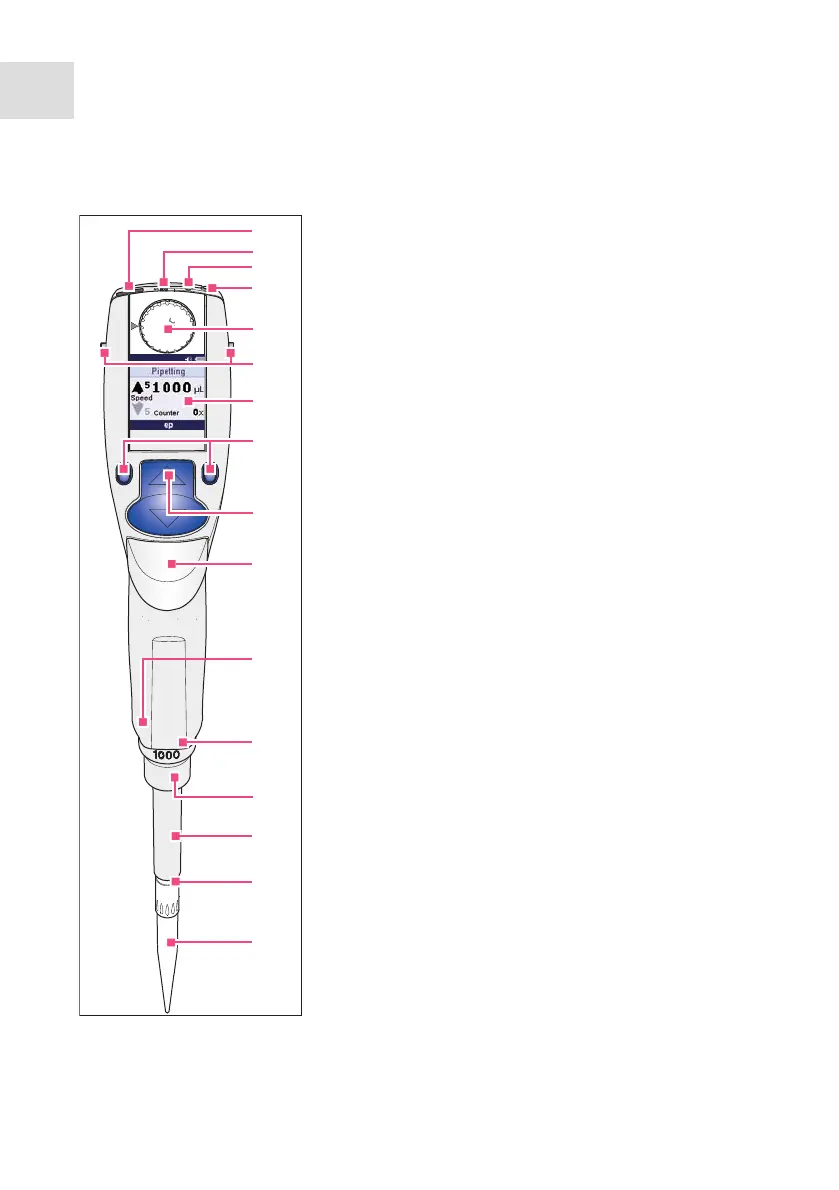
3.1 Main illustration – single-channel pipette
1 USB port
2 On/Off key
3 Reset key
4 Connector socket
Connects the charging plug of the power supply.
5 Selection dial
Sets the operating mode.
6 Charging contacts
For charging and storage in a series 4880 charger
stand or charger carousel.
7 Backlit color display
Switches the display off when it is not in use. The
display automatically switches back on when the
pipette is moved.
8 Softkeys
The assignment of the respective softkey is shown
in the display footer.
9 Rocker
You can either press the rocker up or down. The
rocker can either be used to trigger the piston
movement or to scroll through the menu and
change the values of parameters.
10 Ejector
Moves the ejector sleeve and ejects the pipette tip.
After a filled pipette tip has been ejected, the piston
returns to the basic position after a slight delay.
11 RFID chip
12 Upper part serial number
13 Lower part serial number
Located under the ejector sleeve.
14 Ejector sleeve
15 Spring-loaded tip cone
The spring-loading action optimizes the force
required for attaching and ejecting tips. The
spring-loading action is available for all Xplorer
pipettes up to 1 000 µL.
16 Pipette tip
Only use the pipette with a suitable pipette tip. We
recommend epT.I.P.S.
Dis
Pip
P/M
Man
Opt
Spc
Prg
Edit
Fix
Ads
12345
2
3
5
6
4
7
8
9
10
12
13
14
15
16
11
1



 To Next Page