44
Operation
Eppendorf Xplorer
®
/Eppendorf Xplorer
®
plus
English (EN)
5.15.2 Diluting liquid (Diluting) – Spc selection dial setting
Two different liquids are aspirated in the Diluting mode. These liquids are separated by an
air bubble. The Diluting mode is suitable for diluting samples and reagents using an
appropriate dilution solution (diluent). First, the diluent is aspirated, then the air bubble,
and finally the sample or reagent.
Prerequisites
• The pipette is switched on
• The Diluting (Spc) operating mode has been selected.
• The parameters have been set.
• The pipette tip has been attached.
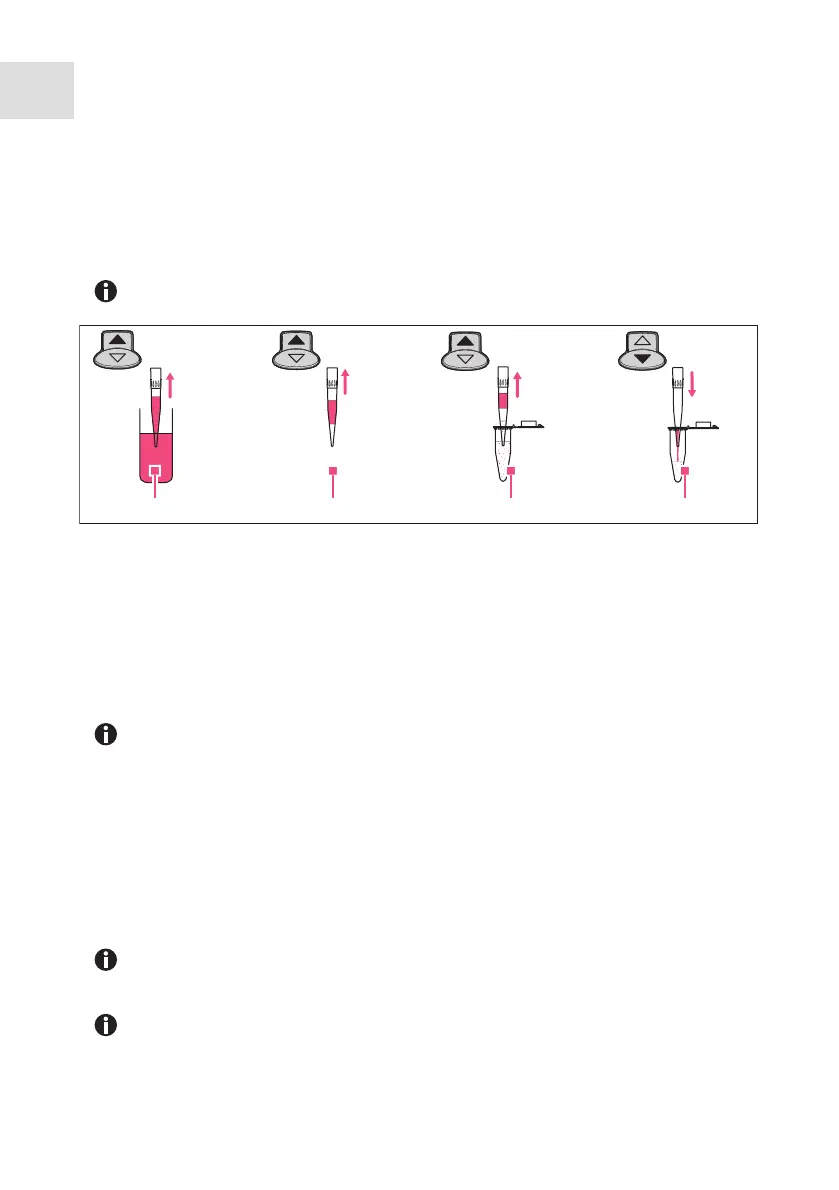
1. Press the rocker up to aspirate the diluent.
2. Press the rocker up to aspirate the air bubble.
3. Press the rocker up to aspirate the sample or reagent.
4. Press the rocker down to dispense all of the liquid.
5. Press the rocker down to trigger the blow-out Blow.
6. If the piston is in the basic position: press the Back softkey to exit the mode.
Because both liquids are aspirated in a single pipette tip, the sample or reagent
may be slightly contaminated by the dilution solution.
1 Aspiration of the diluent
2 Air bubble
3 Aspiration of the sample or reagent
4 Dispensing
For execution, the parameter sequence is carried out in the reverse order of the
editing process. The next volume to be aspirated will be shown on the display
with a border around it.
Set a high value for the Dispensing speed parameter to achieve a good mixture
for dispensing.
To achieve a very high mixture, you can enter the Diluting mode with the
Pipetting+Mix mode as the program.
1 3 42



 To Next Page