36
Operation
Eppendorf Xplorer
®
/Eppendorf Xplorer
®
plus
English (EN)
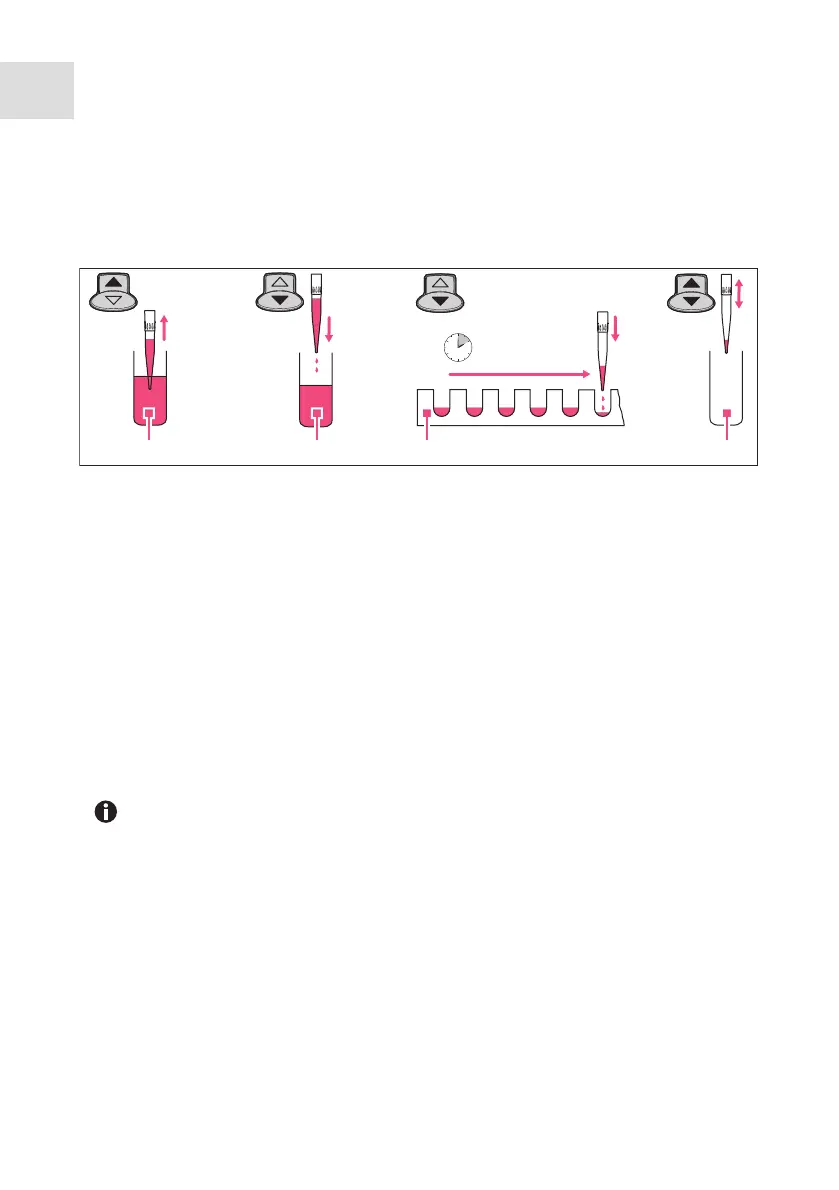
5.10 Automatic dispensing (Ads selection dial setting)
In the Auto dispensing (Ads) mode, liquid is aspirated and dispensed in uniform partial
volumes in selected time intervals. The reverse stroke and remaining stroke are triggered
before or after the dispensing steps.
Prerequisites
• The pipette is switched on.
• The Auto dispensing (Ads) operating mode has been selected.
• The parameters have been set.
• The pipette tip has been attached.
1. Press the rocker up to aspirate liquid.
Then follow the instructions on the display.
2. Press the rocker down to trigger the reverse stroke.
3. Keep the rocker pressed for the duration of dispensing. After the first dispensing step,
the following dispensing steps are triggered with the displayed time interval (Time).
After dispensing, decide whether the residual liquid should be dispensed or liquid should
be aspirated again.
Liquid aspiration: press the rocker up once.
Liquid dispensing: press the rocker down twice.
1 Aspiration
2 Reverse stroke
3 Auto dispensing
4 Aspirate or empty
Press the Empty softkey to cancel dispensing. The tip is completely emptied.
When you release the rocker, an ongoing dispensing operation is still
completed. The display shows the possible dispensings under Steps. Press the
rocker again to continue dispensing.
1234 6
5
1 2 3 4



 To Next Page