Page 94 of 159
10.1 Calibrating the ‘ELite 5’
.
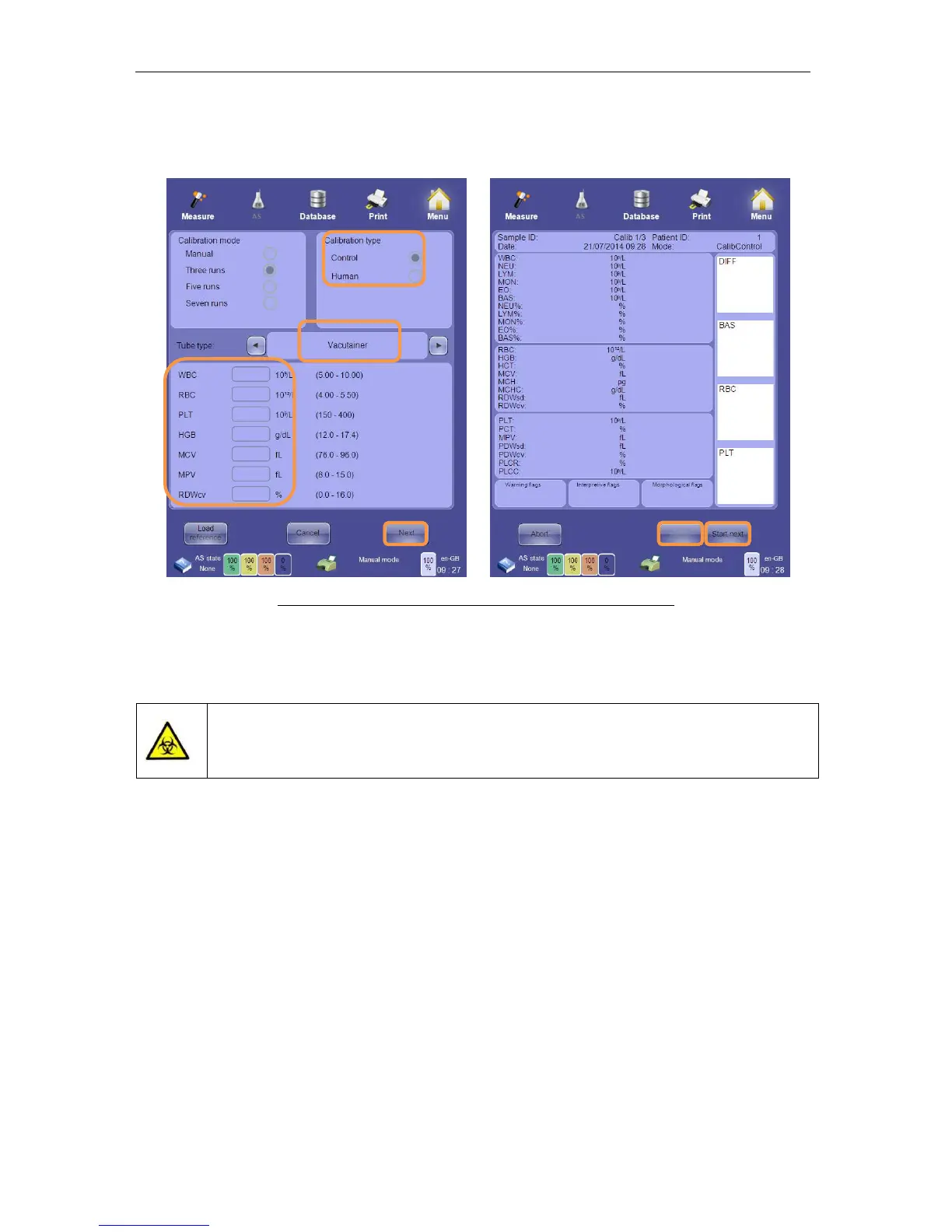
Selecting the ‘Calibrate’ option on the calibration options panel displays the calibration panel.
Figure 67. Calibration Panel and Calibration Run Result Panel
The limits of the calibration target values are linked to the normal range of the ‘Human’
sample mode.
potentially biohazardous material. All applicable laws, regulations, and
laboratory practices should be followed in the handling and disposal of
calibration materials.
To perform the automated calibration procedure, ensure that the ‘ELite 5’ pneumatic system
is started up and that a valid blank measurement has been accepted. Perform the following
steps:
• Prepare a sample tube with commercial calibration material or human whole blood.
Ensure that there is sufficient sample volume for three or seven consecutive runs.
• Place the sample tube with calibration material in the sample rotor.
• Select ‘Three measures’ or ‘Seven measures’ according to your laboratory’s standard
practices.
• Select ‘Control’ for a commercial calibration material (control or calibrator) or ‘Human’
for whole human blood calibration.
• Enter the calibration target values provided with your commercial calibration material
or the previously determined parameter values for human blood calibration.
• Click or tap the ‘Next’ button to begin the calibration process.



 To Next Page