Page 97 of 159
11 Quality Control
Regular use of quality control (QC) ensures that the ‘ELite 5’ analyzer is operating optimally.
Stable recovery of standard QC material parameters assures the operator that the ‘ELite 5’ is
operating consistently on a day-to-day basis and is functioning correctly.
By analyzing control materials on a regular basis, day-to-day reproducibility and general
condition of the analyzer can be monitored. Target values and acceptable (tolerance) ranges
for each parameter can be specified for an unlimited number of QC materials.
control manufacturer’s instructions for storage and use. Control materials
must be well mixed before use.
The ‘ELite 5’ analyzer does not limit the number of QC material lots or the number of QC
measurement runs that are stored in the control database. Each QC measurement run is
saved to the selected QC material lot.
QC lots can be commercial control materials or a whole human blood sample whose
parameter values and ranges are determined by other means. The advantage of a
commercial control material is that its shelf life is much longer than human blood, allowing
control of the analyzer for a longer period of time.
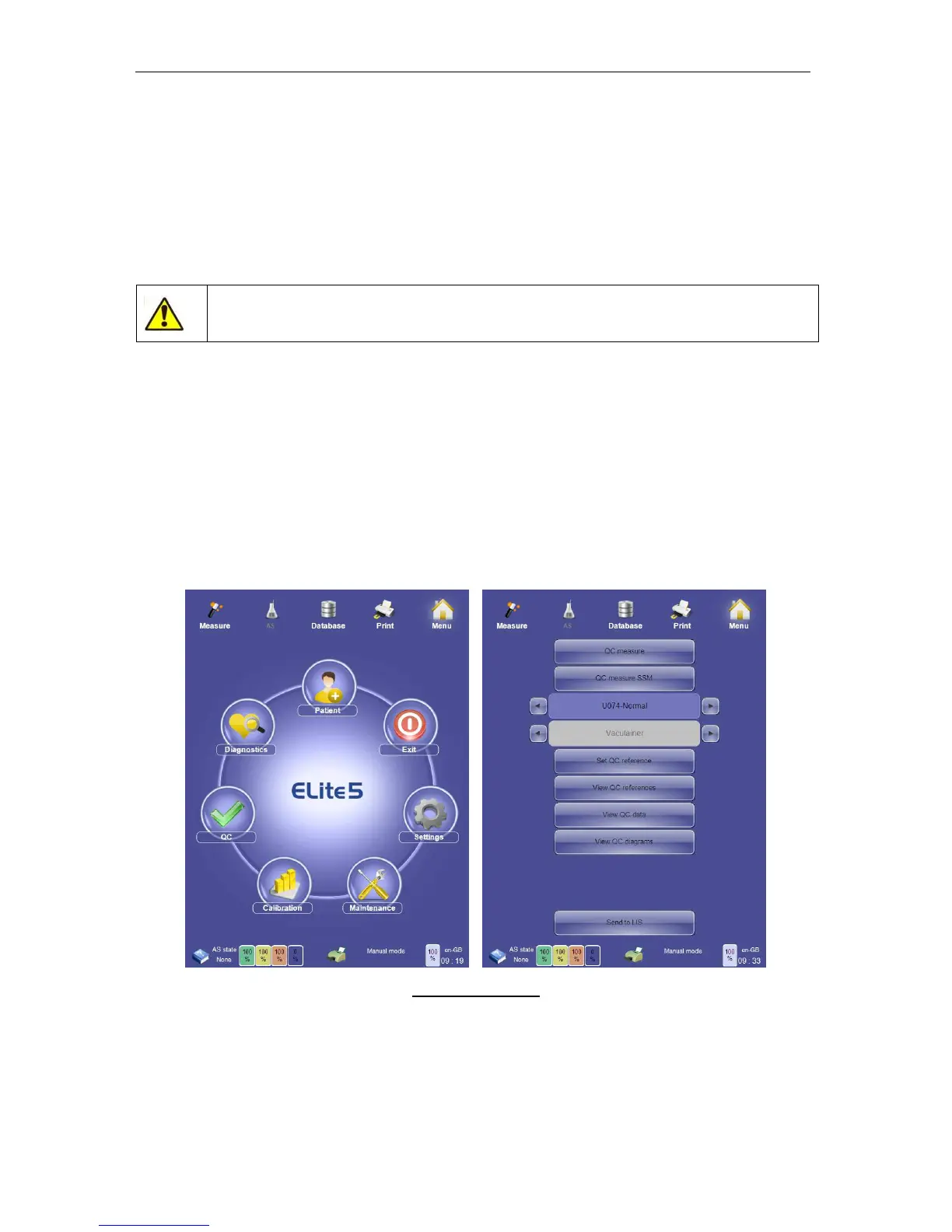
Controls in the ‘ELite 5’ are processed in manual mode only. To access the QC panel, select
the ‘QC’ icon on the main menu.
Figure 70. QC Panel
11.1 Set QC Reference
Before taking any QC measurements, target values and acceptable ranges must be specified
for a lot of control material. Click or tap the ‘Set QC reference’ button to display the Set QC
panel.



 To Next Page