Operating Instructions
Modular Safety Control System MSC
78
(Translation of the original operating instructions) 2121331-04-04/19
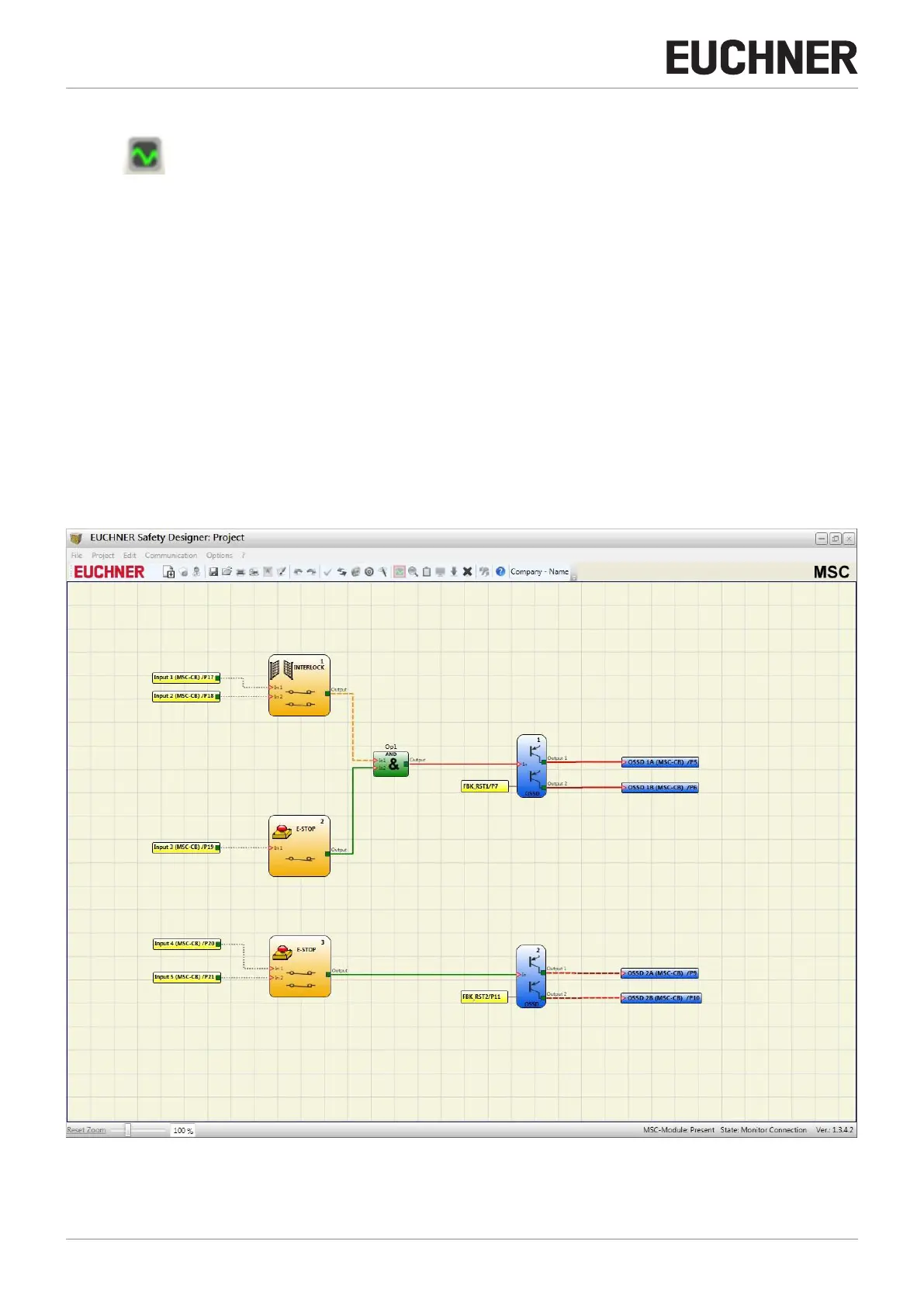
9.1.10.10. Monitor (real-time I/O status – text – graphic)
Click the button to activate/deactivate the monitor (password required: level 1). Based on the color of the links (Figure
56) the diagnostics can be read (in real time) as follows:
Ì RED = OFF
Ì GREEN = ON
Ì DOTTED ORANGE = Connection error
Ì DOTTED RED = ENABLE present (e.g. RESTART)
SPECIAL CASES
¨ "NETWORK" OPERATOR, "NETWORK IN" and "NETWORK OUT" signals:
Ì THICK CONTINUOUS RED LINE = STOP
Ì THICK CONTINUOUS GREEN LINE = RUN
Ì THICK CONTINUOUS ORANGE LINE = START
¨ "SERIAL OUTPUT" OPERATOR:
Ì THICK CONTINUOUS BLACK LINE = Data transmission
You can display the diagnostics by positioning the mouse pointer on the link.
Figure 56: Monitor (graphic)



 To Next Page