95
2121331-04-04/19 (Translation of the original operating instructions)
Operating Instructions
Modular Safety Control System MSC
EN
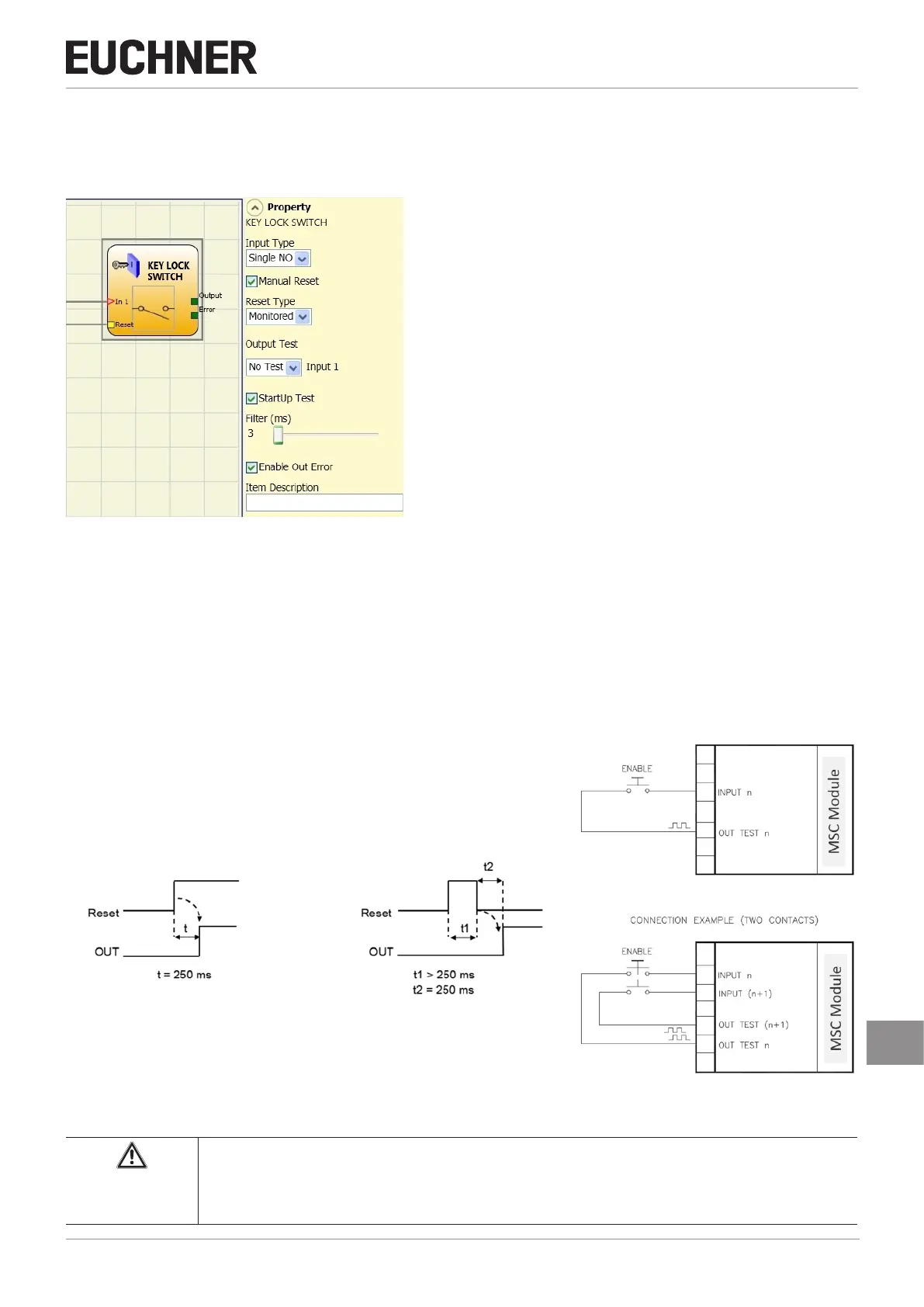
9.2.2.5. Key-operated switch (KEY LOCK SWITCH)
Using the KEY LOCK SWITCH function block the input status of a manual key-operated switch is checked. If the key is not
turned, the OUTPUT output is "0" (FALSE), otherwise the OUTPUT output is "1" (TRUE).
Figure 90: Key-operated switch
Parameter
Ì Single NO – makes it possible to connect components with one normally open contact
Ì Double NO – makes it possible to connect components with two normally open contacts.
Manual Reset: If selected, a reset can be requested on every activation of the command. Otherwise the activation of the
output will correspond directly to the input conditions.
There are two types of reset: "Manual" and "Monitored". On the selection of the manual reset, the system only checks the
signal transition from 0 to 1. With the monitored reset the double transition from 0 to 1 and then back to 0 is checked.
Manual Monitored
Figure 91: Key-operated switch manual/monitored reset Figure 92: Connection examples, key-operated switch
Important!
If manual reset is selected, the next input after the inputs used by the function block must be used.
Example: If Input1 and Input2 are used for the function block, Input3 must be used for the reset input.



 To Next Page