89
2121331-04-04/19 (Translation of the original operating instructions)
Operating Instructions
Modular Safety Control System MSC
EN
9.2.2. Input items
9.2.2.1. Emergency stop (E-STOP)
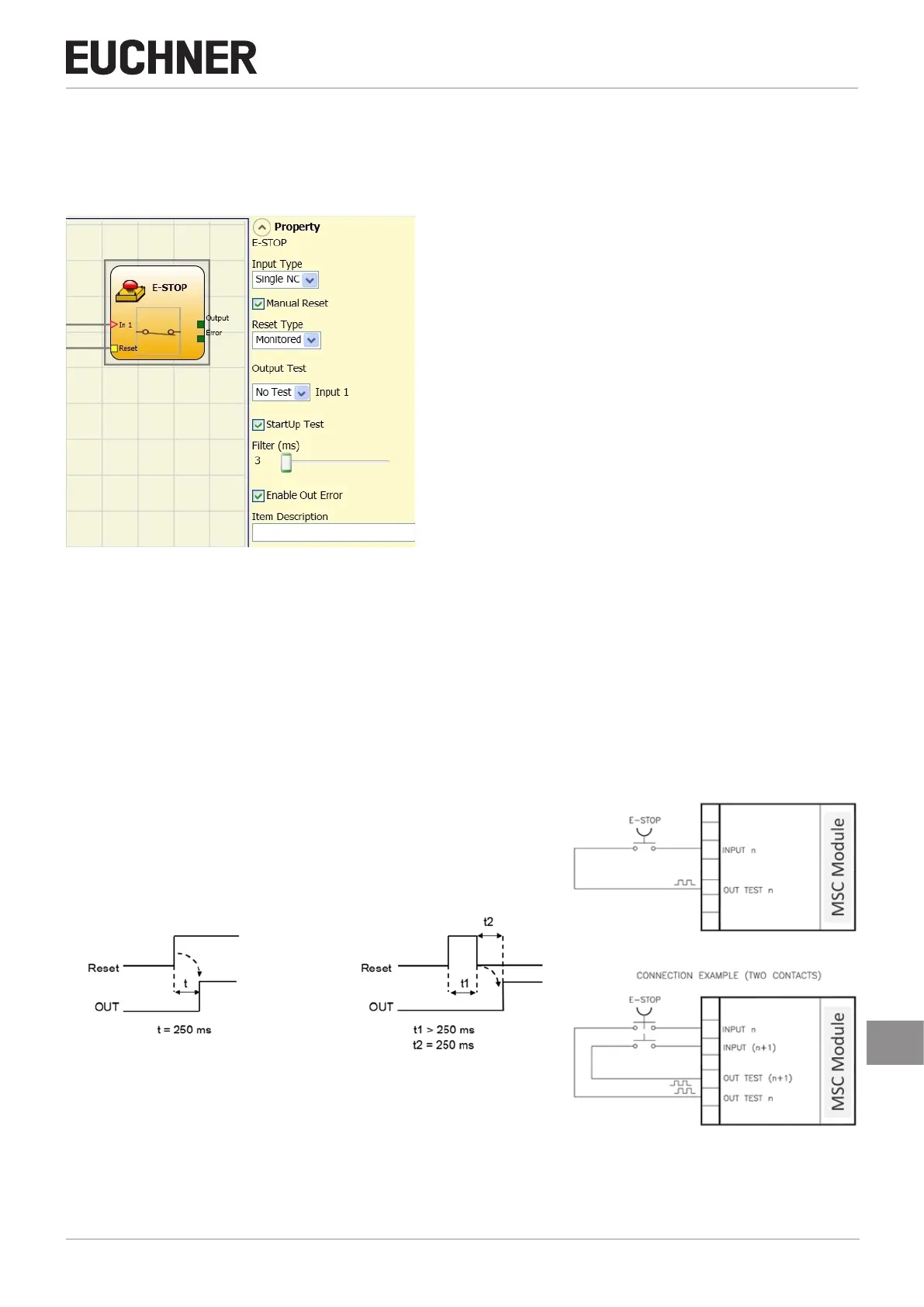
Using the E-STOP function block the input status of an emergency stop device can be checked. If the emergency stop button
is pressed, the OUTPUT output is "0" (FALSE), otherwise the OUTPUT output is "1" (TRUE).
Figure 81: Emergency stop
Parameter
Input Type:
Ì Single NC – makes it possible to connect emergency stop devices with one normally closed contact
Ì Double NC – makes it possible to connect emergency stop devices with two normally closed contacts.
Manual Reset: If selected, a reset can be requested on every activation of the emergency stop. Otherwise the activation of
the output will correspond directly to the input conditions.
There are two types of reset: "Manual" and "Monitored". On the selection of the manual reset, the system only checks the
signal transition from 0 to 1. With the monitored reset the double transition from 0 to 1 and then back to 0 is checked.
Manual Monitored
Figure 82: Emergency stop manual/monitored reset Figure 83: Connection example, emergen-
cy stop



 To Next Page