CP-2116E
Remote Control Panel
Page - 60 Revision 1.2
The TIELINES button when selected will display all Tielines configured for MAGNUM system in the
screen. The Select button when pressed will show the source on the selected Tieline and destinations
that currently have the source. The left shaft encoder under each screen can be used to scroll through
the list. The Back button can be used to return to the Quad Destination view.
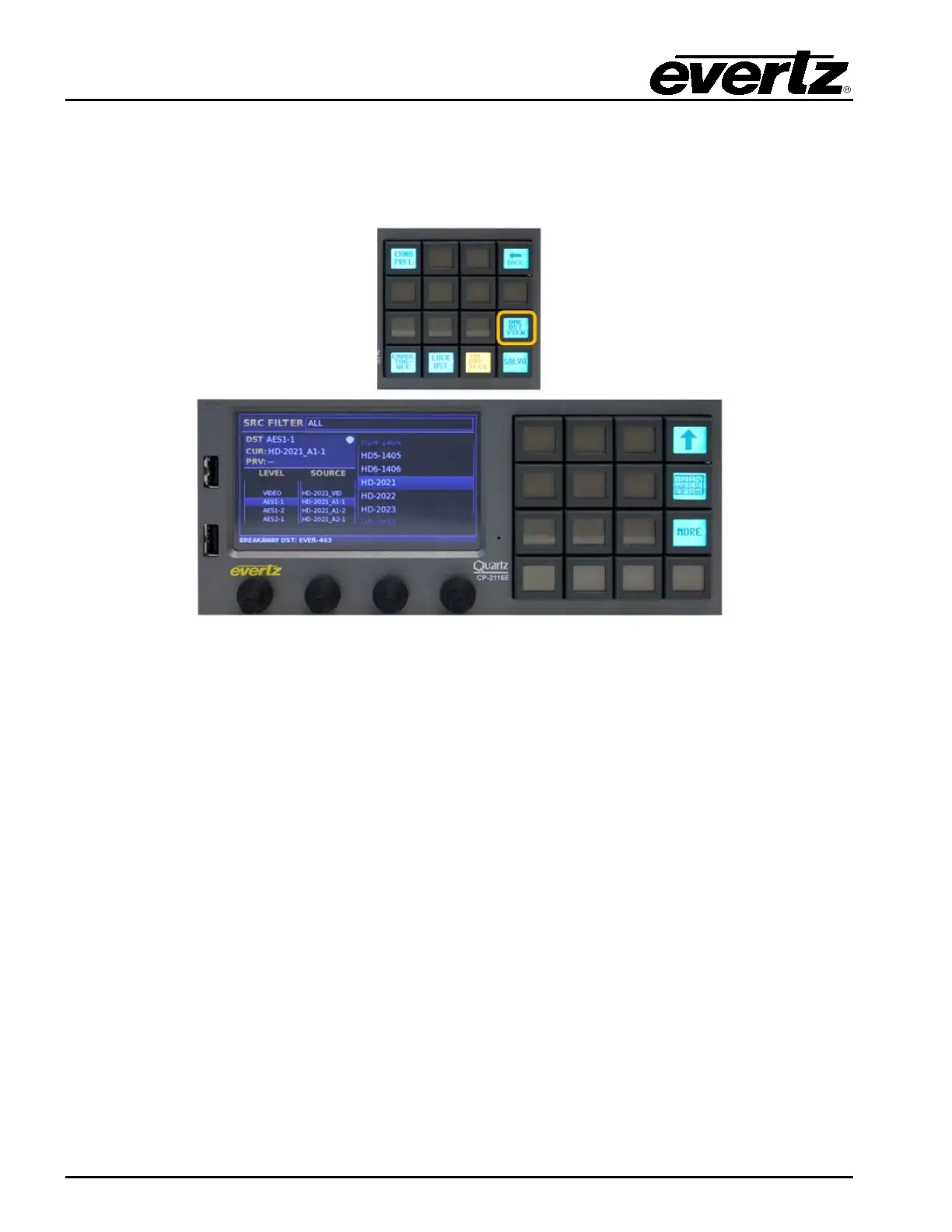
Figure 7-18: Selecting the “ONE DST VIEW” Button
The ONE DST VIEW button when pushed will Toggle the CP-2116E between the Quad Destination
View and One Destination View. When in One Destination View, the screen displays sources on the
right side and one destination in the top level below the Src Filter. The righ shaft encoder under the
source list is used to navigate through the source lists by turning the shaft encoder. When the required
source is highlighted, the Take button is used to route the source.
The Alpha-Numeric button when pressed will allow the user to type the name of the required source in
the top portion of the screen. As the user types the CP-2116E will automatically filter the source list to
display any source that matches the characters typed. If a character is typed incorrectly the DEL button
can be used to delete the characters. The Left and Right buttons on the screen can be used to
navigate the SRC Search box. When the required source is highlighted, the Take button is used to
route the source. The Back button can be used to cancel the source search and display all sources.
The ONE DST VIEW screen will display the Current Destination, the Current Source, and Previous
Source (Toggle is automatically enabled in ONE DST VIEW.



 To Next Page