www.cafection.com 800-561-6162
28
DS2212NSA Rev. 1 2023-04
SERVICE & INSTALLATION MANUAL - Symbol
User Interface
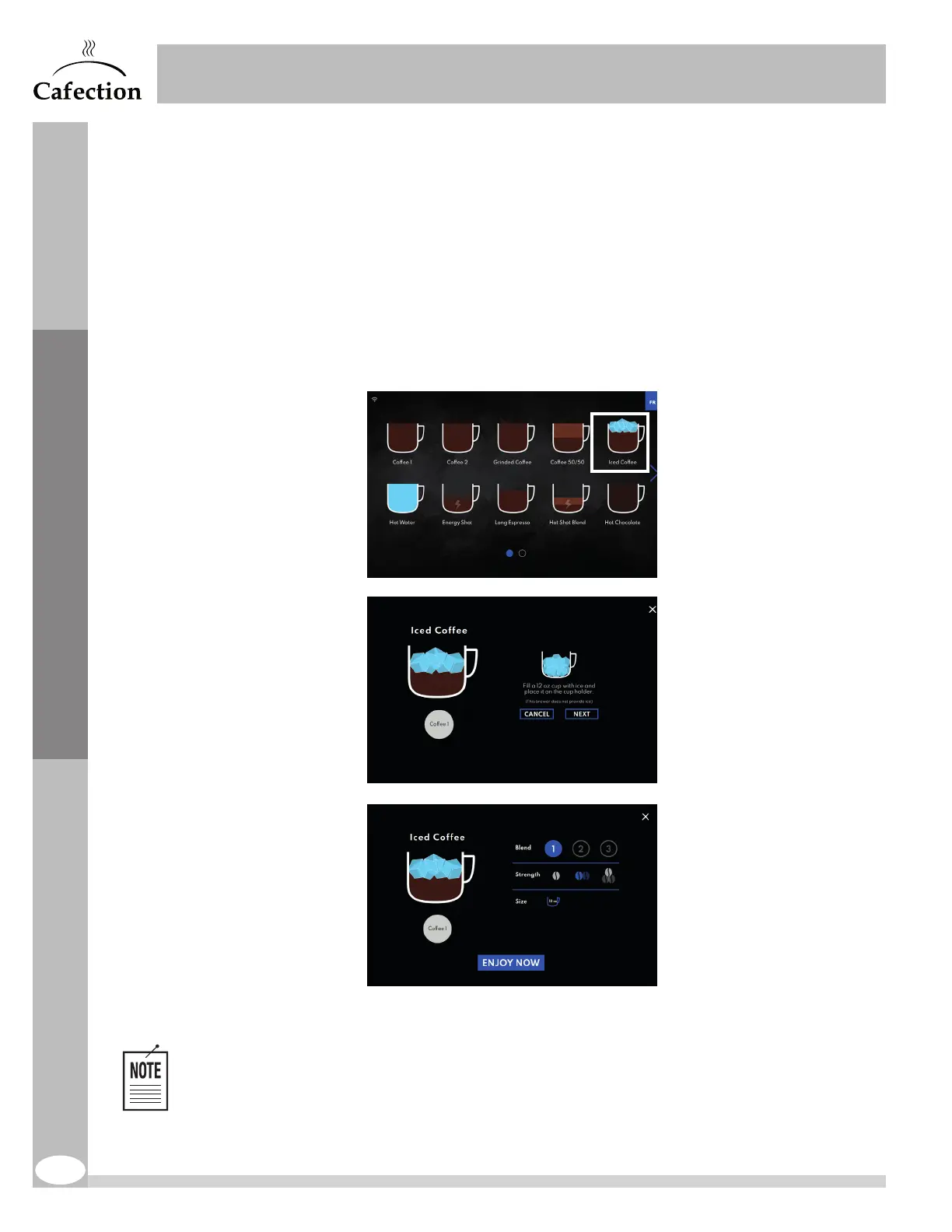
5.2 Iced Coffee
The coffee brewed by the machine is hot. It cools down in contact with ice.
The brewer does not make ice. To order this beverage, an ice machine is required.
The iced coffee is prepared in a 12oz cup size by default. The size can be modified by changing
the amount of water in the beverage.
1. Select "Iced Coffee".
2. Fill a 12oz cup with ice and place it on the cup holder. Press on the "Next" button on the screen.
3. Select blend and strength.
4. Press "Enjoy Now" to start preparation of the beverage.
If there is no ice machine on-site, follow these steps to deactivate the "Iced Coffee" recipe:
1. Access Service mode.
2. In Recipes Information sub tab, under the Recipes tab, select "250_IcedCoff" from the drop-
down menu.
3. Deactivate the "Enabled" toggle bar and press Save (see section 6.5.2).
2
1
3
4



 To Next Page