6 02-2023 6095 00
VARIABLE COMBINATION LOCK
Some models are supplied with a variable
combination lock.
The lock is complete with a silver key, with
the standard combination, for opening and
closing.
It is possible to customise the locks by us-
ing a kit made available as an accessory
and intended to change the lock combina-
tion.
The kit is composed by a change key
(black) of the current combination as well
as by change (gold) and use (silver) keys of
the new combination.
Sets of change and use keys with other
combinations can be supplied upon re-
quest.
Moreover, further sets of use keys (silver)
may be requested by specifying the combi-
nation stamped on the keys.
usual opening operations since this
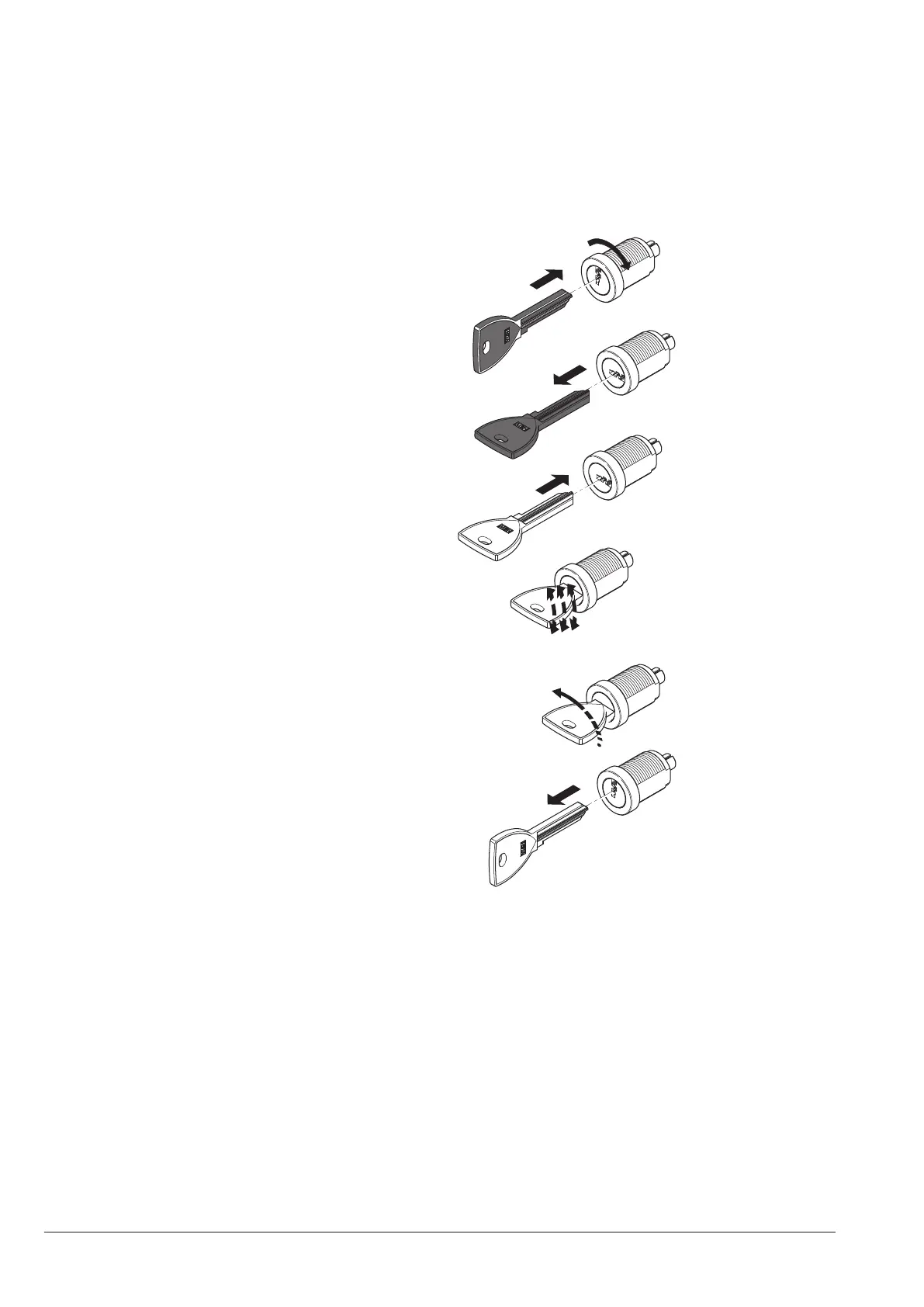
To change the combination:
1. Open the door of the equipment to avoid
having to force the rotation;
2. Slightly lubricate by using a spray inside
the lock;
3. Insert the current change key (black) and
turn it until you reach the change posi-
tion;
4. Remove the current change key and
insert the change key (gold) with the new
combination;
5. Turn the change key slightly several
times without completing the rotation
6. Turn it until you reach the close position
and remove the change key.
The lock has now assumed the new combi-
nation.
no longer used.
time, it is recommended to lubricate the
Other types of lubricants may trap dirt
Fig. 3



 To Next Page